Posts

Showing posts with the label Azure-Backup

Azure Backup - Highlights

Azure Backup offers multiple components that you download and deploy on the appropriate computer, server, or in the cloud .  The following matrix from the official documentation provides a quick summary of the options & key terms ( for a better view of the table, click here ) - Feature Azure Backup (MARS) agent System Center DPM Azure Backup Server Azure IaaS VM Backup Benefits Back up files and folders on physical or virtual Windows OS (VMs can be on-premises or in Azure) No separate backup server required. Application-aware snapshots (VSS - Volume Snapshot Service ) Full flexibility for when to take backups Recovery granularity (all) Can use Recovery Services vault Linux support on Hyper-V and VMware VMs Back up and restore VMware VMs using DPM 2012 R2 Application-aware snapshots (VSS) Full flexibility for when to take backups Recovery granularity (all) Can use Recovery Services vault Linux support on Hyper-V and...
Notes from Azure Backup Deep Dive Whitepaper

Image
The 14 paged  Azure Backup Deep Dive Whitepaper [PDF]  written by Adin Ermie and Charbel Nemnom  covers MARS & IaaS VM Level Backup but not hybrid Azure Backup related technologies, such as System Center Data Protection Manager (SC DPM), and the Microsoft Azure Backup Server (MABS). Key points are paraphrased below along with info from other online resources - * The MARS in Azure Backup (MARS) Agent stands for "Microsoft Azure Recovery Services"...ever since Microsoft combined the Azure Backup (ABU), and the Azure Site Recovery (ASR) services together under the "Azure Recovery Services" label, these two technologies work as 2 pieces in the same puzzle of "recovery" - * In case of System Center Data Protection Manager (SC DPM), or the Microsoft Azure Backup Server (MABS),  there is a main server that performs the processing, coordination, etc. of the agents, backup/recovery jobs - kind of like the air traffic controller between the source (i.e. t...

What is NOT possible with Azure Backup

Before you prepare your environment for Azure Backup, be sure to understand these limitations : * Backing up virtual machines with more than 16 data disks is not supported. * Backing up virtual machines with a reserved IP address and no defined endpoint is not supported. * Backing up Linux VMs encrypted through Linux Unified Key Setup (LUKS) encryption is not supported. * Microsoft doesn't recommend backing up VMs that contain Cluster Shared Volumes (CSV) or Scale-Out File Server configuration. They require involving all VMs included in the cluster configuration during a snapshot task. Azure Backup doesn't support multi-VM consistency. * Backup data doesn't include network mounted drives attached to a VM. * Replacing an existing virtual machine during restore is not supported. If you attempt to restore the VM when the VM exists, the restore operation fails. * Cross-region back up and restore are not supported. * Backing up and restoring virtual machines usin...

Takeaways from Azure Friday Talk on Azure Backup

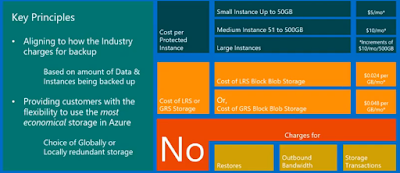
In the informal & entertaining Azure Friday Talks, the inimitable Scott Hanselman chats up with Azure product team members on a variety of Azure topics in roughly 10 minutes. Takeaways from the discussion on Azure Backup * Why do you have to backup if every byte on Azure is already stored 3 times? - To protect against ransomware, corruption of data, human error, accidental deletion * Backup is an option within the VM experience * Recovery Services Vault (and not a Azure Storage account) is the centralized location that stores the backup. * Recovery Services Vault holds data for both Backup & DR * Recovery Services Vault is still connected to Azure Storage account but it is abstracted for user * Backup can be retained up to 99 years * You pay for Backup of each VM (~$10) and the storage consumed * Security PIN constantly updated every 5 minutes in the Azure Portal is required before a Azure Backup copy can be deleted * Backup allows you to restore both VHD...