Posts

Showing posts with the label Javascript

HTML5 & JavaScript Code Samples

Image
HTML5 & JavaScript code samples to learn from - Things around you Dog picture browser in ~200 lines of code Adding a playback speed control to an audio player Essential YouTube Create a single-page web app to fetch results from Bing News Search API  |  Source code HTML5 API demos W.I.P

This Week I Learned - Week #33 2021

Image
This Week I Learned -  * To show a date in a country specific format as a string, use toLocaleDateString() &  toLocaleString() methods of the Date object and specify locale - var n = new Date();  n. toLocaleDateString (" en-CA "); // 2021-08-16 n. toLocaleString (" en-IN "); // 16/8/2021, 9:18:46 pm *  Google Sheets API v3 was turned off on August 2, 2021.   Apps based on the Google Sheets API v3 have to migrate to Google Sheets API v4 .  * Azure NetApp Files can be used while migrating/ setting up Enterprise File Shares on cloud . With Azure NetApp Files, demanding file workloads such as databases, SAP, virtual desktop infrastructure, and high-performance computing applications can be moved to Azure without changing the architecture or the applications. * When deploying legacy .NET Framework applications you have to target Windows Server Core, compatible with legacy apps and IIS, but it has a larger image. When deploying .NET 5 application...

This Week I Learned - Week #32 2021

Image
This Week I Learned -  *  JavaScript isn’t a web technology. It isn’t governed by the W3C but by ECMA. What works and doesn’t work in JavaScript is dependent on browser makers.   *  Superfish  is an enhanced Suckerfish-style menu jQuery plugin that takes an existing pure CSS drop-down menu (so it degrades gracefully without JavaScript) and adds enhancements. * The Enterprise-Scale architecture provides prescriptive guidance coupled with Azure best practices, and it follows design principles across the critical design areas for organizations to define their Azure architecture *  A single heterogeneous Kubernetes cluster can have both Windows and Linux worker nodes . You can only run Windows containers on Windows nodes and Linux containers on Linux nodes. And there's a further constraint: the Kubernetes control plane can only run on a Linux node . Red Hat OpenShift supports both Windows and Linux containers. *  Uptime SLA is an optional feature to...

Iframe Killa bookmarklet removes all iFrames from a loaded web-page

Iframe Killa bookmarklet by Rod McNew removes all iframes from the current page. Once added to the (Chrome, Edge) browser Bookmarks or Favorites bar, click the bookmark to remove all iframes. Once started, it also removes newly spawned iframes every 100ms. javascript:void( function(){ setInterval (function(){ document.querySelectorAll('iframe').forEach(function(element) { console.log('Iframe Killa - Removing Element:', element); element.parentNode.removeChild(element) }) } ,100) }()); Besides iframe, the code can be adapted to removed any other pesky HTML element that is hindering your viewing experience.

Bookmarker Bookmarklet

Image
Update [12-Mar-2025] - Check  Bookmarker Bookmarklet v2  to have bookmarked URLs categorized through AI. You can also try the People Tracker bookmarklet - it lets you save personal notes about someone directly into a Google Sheet from their social media profile or any webpage that mentions them. If you have trouble configuring this tool for yourself, share the code & text from this article with your favorite AI assistant like ChatGPT & Gemini and have it explain specific steps. I've used the Google Bookmarks bookmarklet in the past to save interesting articles for future reference. I like adding some notes so that I know in the future why it was bookmarked. If it was a social media contact, I would like to record some interaction or personal details for future reference.  I found a code sample in a StackOverflow post that showed how to save a URL to Google Sheets. As I like spreadsheets, I liked the idea of saving bookmarks there along with my notes. Having all...

This Week I Learned - Week #19 2021

This Week I Learned -  *  Low-code is the evolution of rapid application development (RAD) to cloud and SaaS models. Note that Gartner defines a no-code application platform as an LCAP that only requires text entry for formulae or simple expressions. The LCAP market, therefore, includes no-code platforms. Furthermore, “no code” is not a sufficient criterion for tasks like citizen development, as many complex tooling configuration tasks are no code but still require specialist skills. * Temenos acquired Kony to bring low-code and world-class mobile development to its banking solutions. Temenos then exclusively licensed the Kony codebase to HCL Software to improve and market as a general-use low-code development platform in nonbanking industries. HCL has wasted no time in advancing the product, rebranding as HCL Volt MX. - Forrester Wave - Low-code development platforms, Q2 2021 *  Oracle Application Express (APEX) provides low-code application tooling ...

Search IMDb Boomarklet

I love Boomarklets . Over the years, I have collected & used more bookmarklets than my Bookmarks bar in my desktop browser can accommodate in direct view. Boomarklets save time by reducing the number of steps it would otherwise take to accomplish a task such as sorting and filtering a column in a table on an external web page as the original table doesn't have that feature.  I fell into a bookmarklet rabbit hole recently and found two interesting bookmarklets in the Wikipedia entry for Boomarklets . The first bookmarklet performs a Wikipedia search on any highlighted text in a web browser window and takes you directly to the corresponding Wikipedia entry (if the keyword is meaningful, otherwise it shows the search results). Alternatively, you can click on the bookmarklet and provide the keyword you want to search for through prompt box that shows up. Drag this link to the Bookmarks bar or Favorites bar in Chrome or Edge to see how it works - Wikipedia Search Impressed with thi...

IP Lookup Bookmarklet that calls a REST API to fetch geolocation details for a given IP address

Image
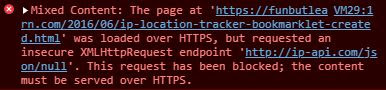
I found a neat bookmarklet that calls a REST API to fetch geolocation details for a given IP address . The original source used an external service that serves JSON output over HTTP only.  As Chrome is more stringent about mixed content, the HTTP call was blocked and the desired output wasn't achieved. I changed just one line of the bookmarklet code to use the IPAPI lookup service to get it working again. Drag this link to the Bookmarks bar or Favorites bar in Chrome or Edge - IP Lookup To view geolocation details, selecting an IP address on any web page & then click on the bookmarklet or provide the IP address through prompt box that shows up.

This Week I Learned - Week #6 2021

This Week I Learned -  *  Starfield effect using vanilla JavaScript * PowerShell Core is the edition of PowerShell built on top of .NET Core (sometimes simplified to “CoreCLR”). PowerShell Core is cross-platform, available on Windows, macOS, and Linux, thanks to the cross-platform nature of .NET Core. PowerShell Core is launched as pwsh.exe on Windows and pwsh on macOS and Linux *  Azure Security Center Labs * Common Data Service, the sophisticated and secure backbone that powers Dynamics 365 and Power Platform, has been renamed to Microsoft Dataverse. * According to the Kaggle 2020 edition of the State of Machine Learning and Data Science survey, Scikit learn is the most popular machine learning tool, Tableau and PowerBI are the most popular business intelligence tools. Jupyter-based IDEs continue to be the go-to tool for data scientists while Visual Studio Code is in the second spot. *  Kaggle Learn & Fast.ai offer free courses on data science  * The pre...

HOW TO grab text from a HTML list or dropdown with JavaScript & Dev Tools

Image
Developer Tools in Chrome & Edge offers convenient ways to probe the content of web pages. Dev Tools can be invoked for specific pages open within the browser by using the F12 or Ctrl+Shift+I or the browser menu. To extract just the text of a HTML list or dropdown identified by id property value of "country" with JavaScript & Dev Tools, use the following from the Console tab - document.querySelector('#country').innerText textContent returns the text content of all elements, while innerText returns the content of all elements, except for <script> and <style> elements.  Snippets  are a feature of the Sources pane in the Developer Tools. It allows you to write small scripts to execute in the context of the current page using a built-in editor. Common tasks can be scripted and kept in a collection for re-use later.

HOW TO present a collection of Tweets as a Slide Show

Twitter Moments lets you curate a set of public Tweets from anyone all at one place. Twitter’s recommendation is to keep Moments, the feature to stitch together multiple tweets into slideshow-like stories, around 10 tweets long. From my experience, there may be an upper limit of 50+ in a single collection but managing the list gets messy and some Tweets in the list may disappear or the order may get jumbled. I found that Twitframe allows us to display Embedded Tweets on websites to dynamically show retweet and favorite counts, inline media/card data while isolating the Javascript and DOM manipulation to an embedded iframe. This is an independent service not affiliated with Twitter in any way. No guarantee of availability or security is made by using this service by Twitframe. I used this service to build a slide show of any collection of public Tweets. Check a sample and the Github Gist of the code If you enable  Tracking prevention in Microsoft Edge , the code doesn't work...

HOW TO create a Responsive Iframe-d Tweets Carousel using plain JavaScript & CSS

Let's say you wanted to display a custom set of images within tweets from your Twitter feed or someone else's, Twitter provides a feature  called  Twitter Moment to create a curated list on Twitter.com. You have to scroll vertically to view the collection. If you need a slide show kind of view, try the code I put together in a Github Gist after deriving inspiration from code samples on StackOverflow.com & W3Schools The code for Responsive Iframed Tweets Carousel doesn't have much styling in order to just focus on the essentials.

This Week I Learned - Week #19 2020

Image
This Week I Learned - *  Container support in Azure Cognitive Services allows developers to use parts of a subset of Azure Cognitive Services APIs that are available in Azure *  For agent-based migration, Azure Migrate appliance is not mandatory. It is only required if you want server assessment before migration. * In the last three years, Cognizant has moved from being a Niche Player to Challenger and now Leader in the Magic Quadrant for Public Cloud Infrastructure Professional and Managed Services, Worldwide 2020 * A subtype of AI, deep neural networks or DNNs can identify important lesions missed by gastroenterologists during endoscopy and colonoscopy. Deep learning and other forms of AI have also been applied to predict clinical outcomes from electronic health records (EHRs), promote patient safety using machine-vision monitoring, process massive datasets from genome sequencing, provide immediate patient-generated data feedback and synthesize notes from patie...

This Week I Learned - Week #15 2020

Image
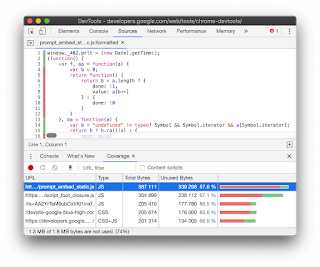
This Week I Learned - *  Direct upload provides a simplified workflow to copy an on-premises VHD directly into an empty managed disk. You can use it to upload to Standard HDD, Standard SSD, and Premium SSD managed disks of all the supported sizes. Direct Upload can be leveraged to restore customers’ backups to managed disks without having to bother about storage account management. The Azure Backup support for large managed disks is powered by direct-upload. Customers can use AzCopy to copy an on-premises VHD into an empty managed disk and also copy a managed disk to another Azure region for regional migration or expansion. Azure Storage Explorer exposes Direct Upload via an easy-to-use graphical user interface (GUI), enabling you to migrate your local VHD files to managed disks in few clicks. Moreover, it also leverages Direct Upload to enable you to copy and migrate your managed disks seamlessly to another Azure region. * The Coverage tab in Chrome DevTools can help yo...

This Week I Learned - Week #12 2020

Image
This Week I Learned - * Microsoft Translator API is an ISO and HIPAA compliant neural machine translation (NMT) service * Translator Text API Version 3 is GDPR compliant as a processor and satisfies all ISO 20001 and 20018 as well as SOC 3 certification requirements. * Azure Form Recognizer is a cognitive service that uses machine learning technology to identify and extract key-value pairs and table data from form documents. It then outputs structured data that includes the relationships in the original file. Unsupervised learning allows the model to understand the layout and field data without manual data labeling or intensive coding. You can also do supervised learning with manually labeled data. Models trained with labeled data can perform better and can work with more complicated documents. * Form Recognizer keeps your data private. The custom training performed on your documents is not used by Microsoft to improve the Form Recognizer model. * Form Recognizer can be use...