Posts

Showing posts with the label Azure-Virtual-Machine

This Week I Learned - Week #274

This Week I Learned - *  The Azure Dv3 & Ev3 family of VMs use Hyper-Threading . This is something to note for those concerned  with  Oracle cloud-licensing. *  After a VM  is created, you can add or remove a NIC (unless it's the last NIC on the VM) *  Managed disks provide better reliability for Availability Sets by ensuring that the disks of VMs in an Availability Set are sufficiently isolated from each other to avoid single points of failure *  Microsoft recommends using a separate storage account for each VM in an Availability Set. *  Azure uses Live Migration technology to migrate the Virtual Machines from the failing hardware to a healthy physical machine. Live Migration is a VM preserving operation that only pauses the Virtual Machine for a short time. Memory, open files, and network connections are maintained, but performance might be reduced before and/or after the event. In cases where Live Migration cannot be used, the VM...
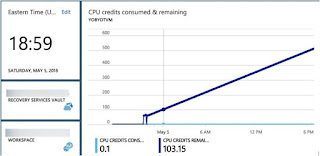
Azure B-Series VMs

Image
Key points to note about the cheapest Azure B-Series VMs from various online hyper-linked sources: B-series burstable VMs are suitable for workloads that do not need the full performance of the CPU continuously or workloads typically having burstable performance requirements. Example use cases include development and test servers, low-traffic web servers, small databases, micro services, servers for proof-of-concepts, build servers . B-Series VMs run on hosts with Intel Haswell 2.4 GHz E5-2673 v3 processors or better processors. The E5-2673 v3 is what is used on the D_v2- and F-Series hosts, so the B-Series is a throttled FS-Series machine .  B-Series uses a similar system to the AWS T2 Instance. A B-Series virtual machine has a per-core base performance level, which is a percentage of each core. If the virtual machine remains under this level, it will earn credits up to a certain level. These credits can be burned to allow the virtual machine to burst beyond this per-core bas...

Azure Virtual machines & network interface cards (NICs)

Image
Notes compiled from official Azure documentation - When you create an Azure virtual machine (VM), you must create a virtual network (VNet) or use an existing VNet When creating a virtual machine using the Azure portal, the portal creates a network interface with default settings for you.  A network interface enables an Azure Virtual Machine to communicate with internet, Azure, and on-premises resources. Before creating a network interface, you must have an existing virtual network in the same location and subscription you create a network interface in. You assign IP addresses to a VM using a network interface. Once a network interface is created, you cannot change the virtual network it is assigned to. You can change the subnet the network interface is assigned to after it's created. The virtual machine you add the network interface to must also exist in the same location and subscription as the network interface. The virtual machine you attach a network i...

Azure Virtual Machine Sizes & their Usage Scenarios

Available sizes and options for the Azure virtual machines you can use to run your Windows & Linux apps and workloads . Type Sizes Description General purpose B, Dsv3, Dv3, DSv2, Dv2, DS, D, Av2, A0-7 Balanced CPU-to-memory ratio. Ideal for testing and development, small to medium databases, and low to medium traffic web servers. Compute optimized Fsv2, Fs, F High CPU-to-memory ratio. Good for medium traffic web servers, network appliances, batch processes, and application servers. Memory optimized Esv3, Ev3, M, GS, G, DSv2, DS, Dv2, D High memory-to-CPU ratio. Great for relational database servers, medium to large caches, and in-memory analytics. Storage optimized Ls High disk throughput and IO. Ideal for Big Data, SQL, and NoSQL databases. GPU NV, NC, NCv2, NCv3, ND Specialized virtual machines targeted for heavy graphic rendering and video editing. Available with single or multiple GPUs. High performance compute H, A8-11 Our fastest and mos...

Azure Availability Zones vs Availability Set

Notes from various Microsoft sources - Availability Zones (AZ) are fault-isolated locations, within an Azure region, providing redundant power, cooling, and networking. AZs allow your customers to run mission critical applications with high availability and fault tolerance to datacenter failures. The goal of AZ is to serve and support applications that need to use synchronous data replication (the latency could be around 1.5 - 2.0 ms, official numbers may come after general availability release of AZ). Azure Virtual Networks (VNETs) and Subnets, are and will remain "regional" entities. Once you will define in a region, they will be visible and usable across all the AZ since Network Resource Manager in Azure is region-wide. There is no AZ specification for these objects, VNETs and Subnets can cross AZ. You can synchronously replicate your applications and data using Availability Zones within an Azure region for high-availability and asynchronously replicate across Azu...

Which Azure VM type to choose?

Image
Mike McKeown has a nice summary of the Azure VM types - A series – Normal generic VMs F series – Eventually replace generic A-series D/DS series  – “DISK” with faster caching G/GS series – “GODZILLA” with very large RAM N series – “NVIDIA” (Graphics units) H series – “HPC” Compute Intensive with fast Infiniband RDMA L/LS series -“LOW LATENCY” storage optimized The official documentation has another view of Azure sizes - Type Sizes Description General purpose DSv2, Dv2, DS, D, Av2, A0-7 Balanced CPU-to-memory ratio. Ideal for testing and development, small to medium databases, and low to medium traffic web servers. Compute optimized Fs, F High CPU-to-memory ratio. Good for medium traffic web servers, network appliances, batch processes, and application servers. Memory optimized GS, G, DSv2, DS High memory-to-core ratio. Great for relational database servers, medium to large caches, and in-memory analytics. Storage optimized Ls High disk through...

Azure Questions & Answers - 2

1. What is  Azure Cloud Service &  the usefulness of it? Cloud service is a term that means more than one thing, but in summary it's a logical group. There's also Worker and Web Roles that usually are referred as Cloud Service too. So, what is Cloud Service, depends on context. Cloud Services are ways to combine a set of stateful virtual machines (or web/worker role instances, which are stateless virtual machines) into its own private network, sitting behind a public virtual IP address. Cloud service is a management and security boundary for VMs Cloud Service also provides optional load-balancing between the virtual machines Originally, the cloud service was a network isolation container into which compute resources are placed. It is used for Azure PaaS and IaaSv1 resources. Its considered "legacy" and is not present in Azure's IaaSv2 which is based on the new Azure Resource Manager model v1 is the version of IaaS that was launched in 2012. IaaS...

Azure Questions & Answers - 1

1. Name the "kernel" of the Azure Cloud operating system Fabric Controller ( FC ).  It provisions, stores, delivers, monitors and commands the virtual machines (VMs) and physical servers that make up Azure . 2.  Critical business applications require a low RTO & RPO . True or False True 3. Scaling-out is a preferable scaling method for cloud applications than scaling-up - True or False True. Scaling up is constrained by what VM sizes are available 4. Azure organizes VM sizes into different machine series. What are they & what is specialty of each series? A series - generic workloads A8-A11 - high performance computing D series - high CPU & high temporary data IO DS series - high I/O workloads G series - high CPU & high memory demands 5. When you create a VM in Windows Azure you are provided with a temporary storage automatically. What is the location of this storage This temporary storage is “D:” on a Windows VM and it is “/dev/sdb1” ...