Posts

Showing posts with the label CSS

This Week I Learned - Week #45 2023

Image
This Week I Learned -  * The  user-select:none style can block a user from selecting text - body{-webkit-user-select:none;-moz-user-select:-moz-none;-ms-user-select:none;user-select:none} * Pangrams are sentences that have all 26 letters of the alphabet in them.  Codepo8 has written a Pangram Checker to write pangrams and check them while typing.  * ScyllaDB is a NoSQL data store compatible with Apache Cassandra that runs on top of Seastar. Discord migrated trillions of messages from Cassandra to ScyllaDB. The book Database Performance at Scale written by engineers at Scylla, covers strategies for achieving low latencies at high throughput. Scylla is the new name of the Israeli startup Cloudius Systems that is behind ScyllaDB. *  GitHub Skills is a collection of interactive courses on how to use GitHub designed for beginners and experts. *  Jupyter AI brings generative artificial intelligence to Jupyter notebooks, giving users the power to explain an...

25 Mobile Site Design Principles from a Google Research Study

Below is a summary of the article  What Makes a Good Mobile Site?  which uncovers 25 mobile site design principles, grouped into five categories: Home page and site navigation - Keep calls to action front and center - Keep menus short and sweet - Make it easy to get back to the home page - Don't let promotions steal the show Site search - Make site search visible - Ensure site search results are relevant - Implement filters to narrow results - Guide users to better site search results Commerce and conversion - Let users explore before they commit - Let users purchase as guests - Use existing information to maximize convenience - Use click-to-call buttons for complex tasks - Make it easy to finish on another device Form entry - Streamline information entry - Choose the simplest input - Provide visual calendar for date selection - Minimize form errors with labeling and real-time validation - Design efficient forms Usability and form factor - Optimize...

This Week I Learned - Week #15 2020

Image
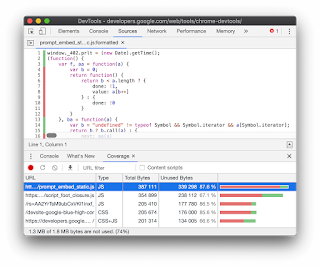
This Week I Learned - *  Direct upload provides a simplified workflow to copy an on-premises VHD directly into an empty managed disk. You can use it to upload to Standard HDD, Standard SSD, and Premium SSD managed disks of all the supported sizes. Direct Upload can be leveraged to restore customers’ backups to managed disks without having to bother about storage account management. The Azure Backup support for large managed disks is powered by direct-upload. Customers can use AzCopy to copy an on-premises VHD into an empty managed disk and also copy a managed disk to another Azure region for regional migration or expansion. Azure Storage Explorer exposes Direct Upload via an easy-to-use graphical user interface (GUI), enabling you to migrate your local VHD files to managed disks in few clicks. Moreover, it also leverages Direct Upload to enable you to copy and migrate your managed disks seamlessly to another Azure region. * The Coverage tab in Chrome DevTools can help yo...

This Week I Learned - Week #50 2019

Image
This Week I Learned - *  Azure Spot Virtual Machines provide access to unused Azure compute capacity at deep discounts. Spot pricing is available on single Virtual Machines in addition to Virtual Machine Scale Sets (VMSS). Spot Virtual Machines offer the same characteristics as a pay-as-you-go Virtual Machines, with differences in pricing and evictions. Spot Virtual Machines can be evicted anytime if Azure needs capacity. The workloads that are ideally suited to run on Spot Virtual Machines include, but are not necessarily limited to, the following: •    Batch jobs. •    Workloads that can sustain and/or recover from interruptions. •    Development and test. •    Stateless applications that can use Spot Virtual Machines to scale out, opportunistically saving cost. •    Short-lived jobs which can easily be run again if the Virtual Machine is evicted. *  To remove unused CSS, automated unused CSS cleaning, visual r...

This Week I Learned - Week #26 2019

Image
This Week I Learned - * The browser must download and parse CSS files before it can show the page, which makes CSS a render-blocking resource. Inlining extracted styles in the <head> of the HTML document eliminates the need to make an additional request to fetch these styles. The remainder of the CSS can be loaded asynchronously - web.dev * Azure Bastion is a new managed PaaS service that provides seamless RDP and SSH connectivity to your virtual machines over the Secure Sockets Layer (SSL). This is completed without any exposure of the public IPs on your virtual machines. Azure Bastion provisions directly in your Azure Virtual Network, providing bastion host or jump server as-a-service and integrated connectivity to all virtual machines in your virtual networking using RDP/SSH directly from and through your browser and the Azure portal experience. This can be executed with just two clicks and without the need to worry about managing network security policies. * Azure Sha...

This Week I Learned - Week #248

Image
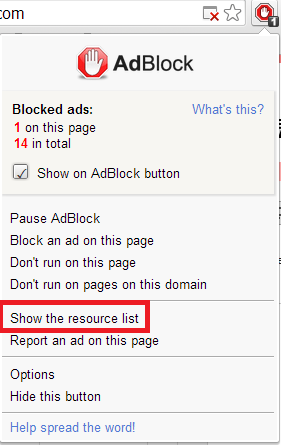
This Week I Learned - * Computer security experts have discovered  two major security flaws in the microprocessors  inside nearly all of the world’s computers. The two problems, called  Meltdown and Spectre , could allow hackers to steal the entire memory contents of computers, including mobile devices, personal computers, servers running in so-called cloud computer networks. By exploiting the Meltdown flaw, a hacker can just load some software onto a cloud service and then grab data from anyone else who has loaded software onto the same server. Phones and PCs are more difficult targets. Before they can exploit the chip flaws, hackers must find a way of getting their software onto your device. They could fool you into downloading an app from a smartphone app store. Or they could trick you into visiting a website that moves code onto your machine. The onus is now on consumers and businesses to install the fix on their machines. A popular ad blocker among security researc...

HOW TO disable CSS of a web page after it loads in a browser

A question on this topic has been viewed on the StackOverflow forum 115,028 times since it was asked 4 years ago! And why would any one want to disable CSS? A developer or tester may want to see how a web page would look if the external CSS files fail to load when viewed over a slow internet connection. If the print output forced by the print stylesheet imposes style settings on the content of the web page that isn't to your liking, you may want to get rid of the meddlesome CSS. There are many good ways to tackle this scenario but I liked the JavaScript bookmarklet approach Also see: HOW TO disable JavaScript in a browser after the page loads

HOW TO block font, CSS & JavaScript files so as to view plain text web pages

Image
If you're a fan of minimalism and want the web pages your frequently visit without the bells and whistles that make use of large CSS & JavaScript files sucking up the bandwidth that you pay for, the are a few ways to block those CSS & JavaScript files: 1. Use Google Mobilizer  to let it show you just the text of a web page with or without images. To make it easier to use, you can configure Google Mobilizer to work like a search provider in Chrome . You can then assign a letter like M to this app, so that you can type M in the Chrome address bar/omnibox & then the type the URL you would like to see via Google Mobilizer. 2. Use the browser's Developer Tools to disable CSS and JavaScript. This has to be done each time you visit a website and it is not quite convenient unless you're a developer who likes tinkering with the dependent files that the original web page needs. On Firefox, the simplest way is via the menu command View > Page Style > No Style. ...

35+ Ways To Speed Up Your Web Site

One of the oldest and most authoritative resource on improving front-end performance is the list of 35 best practices identified by the Yahoo Exceptional Performance team. The main contributor of that list is Steve Souders who also went on to write books on Web Performance Optimization and possibly contributed to PageSpeed Rules  while he was at Google. The original 35 best practices are neatly structured into 7 categories. There are additionally some best practices identified by other  Web Performance Analysis & Optimization tools . I plan to consolidate them all (points other than those in the original list will be italicized & linked) so that I have a single list which is easy to refer. I'll keep looking out for newer findings from the WPO community and add them here as & when I find them. So here goes my custom list: Content     1. Make Fewer HTTP Requests 2. Reduce DNS Lookups 3. Avoid Redirects 4. Make Ajax Cacheable 5. Postload C...

The Udacity Mobile Web Development course has started

Image
I enjoyed going through the first three lessons of the Mobile Web Development course on Udacity and I highly recommend it to web developers and hobbyist programmers. It is a categorized as an intermediate level course but I feel a basic background in HTML, CSS & JavaScript is enough for anyone to get started. The course is taught by Google employees, Peter Lubbers & Chris Wilson - folks who are deeply experienced & passionate about web development. There are 12 lessons in all with quizzes in between. Though it is possible skip the quiz that follows a topic, the normal flow requires you to answer it before you can move forward - which is a good way to stay involved and reflect on what you're learning. Considering that this is a MOOC (Massive Open Online Course), the Forum for the course is abuzz with scores of questions and answers from participants across the world. Also see:  Free 42 episode video series on HTML5, CSS3, JavaScript for Absolute Begin...

jQuery Visual Navigation Menu plugin to highlight title when menu's target scrolls into view

Image
The visualNav jQuery plugin simplifies the process of building a navigation menu in which you can highlight a title in the menu when the menu's target represented as a named anchor scrolls into view. The source code, documentation and demo are available on GitHub . Also see:  My favorite jQuery plugins

Print stylesheet - Best Practices

Image
Using a Print stylesheet is a more convenient way to generate a printer-friendly page than creating such a page through server-side coding. Tim Connell has a nice CSS tip in his article on things to note while coding a stylesheet meant for printer output . At some point, you have probably found yourself reading a printed article when you get to an engrossing section that includes a link for more information. A link that sits there teasing you with its blue underline. Without a mouse or Apple’s latest interfacing doo-​​hicky you have no chance of finding out where that link goes unless you return to the original article on screen. The solution to unclickable links is an easy one to deploy. Use some CSS to print out the location of the link that would otherwise be hidden: #content a:link:after, content a:visited:after { content: ” (“ attr(href) ”) “; font-​​size: 80%; text-​​decoration: none; } As a result of using the above CSS content property setting in the stylesheet mean...

HOW TO detect unused CSS style definitions

Image
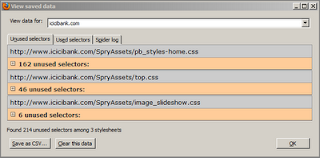
As your web app project & the team size get larger,  there is a chance that the CSS style definitions within the stylesheets grow uncontrollably due to lack of coordination among the developers. This could lead to duplicate style definitions & gradually this could impact web page performance. Luckily, there are tools to detect unused CSS selectors per page & weed them out manually - Dust-Me Selectors is a Firefox Extension (Firefox version 4 is not currently supported) that scans all the definitions inline & within external stylesheets and reports the unused ones. Audit tab within Google Chrome Developer Tools (Ctrl+Shift+I) lists unused selectors as part of its performance recommendations  Also see: HOW TO cut & paste just the text in a browser, not the formatting

HOW TO dynamically generate a Word document with custom header & footer

Image
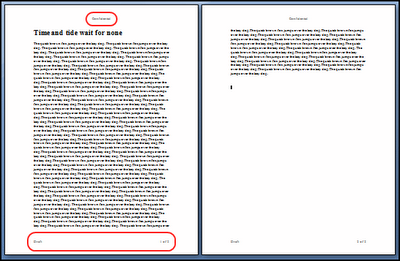
Way back in 2004, a project I was working on required a web page to be exported as a Word document (.DOC). Without relying on any components, I utilized the Office XML & HTML technique to implement this feature. I posted my sample on CodeProject to seek feedback. Over the years, I've received some generous comments & feature requests. Many wanted to know how to add a header & footer to the dynamically generated Word document. With the help of the Microsoft Office HTML and XML Reference , I devised a hack to add a lacklustre header and/or footer . Some folks wanted to customize the contents of the header & footer but when they tried with my hack that offered limited functionality, the header/footer text showed up in the document body to their annoyance. This July, an ingenious developer posted a hack that can overcome this problem, in the Comments section of my CodeProject article. His practical workaround was to pack the duplicating header/footer text inside a t...

Web apps in less than 10 KB

There have been over 350+ submissions to the  10K Apart contest conducted by Microsoft & Event Apart that has a prize money of over $10K. The important rule was that participants should build a web app whose total file size including images, scripts & markup, shouldn’t be over 10K. All code must run client-side although 3rd-party Web services & JavaScript libraries like jQuery, Prototype & Typekit are allowed. The code must be standards compliant & usage of HTML5 is encouraged. The submissions are good learning material for developers who value speed & standards. They are listed on the home page. Sort on the Highest Rating & Most Comments options (generally good indicators of popularity) in the dropdown box there, to get started with viewing the apps & their source. Update (14-Sep-2010) - Hakim El Hattab's game measuring a measly 6.9KB has won him the grand prize of $3000 & other goodies. The entrie...

My web pages work in browser X but fail in browser Y. What to do next?

It doesn't take long for rookie Web developers to realize that the browser world is as unfair as the world we live in as browsers do not all comply with standards to the same degree. As a result, they are aghast when they find that their painstakingly-built web pages fail in some browsers that they test on towards the end. Being aware of HTML, CSS & JavaScript standards is a pre-condition to building cross-browser web pages but what if you skipped that step & now have to get a project out of the door? Almost all of the new browsers come with developer tools to help locate & debug issues that could be preventing a web page from running as intended in that browser. A good first line of action would be review & resolve the errors & warnings displayed in the Console that is generally part of the browser's native developer tools. In Firefox, there is an Error Console in the Tools menu. IE 8 has a Script Console under the Script tab in Developer Tools which...

HOW TO add a header or footer to a dynamically generated Word document

Image
There was a question recently on my CodeProject article "Dynamically generate a MS Word document using HTML & CSS" . The article describes how to generate a Word document programmatically without using any components, by exploiting the formatting features exposed through Office XML and CSS. The questioner wanted to know how to add a custom header and footer and show something like Page X of Y (total pages). Based on what I have tried so far, showing a header and footer using Office XML in MS Word is not as easy as it is in Excel . If you want to keep the code simple & don't need any great fireworks i.e. you will just settle for page numbers in the header or footer then it's a matter of adding a few lines to the original source code. The code can be viewed at this Github Gist Update (1-Sep-2010): To add a custom header & footer, check this new post To add a footer that shows Page number at the bottom right, here are the steps - 1) Add these classes...