Posts

Showing posts with the label Google App Script

Bookmarker Bookmarklet v2

Image
Remember the days of Google Bookmarks? A handy little service that let you keep all your interesting web finds in one place. Well, that service has sailed off into the digital sunset. I built an alternative for myself that saves my Bookmarks to a spreadsheet in Google Sheets using Google App Script - the Bookmarker bookmarklet . It works by using a bookmarklet - a browser bookmark that runs a bit of JavaScript code when you click it. This code grabs the page's URL and title and adds it as a new row in your own copy of Google Sheets.  This provides a centralized and flexible way to keep track of interesting articles and websites, offering the ability to add your own notes in the corresponding columns. The motivation behind this was to have all bookmarks in one location, accessible from any device, rather than being tied to a specific browser. I enhanced the original code by prompting Gemini Flash within GitHub Copilot Chat to generate code to categorize a bookmarked URL. To mak...

This Week I Learned - Week #40 2023

Image
This Week I Learned -  *  CNCF Cloud Native Glossary *  4 typical models with which open-source companies operate : Open core Professional services Hosting Marketplace * Red Hat’s subscription business started as primarily a “support subscription” but evolved into a product offering over time as companies like IBM started to undercut Red Hat for support services (IBM has since acquired Red Hat).  * Mozilla generates the bulk of their $500m annual revenue by providing lead generation to search engines. * Generative models can simulate the aging process of a face, which can be useful for matching faces across different ages. For example, a missing child's photo can be age-progressed to generate an image of what they might look like now. Besides Age Progression/Regression, Generative models can be used to generate privacy-preserving representations of faces. For example, facial images can be transformed into a privacy-preserving format, such as facial embeddings, w...

This Week I Learned - Week #30 2021

This Week I Learned -  * The download attribute of the anchor tag prompts the user to save the linked URL instead of navigating to it. Without a value, the browser will suggest a filename/extension. *  One way to center content in a div in 2021 . This works for all kinds of content - div {   display: flex;   /* vertical */   align-items: center;   /* horizontal */   justify-content: center; } If its just text, inline tags then text-align: center can do this in single property. If you want to center vertically and horizontally at the same time - display:grid; place-content:center; * Vue arguably improves upon React by combining the best of both AngularJS and React. Features like component-based approach, the one-way data flow for component hierarchy, virtual rendering and state management of app are features that are borrowed from ReactJS. The templates, syntax and easy user interface have been borrowed from AngularJS. * The Azure Relay service enab...

Bookmarker Bookmarklet

Image
Update [12-Mar-2025] - Check  Bookmarker Bookmarklet v2  to have bookmarked URLs categorized through AI. You can also try the People Tracker bookmarklet - it lets you save personal notes about someone directly into a Google Sheet from their social media profile or any webpage that mentions them. If you have trouble configuring this tool for yourself, share the code & text from this article with your favorite AI assistant like ChatGPT & Gemini and have it explain specific steps. I've used the Google Bookmarks bookmarklet in the past to save interesting articles for future reference. I like adding some notes so that I know in the future why it was bookmarked. If it was a social media contact, I would like to record some interaction or personal details for future reference.  I found a code sample in a StackOverflow post that showed how to save a URL to Google Sheets. As I like spreadsheets, I liked the idea of saving bookmarks there along with my notes. Having all...

This Week I Learned - Week #10 2021

Image
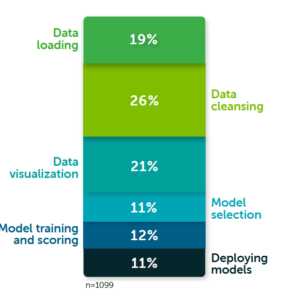
 This Week I Learned - * For migration, Microsoft recommends that you use the Azure Migrate service to migrate VMs and servers to Azure, rather than the Azure Site Recovery service. Azure Site Recovery should be used for disaster recovery only . If you've already started your migration journey with Site Recovery, you can continue using it to complete your migration . * Data wrangling still takes the lion’s share of time in a typical data professional’s day. Data scientists spend 45% of their time on data preparation tasks like loading and cleaning data according to Anaconda’s annual survey * What is the difference between App Virtualization and Desktop Virtualization? App Virtualization leverages Remote Desktop Services (RDS) technology to publish and run applications in the data center, sharing those apps to multiple users who view the application remotely on their endpoint device. App virtualization focuses on delivering just an individual application or set of apps, while v...

HOW TO copy values from one sheet in a specified Google Spreadsheet & archive into another sheet

Google App Script is to Google products what Office Macros are to the Microsoft Office suite. I'm a fan of the ImportXML function that can used within Google Spreadsheet to scrape values from a web page given a  URL and a XPath query representing a HTML segment to extract. Now if you wish to maintain historical values, you'd have to archive the values dynamically fetched by ImportXML function each day. This process can be automated by setting up a trigger for a script to copy values between sheets of a Google Spreadsheet within the Google App Script editor to run at any interval that you can choose. This snippet  from a StackOverflow answer accomplishes that. Also see:  HOW TO prevent screen scraping