Posts

Showing posts with the label JSON

This Week I Learned - Week #266

This Week I Learned - * Many REST web services return results formatted as JSON text or accept data formatted as JSON. Most Azure services such as Azure Search, Azure Storage, and Azure Cosmos DB have REST endpoints that return or consume JSON.  Azure SQL Database lets you parse and query data represented in JavaScript Object Notation (JSON) format, and export your relational data as JSON text. * From the Microsoft veteran and co-author of "Enterprise Cloud Strategy" comes the new free ebook " Designed to Disrupt " [PDF] *  OpenShift on Azure will be jointly engineered, operated, and supported by both Red Hat and Microsoft. As a fully managed service, it will be kept up-to-date, with a single unified bill, integrated support experience, and in all respects a native Azure service. *  CloudEndure Disaster Recovery is now available as a SaaS subscription for direct purchase on the newly expanded Microsoft Azure Marketplace * The minimum required Android vers...

Stack Exchange API offers a mine of crowd-sourced information

Stack Exchange is the family of Q&A websites all based on the Stack Exchange engine. The Stack Exchange API allows developers to use quite a lot of data from websites on the Stack Exchange network. The Stack Exchange API is based on HTTP and URLs. The responses are all in JSON. There is a "Hello World" introduction but  no tutorial for the API other than the documentation The API enforces a daily limit of 10,000 requests for those with a Key & 300 requests for anonymous calls from a single IP address with no Key. The API will cut you off if you make more than 30 requests over 5 seconds to any single endpoint. To discuss about the Stack Exchange API, applications that use the Stack Exchange API, or scripts that work on the Stack Exchange network of websites use the StackApps website or post programming related questions by tagging them with the  stackexchange-api tag on StackOverflow . If you are learning to program with JavaScript & JSON,...

HOW TO use Bing Search v5 API with JavaScript

Taking off from the single basic JavaScript sample on the newly minted  version 5 of Bing Search API, I put together a couple of samples of my own. You'll have to sign-up for a free key  from Microsoft Cognitive Services to replace in the code samples to try them & also experiment with all the other APIs that are available Bing Search API gets not just web search results but also image, news, & videos results for a given query and allows up to 1,000 free transactions per month across all Bing Search APIs Google Custom Search API has a few additional steps & provides 100 search queries per day for free This comparison of version 2 and 5 highlights the improvements - Category Feature v2 v5 Web Search REST API x x Related searches x x Ranked Answers (image, video, news, math, time) x Deep links (for first web page result) x Adult intent signal x Image Search REST API x x Enhanced filters: image size, license...

An overview of OData

- The Open Data Protocol ﴾OData﴿ is a data access protocol for the web built on core protocols like HTTP and commonly accepted methodologies like REST for the web. -  OData provides a uniform way to query and manipulate data sets through CRUD operations ﴾create, read, update, and delete﴿ . -  Methods for serving OData :  ~ Manually  ~ WCF  ~ WCF Data Services  ~ MVC  ~ Web API (the most convenient) -  ASP.NET Web API supports both versions 3 & 4  of the protocol. - A v4 endpoint can run side-by-side with a v3 endpoint. - The new OData V4 libraries are in the assembly: System.Web.OData. System.Web.Http.OData are the V3 libraries - Web API OData does not require Entity Framework. Use any data-access layer that can translate database entities into models. - It includes features that make it much more ready for the enterprise environment, supporting: a service definition language  ...

HOW TO use a Google Spreadsheet as a read-only database for a web app

Image
The data in a Google Spreadsheet can be accessed in JSON and JSONP format through a URL .  The trick is to extract the key from a spreadsheet's URL (the key looks something like this - 0AtMEoZDi5-pedElCS1lrVnp0Yk1vbFdPaUlOc3F3a2c ) and place it in the position indicated in the below URL: https://spreadsheets.google.com/feeds/list/ KEY /od6/public/values?alt=json-in-script&callback=  This approach can be useful when a limited number of people manage a database but when it has to be publicly viewed by users of a website. You can even use Google Spreadsheet formulas (like ImportXML()) to create dynamic values for a column. So if you have data in a Google Spreadsheet whose schema is defined by the names in the first row, it is possible to get that data as a JSON feed and use it to programmatically display the list on a web page Retrieving a feed without authentication is only supported for published spreadsheets. On a related note - Microsoft too has an API tha...

A quick way to check latest values of Sensex, Nifty, Gold, Silver, USD-INR currency

Image
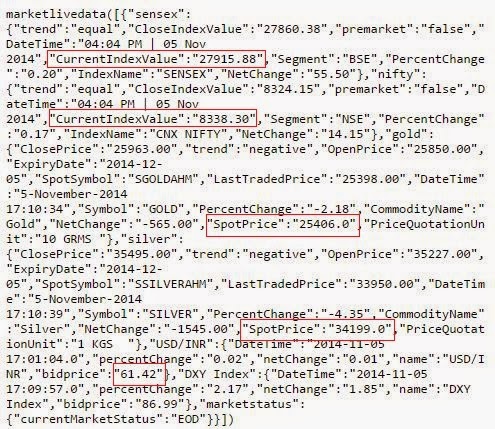
I occasionally like to catch up on how the Indian stock exchanges are faring. I like the Economic Times newspaper website for its brevity and focus on facts & numbers. The homepage of their website is quite bulky with lots of ads, so I started using their mobile version of their site as it loads faster - m.economictimes.com Most of the times, I'm just interested in the indices. I realized today that I can just look at their continuously updating JSON feed -  http://json.bselivefeeds.indiatimes.com/homepagedatanew.json The data is less than 1KB. Though it has poor readability, I get what I want pretty quickly. I also discovered that there are plenty of online JSON Viewers that present information as a tree view. While I found some online viewers that were open-source and could load a public JSON feed URL , I could not find any online viewer that could handle JSONP and  strip everything outside the main opening and closing braces like function name, commen...

JSONP Viewer

Image
Firebug, the Firefox add-on offers the best view among commonly used browser developer tools to visualize the JSON feed provided by an API. reviewing JSON in Firebug However, all native browser Developer Tools show JSONP data as a blob of plain text that is hard to make sense of.  JSON with Padding or JSONP's purpose is to circumvent the same-source policy limitations of XMLHttpRequest . JSON Viewer is a free tool that can present JSONP data in a tree view thereby enabling easy analysis. There is a small additional step though before you can view. JSON Viewer - Text tab After you paste JSONP into the textarea in the Text tab, click on the Strip to {} option in the toolbar Now when you click on the Viewer tab, the JSONP will be better readable JSON Viewer - Viewer tab

Search for free eBooks from the Google Books collection

Image
I have a fascination for public Web APIs that return results in JSON or JSONP format. I wrote a web app that simplifies the process of downloading ebooks from the Google Books collection that are free using the  Google Books API  after noticing that Google Books doesn't readily show if an out of copyright book is available for free download in PDF or EPUB format. You have to go through multiple steps using Advanced Search to find this. Luckily, Google provides a Google Books API that exposes this information and it returns the results in JSON format so that anyone can build an interface to access just filtered details. Though the books are free & old, they are invaluable, especially if you love books. You may not be able to get a physical copy of some of them even if you wanted to. Here is a list of books that I found and liked. The H5BP template's view for Mobile The app uses a responsive HTML5 Boilerplate template generated using  Initializr . Some...

HOW TO work with a JSON/JSONP feed locally

When you're working with a JSONP feed  like the one returned by Twitter Search API or Google News, the different results that show up each time may distract you from the functionality that you're building. You can instead work with a copy of the JSON resultset locally and hook up the code to the actual JSONP feed when you're done. A JSONP feed is just JSON-formatted response wrapped in a function call. You can grab the JSONP content generated by an API by going to the Network Tab within Developer Tools (F12 keyboard shortcut) of Chrome or IE or Firebug within Firefox. When a JSONP feed is called through jQuery, it will look something like this - jQuery17109422175763174891_1337695981767({ json }) To work with the dynamically generated JSON, we need the content within the brackets - { json } Save that content within a text file & give it some name & a ".js" extension. To use the JSON content locally, specify the file name as the first parameter to...
