Posts

Showing posts with the label ComparisonChart

Azure AD Domain Services vs Self-managed AD DS

Azure AD Domain Services enables you to deploy your workloads in Azure Infrastructure Services, without having to worry about maintaining your identity infrastructure. Comparison of Azure AD Domain Services to DIY AD domain in Azure : Feature Azure AD Domain Services Self-managed AD DS Managed service ✓ ✕ Secure deployments ✓ Administrator needs to secure the deployment. DNS server ✓ (managed service) ✓ Domain or Enterprise administrator privileges ✕ ✓ Domain join ✓ ✓ Domain authentication using NTLM and Kerberos ✓ ✓ Custom OU structure ✓ ✓ Schema extensions ✕ ✓ AD domain/forest trusts ✓  (one-way outbound forest trusts only) ✓ LDAP read ✓ ✓ Secure LDAP (LDAPS) ✓ ✓ LDAP write ✓ (within the managed domain) ✓ Group Policy ✓ Full Geo-distributed deployments ✕ ✓

Concept mapping between Azure & GCP terms

The official Google Cloud documentation has a great service model comparison categorized by  high-level overview , Compute , Networking and  Storage . I compiled my own paraphrased notes along with content from tables from their articles.

Comparison of Azure Monitor agents for Windows and Linux

Virtual machines and other compute resources require an agent to collect monitoring data required to measure the performance and availability of their guest operating system and workloads.  Azure Monitor currently has multiple agents because of recent consolidation of Azure Monitor and Log Analytics. While there may be overlap in their features, each has unique capabilities. Depending on your requirements, you may need one or more of the agents on your virtual machines.

Azure Storage Tables vs Azure Cosmos DB

From the official Azure documentation - To move data in one or more Azure Storage tables to Azure Cosmos DB, Microsoft provides two tools to complete this task: - Azure Cosmos DB Data Migration Tool - AzCopy

CloudEndure vs AWS SMS

Paraphrased summary from Field Notes: Choosing a Rehost Migration Tool – CloudEndure or AWS SMS Both CloudEndure Migration and AWS SMS are good options for a lift-and-shift migration. CloudEndure Migration is a better option when you migrate physical servers to AWS, when you want to deploy a block-level replication solution, or when you have near real-time replication requirements. In contrast, AWS SMS is a better option when you want to leverage an agentless solution , when you can tolerate one hour between replication jobs, or when you want a solution that’s managed from one place in the AWS Management Console .

Compared: Splunk and Azure Monitor

Key similarities  and differences between Splunk and Azure Monitor from the official Azure documentation :

Comparison of Azure Front Door, Traffic Manager, Application Gateway & Load Balancer

Image
With the introduction of Azure Front Door, the official documentation has new guidance [ compare with old ] on load balancing options and a decision tree - Options   Azure Front Door Traffic Manager  Application Gateway  Azure Load Balancer    Description Offers Layer 7 capabilities for your application like SSL offload, path-based routing, fast failover, caching, etc. to improve performance and high-availability of your applications. DNS-based load-balancing service that operates only at the domain level. For that reason, it can't fail over as quickly as Front Door, because of common challenges around DNS caching and systems not honoring DNS TTLs.  Provides application delivery controller (ADC) as a service, offering various Layer 7 load-balancing capabilities. Zone-redundant, high-performance, low-latency Layer 4 load-balancing service (inbound and outbound) for all UDP and TCP protocols.  Global/regional  Global ...

Choosing your Cloud Adoption Strategy and Approach

Image
Nice summary slide from a presentation " Applications modernization journey – The four R’s " by Alexandre Menezes - click on image for enlarged view Definitions: Rehost  (lift & shift) - Redeploy as-is to cloud Refactor / Repack - Minimally alter to take better advantage of cloud Rearchitect - Materially alter/decompose application to services Rebuild - New code written with cloud native approach

Comparison of Azure Managed Disk types

Annotated comparison table derived from official Azure documentation - Ultra disk Premium SSD Standard SSD Standard HDD Disk type SSD SSD SSD HDD Scenario IO-intensive workloads such as SAP HANA, top tier databases (for example, SQL, Oracle), and other transaction-heavy workloads. Production and performance sensitive workloads Web servers, lightly used enterprise applications and dev/test Backup, non-critical, infrequent access Max disk size 65,536 gibibyte (GiB) Range - Fixed sizes from 4 GiB up to 64 TiB 32,767 GiB 32,767 GiB 32,767 GiB Max throughput 2,000 MiB/s Range - 256 KiB/s for each provisioned IOPS to 2000 MBps per disk 900 MiB/s 750 MiB/s 500 MiB/s Max IOPS 160,000 Range - 300 IOPS/GiB to 160 K IOPS per disk 20,000 6,000 2,000 Notes Outbound data transfers (data going out of Azure data centers) incur billing for bandwidth usage Some of the current limitations: - Supported only in regions - Can only be u...

App Hosting Options on Google Cloud

A comparison of  App Hosting Options on Google Cloud from the official documentation - Service Compute Engine Kubernetes Engine (GKE) Cloud Run on GKE β Cloud Run β App Engine Flexible Environment App Engine Standard Environment Cloud Functions Suitable for On-premises and monolithic workloads Raw compute to meet existing infrastructure requirements Examples: Relational databases, SAP HANA CRM systems Legacy ERP systems Self-hosted, scalable infrastructure Self-managed hosting, with serverless scalability Examples: Containerized apps that need custom hardware and software (OS, GPUs) Existing containerized stateless apps Apps on Kubernetes Engine that can benefit from scaling to zero Container-based apps and services Industry standard packaging for multi-cloud infrastructure Examples: Custom runtime environments such as Rust, Kotlin, C++, an...

Comparison of Azure Container Registry Service Tiers

Paraphrased summary of Azure Container Registry (ACR) features from the official documentation - Azure Container Registry is a managed Docker registry service based on the open-source Docker Registry 2.0. Azure Container Registry (ACR) is available in multiple service tiers with several options for aligning to the capacity and usage patterns of your private Docker registry in Azure. Azure Container Registry SKUs Basic Standard Premium Price per day A cost-optimized entry point for developers learning about Azure Container Registry. Basic registries have the same programmatic capabilities as Standard and Premium (such as Azure Active Directory authentication integration, image deletion, and webhooks). However, the included storage and image throughput are most appropriate for lower usage scenarios. Standard registries offer the same capabilities as Basic, with increased included storage and image throughput. Standard registries should satisfy the needs of most ...

Compared: Azure Functions & Logic Apps

Image
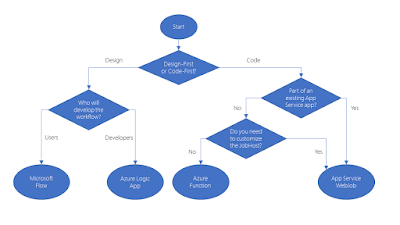
Comparison table & notes from the official Azure documentation : The following services can solve integration problems and automate business processes - Microsoft Flow Azure Logic Apps Azure Functions Azure App Service WebJobs They can all define input, actions, conditions, and output. You can run each of them on a schedule or trigger. Each service has unique advantages . Microsoft Flow and Logic Apps are both designer-first integration services that can create workflows. Both services integrate with various SaaS and enterprise applications. Microsoft Flow is built on top of Logic Apps . Azure Functions is built on the WebJobs SDK .  Both Azure Functions & Azure App Service WebJobs are built on Azure App Service and support features such as source control integration, authentication, and monitoring with Application Insights integration. Any console application can be converted to an HTTP web service in Azure Functions Durable Functions are an extension o...

Compared: Google Cloud Platform Load Balancing options

Google Cloud Load Balancer is a fully distributed, software defined, managed service that can respond to over 1 million queries per second. Consider the following aspects of Cloud Load Balancing for choosing the appropriate option: * Global versus regional load balancing * External versus internal load balancing * Traffic type Load balancer Traffic type Global/Regional External/Internal External Ports for Load Balancing HTTP(S) HTTP or HTTPS Global External HTTP on 80 or 8080; HTTPS on 443 SSL Proxy TCP with SSL offload Global External 25, 43, 110, 143, 195, 443, 465, 587, 700, 993, 995, 1883, and 5222 TCP Proxy TCP without SSL offload. Does not preserve client IP addresses Global External 25, 43, 110, 143, 195, 443, 465, 587, 700, 993, 995, 1883, 5222 Network TCP/UDP TCP/UDP without SSL of...

Compared: Google Cloud Network Service Tiers

Image
Charts & images from the official documentation - click on images for enlarged view

Notes from Pluralsight course "Architecting Google Cloud Storage Configurations"

Image
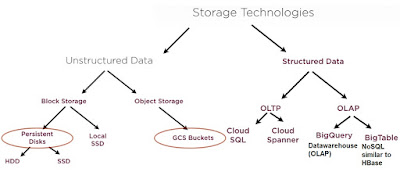
I found the Pluralsight course on  Architecting Google Cloud Storage Configurations  by Janani Ravi, a former Google engineer, useful & informative. Key points, slides from the video course & official GCP documentation with my annotations - Cloud Storage pricing is based on the following components : Data storage: storing data in buckets. Network usage: accessing and moving data in buckets. Operations usage: performing actions within Cloud Storage. Retrieval and early deletion fees: applicable only for data stored in the Nearline Storage or Coldline Storage classes. Bucket names are globally unique. Operation charges apply when you perform operations within Cloud Storage. An operation is an action that makes changes to or retrieves information about buckets and objects in Cloud Storage. Operations are divided into three categories: Class A, Class B, and free. A minimum storage duration applies to data stored as Nearline Storage (30 day...

Compared: App Engine Standard & Flexible Environments

Comparison of  App Engine Standard & Flexible environments from the Google Cloud documentation - Feature Flexible environment Standard environment Instance startup time Minutes Seconds Maximum request timeout 60 minutes 60 seconds Background threads Yes Yes, with restrictions Background processes Yes No SSH debugging Yes No Scaling Manual, Automatic Manual, Basic, Automatic Scale to zero No, minimum 1 instance Yes Writing to local disk Yes, ephemeral (disk initialized on each VM startup) No Modifying the runtime Yes (through Dockerfile) No Automatic in-place security patches Yes (excludes container image runtime) Yes Network access Yes Node.js, Python 3, PHP 7.2, Go 1.11: Yes. Python, Go, and PHP (billing-enabled): Only via App Engine services (in...

Docker Swarm vs Kubernetes

Docker is just a containerization platform. Docker Swarm is a container orchestration platform, the same as Kubernetes. What’s the difference between Docker and Kubernetes? Docker and Kubernetes are complementary. Docker provides an open standard for packaging and distributing containerized applications, while Kubernetes provides for the orchestration and management of distributed, containerized applications created with Docker. In other words, Kubernetes provides the infrastructure needed to deploy and run applications built with Docker. Container orchestration is the process that can typically deploy multiple containers to implement an application through automation. Platforms like Kubernetes and Docker Swarm are the container management and container orchestration engines that enable users to guide container deployment and automate updates, health monitoring, and failover procedures. A feature summary compiled from multiple online articles - Docker Swarm ...

Compared: AWS Virtual Private Cloud (VPC) vs Azure Virtual Network (VNet)

Similarities and differences between Azure VNets and AWS VPC from a Premier Developer blog post - AWS Virtual Private Cloud (VPC) Azure Virtual Network (VNet) Subnet Both Azure VNet and AWS VPC segregate the networks with subnets An AWS VPC spans all the Availability Zones (AZs) in that region, hence, subnets in AWS VPC are mapped to Availability Zones (AZs). A subnet must only belong to one AZ and cannot span AZs. Communications between all subnets in the AWS VPC are through the AWS backbone and are allowed by default. AWS VPC subnets can either be private or public. A subnet is public if it has an internet gateway (IGW) attached. AWS allows only one IGW per VPC and the public subnet allow resources deployed in them access to the internet. AWS creates a default VPC and subnets for each region. This default VPC has subnets for each region where the VPC resides, and any image (EC2 instance) deployed to this VPC will be assigned a public IP address and hence ha...

AWS: Comparing Multi-AZ Deployments & Read Replicas

From the AWS Documentation - Read replicas are available in Amazon RDS for MySQL, MariaDB, and PostgreSQL as well as Amazon Aurora. Read replicas in Amazon RDS for MySQL, MariaDB, and PostgreSQL provide a complementary availability mechanism to Amazon RDS Multi-AZ Deployments.  You can combine Multi-AZ deployments and read replicas to enjoy the benefits of each. For example, you can configure a source database as Multi-AZ for high availability and create a read replica (in Single-AZ) for read scalability. Multi-AZ Deployments Read Replicas Synchronous replication – highly durable Asynchronous replication – highly scalable Only database engine on primary instance is active All read replicas are accessible and can be used for read scaling Automated backups are taken from standby No backups configur...

Comparison of AWS Storage Classes

From the AWS Documentation on Storage Classes Storage Class Durability (designed for) Availability (designed for) Other Considerations STANDARD 99.999999999% 99.99% Default storage class ...