Posts

Showing posts with the label Bookmarklet

Reverse Clock Bookmarklet

Image
E Sreedharan, also known as "Metro Man," is said to have installed reverse clocks in the offices and work sites of Konkan Railways and the Delhi Metro Rail Corporation (DMRC) to create a sense of urgency among team members and encourage them to work towards their goals without wasting any time. Inspired by this approach, I decided to create a Reverse Clock Bookmarklet to help me allocate time for my daily tasks and improve my ability to estimate how much time I need to complete them. By visually counting down the minutes and seconds, it would also cultivate a heightened awareness of the precious moments slipping away. To use this bookmarklet, create a new bookmark in your browser and paste the above code as the URL. Then, navigate to any webpage and click the bookmark(let) to activate the countdown.  You'll be prompted to input the number of minutes you want the reverse clock to run for. A reverse clock with a semi-transparent black background and white text will appear...

Bookmarklet to Save & Retrieve Frequently Used Text Snippets

Image
Do you often type the same text over and over again?  Snippets Bookmarklet saves snippets of the text you need, in your browser storage with names of your choice & retrieves them with a single click.  Just click the bookmarklet anytime you find something you want to save for later. Give your snippet a name, and it will be stored securely in your browser. To view your saved snippets, click the bookmarklet again and select the name you gave it. The snippet will be inserted in the input element where you need it. I employed  Anthropic's Claude  AI assistant to generate bookmarklet code by prompting my requirement: Here's the compact version of the same code: Here's how to use it: Create a new bookmark in your browser. Edit the bookmark and set the name to something like "Snippets". Paste the above code into the URL or Location field. Alternatively drag and drop this link (after checking and adapting the words-per-minute rate) to the Bookmarks bar or Favorites ba...

Bookmarklet: Calculate Word Count & Estimated Reading Time

Image
I realized I have too many tabs open because I can't get a sense of how long or complex an online article is and therefore can't finish it in one go.  I took the help of Bard to generate bookmarklet code to show me the Word Count & Estimated Reading Time for the web page I'm on. There are caveats to consider but this simple estimation gives me a rough idea of whether I should read an article right away or bookmark it for later . Here's the commented code  followed by the Bookmarklet link you can directly use: Compact version : Here's how to use it: Create a new bookmark in your browser. Edit the bookmark and set the name to something like "Estimated Reading Time". Paste the above code into the URL or Location field. Alternatively drag and drop this link (after checking and adapting the words-per-minute rate) to the Bookmarks bar or Favorites bar in Chrome or Edge to see how it works - Estimated Reading Time Along with the code that Bard generated, it ...

HOW TO extract table on a public web page as a CSV file

Image
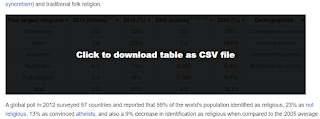
Tables within web pages on the internet don't provide interactivity most of the times and data is presented through plain HTML tables unless developers of the website implement it through client-side functionality through something like a jQuery plug-in such as  DataTables to make data more accessible . In such cases, you cannot filter or sort unless you manually copy the table to a spreadsheet and then use the functions of a software tool like Excel.  To minimize the steps, it is better to use bookmarklets that can create a CSV file from an HTML Table. Below are such bookmarklets graciously shared by some good folks on the internet - Stoyan Stefanov's ReactiveTable bookmarklet Davin Studer Export to CSV bookmarklet ShareProgress' TableThis bookmarklet   The screenshot shows how ShareProgress' TableThis bookmarklet can inject code to make a table within a Wikipedia page to be downloaded as a CSV file Bookmarklet code needs to be relatively short because of browser lim...

Iframe Killa bookmarklet removes all iFrames from a loaded web-page

Iframe Killa bookmarklet by Rod McNew removes all iframes from the current page. Once added to the (Chrome, Edge) browser Bookmarks or Favorites bar, click the bookmark to remove all iframes. Once started, it also removes newly spawned iframes every 100ms. javascript:void( function(){ setInterval (function(){ document.querySelectorAll('iframe').forEach(function(element) { console.log('Iframe Killa - Removing Element:', element); element.parentNode.removeChild(element) }) } ,100) }()); Besides iframe, the code can be adapted to removed any other pesky HTML element that is hindering your viewing experience.

Bookmarker Bookmarklet

Image
Update [12-Mar-2025] - Check  Bookmarker Bookmarklet v2  to have bookmarked URLs categorized through AI. You can also try the People Tracker bookmarklet - it lets you save personal notes about someone directly into a Google Sheet from their social media profile or any webpage that mentions them. If you have trouble configuring this tool for yourself, share the code & text from this article with your favorite AI assistant like ChatGPT & Gemini and have it explain specific steps. I've used the Google Bookmarks bookmarklet in the past to save interesting articles for future reference. I like adding some notes so that I know in the future why it was bookmarked. If it was a social media contact, I would like to record some interaction or personal details for future reference.  I found a code sample in a StackOverflow post that showed how to save a URL to Google Sheets. As I like spreadsheets, I liked the idea of saving bookmarks there along with my notes. Having all...

This Week I Learned - Week #19 2021

This Week I Learned -  *  Low-code is the evolution of rapid application development (RAD) to cloud and SaaS models. Note that Gartner defines a no-code application platform as an LCAP that only requires text entry for formulae or simple expressions. The LCAP market, therefore, includes no-code platforms. Furthermore, “no code” is not a sufficient criterion for tasks like citizen development, as many complex tooling configuration tasks are no code but still require specialist skills. * Temenos acquired Kony to bring low-code and world-class mobile development to its banking solutions. Temenos then exclusively licensed the Kony codebase to HCL Software to improve and market as a general-use low-code development platform in nonbanking industries. HCL has wasted no time in advancing the product, rebranding as HCL Volt MX. - Forrester Wave - Low-code development platforms, Q2 2021 *  Oracle Application Express (APEX) provides low-code application tooling ...

Search IMDb Boomarklet

I love Boomarklets . Over the years, I have collected & used more bookmarklets than my Bookmarks bar in my desktop browser can accommodate in direct view. Boomarklets save time by reducing the number of steps it would otherwise take to accomplish a task such as sorting and filtering a column in a table on an external web page as the original table doesn't have that feature.  I fell into a bookmarklet rabbit hole recently and found two interesting bookmarklets in the Wikipedia entry for Boomarklets . The first bookmarklet performs a Wikipedia search on any highlighted text in a web browser window and takes you directly to the corresponding Wikipedia entry (if the keyword is meaningful, otherwise it shows the search results). Alternatively, you can click on the bookmarklet and provide the keyword you want to search for through prompt box that shows up. Drag this link to the Bookmarks bar or Favorites bar in Chrome or Edge to see how it works - Wikipedia Search Impressed with thi...

IP Lookup Bookmarklet that calls a REST API to fetch geolocation details for a given IP address

Image
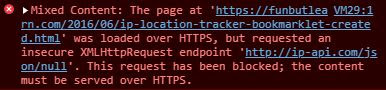
I found a neat bookmarklet that calls a REST API to fetch geolocation details for a given IP address . The original source used an external service that serves JSON output over HTTP only.  As Chrome is more stringent about mixed content, the HTTP call was blocked and the desired output wasn't achieved. I changed just one line of the bookmarklet code to use the IPAPI lookup service to get it working again. Drag this link to the Bookmarks bar or Favorites bar in Chrome or Edge - IP Lookup To view geolocation details, selecting an IP address on any web page & then click on the bookmarklet or provide the IP address through prompt box that shows up.

Google Bookmarks

Image
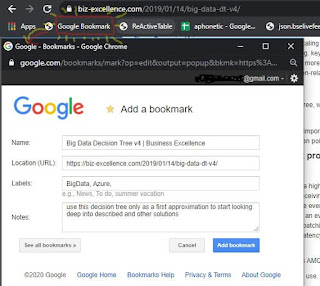
Joe Previte (@jsjoeio) asked on Twitter : Random question for y'all Imagine this scenario. 1. You're online (mobile or desktop) 2. You see something that looks interesting (link to something) 3. You don't have time to read/watch now, but want to do it later. What do you do? (i.e. what's your system?) Going by the 1000+ answers, many people struggle to manage the internet information overload while others use a variety of apps & browser extensions. Rather than depend on a new app only to bookmark, I like how some folks are re-purposing Whatsapp for bookmarking by sending links to themselves. As I already have a Google Account, I have been using Google Bookmarks bookmarklet to add notes while I bookmark my favorite articles - Google Chrome has an option to directly bookmark in the browser & sync them across your devices while signed-in, I like the Google Bookmarks service better as the Notes and Labels option help me to annotate & categorize the l...

HOW TO use a Bookmarklet on Chrome mobile

Image
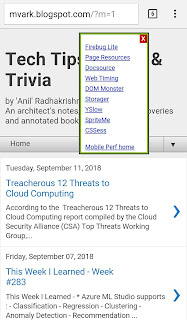
Web Performance guru, Steve Souders, has nicely listed the steps to use a bookmarklet within a mobile browser (generally deemed not possible as mobile browsers lack a bookmarks bar like desktop browsers do). His technique involves bookmarking a URL with an embedded anchor and then editing that URL within the mobile browser While using those instructions on Chrome on Android, I had to do the last step differently to make Steve's Mobile Perf Bookmarklet work. I had to type the bookmarklet by name ("Perf" in my case)  in the address bar to invoke while I was on the web page where I wanted to use the bookmarklet. Surprisingly, the Mobile Perf bookmarklet doesn't work on some webpages (like Google Search) & I haven't been able to figure out the reason. It also appears that only certain type of bookmarklets can work on mobile browsers.

HOW TO disable CSS of a web page after it loads in a browser

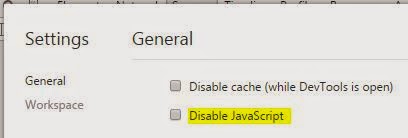
A question on this topic has been viewed on the StackOverflow forum 115,028 times since it was asked 4 years ago! And why would any one want to disable CSS? A developer or tester may want to see how a web page would look if the external CSS files fail to load when viewed over a slow internet connection. If the print output forced by the print stylesheet imposes style settings on the content of the web page that isn't to your liking, you may want to get rid of the meddlesome CSS. There are many good ways to tackle this scenario but I liked the JavaScript bookmarklet approach Also see: HOW TO disable JavaScript in a browser after the page loads

HOW TO filter columns in a HTML table within any web page

Image
There are multiple ways to filter columns in a HTML table within any web page 1. Google Sheet can be used to scrape tabular data. For example, by using the IMPORTHTML formula in a cell within Google Sheet it is possible to scrape the tabular data from this Wikipedia article link : =IMPORTHTML("http://en.wikipedia.org/wiki/Demographics_of_India", "table", 4) The table referred in the formula is the fourth among the tables on the web page referred by the URL. Once you have the data within Google Sheet, you can filter by column value (select column header, choose Filter from Data menu) or hide column (select column, choose Hide column from context menu) Mediawiki, the open-source wiki application that Wikipedia is based on makes it simple to make a table's columns sortable by just including the value "sortable" in the CSS class attribute for that table. 2. Stoyan Stefanov's ReactiveTable bookmarklet can work on any table (that has table ...

This Week I Learned - Week #85

Image
This Week I Learned: - Difference between Visual Studio Express Editions & Visual Studio Community Edition:   ~ VSE does not allow users to use extensions (aka. plugins).  There are over 5000 great plugins for Visual Studio in Visual Studio Gallery. With Visual Studio Community (similar to Professional) Edition, you can access all of them   ~ There are 3 different Visual Studio Express Editions targeting specific platforms. Visual Studio Community Edition lets you develop projects targeting cross-platforms. - Google Spreadsheet has a feature to scrape a specific portion of web pages using the ImportXML() formula. Firefox and Chrome Developer Tools can easily generate the XPath for a selected element which is a required parameter for ImportXML. -  Some of the video tutorials on Microsoft Virtual Academy are also available on Channel 9 . Channel9 shows the file size of videos in different formats. If you're looking for the lowest sized file, you...

HOW TO turn off copy-pasting restrictions on web form fields of annoying websites

Image
Some sites disallow pasting values into text boxes within a form. This can be annoying if the content that is to be copied is a very long or is so cryptic that you have to copy it from somewhere else carefully character by character. Some websites implement it using the onpaste event: <input class="yellowtextbox" name="txtCustomerID1" maxlength="10" onpaste="return false;" > Derek Prior has written a bookmarklet that deactivates the functionality that prevents values from being pasted into text fields. Copy the bookmarklet to your browser's bookmarklet bar and click on it while you're on the annoying web page that disables pasting values. His code works for password fields. It can be made to work for input fields like textboxes as well by commenting a couple of lines. var inputs = document.getElementsByTagName('input'); for (var i=0; i < inputs.length; i++) {  // if (inputs[i].getAttribute('type').toLo...

StopTabAlerts - a bookmarklet to replace dynamic blinking alerts in tab with custom text

There is a question on the SuperUser StackExchange forum where a person annoyed with the Gmail Chat notifications in the browser tab wants to hide the blinking messages . If  Doe sends you a chat response, you would see the message "Doe says…" in the browser tab's title alternating with the text showing the count of unread email in your Inbox. Such blinking messages are shown using a timer written in JavaScript  which make use of the  setInterval method. My solution to the above scenario was to mask that timer with a timer of my own that sets a fixed text message (I used the text "Advanced Rocket Engineering" so that anyone snooping on your computer may be impressed with your deep interest in science). Now how do you activate the timer? I'm fond of bookmarklets , so I thought a bookmarklet could do the job of overriding the blinking messages with custom text with just a click while you're on the Gmail tab. The actual bookmarklet cannot be placed dire...

Lazy-Developer-CAPTCHA Text Extractor Bookmarklet

Image
CAPTCHA or Completely Automated Public Turing Test To Tell Computers and Humans Apart, is a technique to to stop bots from signing up for online accounts or automatically filling up forms. The inventor of reCAPTCHA is a computer science professor at Carnegie Mellon University named Luis von Ahn, who is also the brain behind Duolingo (the free language learning site/app) and considered the father of crowdsourcing. Google bought his company, reCAPTCHA , and uses our free labor to verify hundreds of millions of words from books that its scanners can’t parse . The whole purpose of CAPTCHA is to prevent automation from the UI. The CAPTCHA image which includes the text within it (cannot be copied) is generated dynamically. Some lazy developers choose to build a simpler implementation by overlaying dynamic text over a hazy background making it look like a CAPTCHA but as the text can be copied it defeats the purpose of having a CAPTCHA. This  Gist snippet for a JavaScript ...

Dictionary Bookmarklet

Image
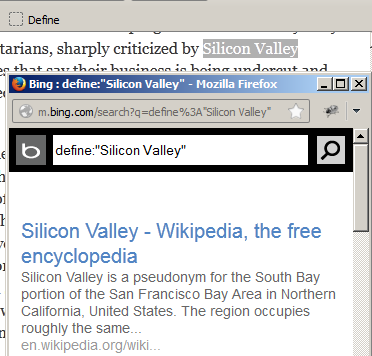
Peter Coles has published a simple Dictionary bookmarklet that would let you highlight a word on a page and get a definition for that word in a popup. It used to make use of the mobile version of Google which doesn't work anymore. Just replace the references to http://www.google.com/m/  in the code with http://m.bing.com/search  and the bookmarklet will work! Use this modified bookmarklet - Define  if you don't want to meddle with the code. Drag & drop that button to your Bookmarks toolbar. You can also adapt the bookmarklet script to work with any other online dictionary that uses a querystring in its URL via a HTTP GET request to fetch results for submitted keywords. If you don’t highlight a word ahead of time, it let’s you type in any term you want. Even if the word doesn’t show up in the dictionary, Bing should hopefully return some relevant results. Also see:  Fastest dictionary on the web - thefreedictionary.com

Browsing Time Tracker Bookmarklet

Image
There are quite a few services and browser extensions to track your browsing time. I liked the simplicity of  TimeTracker Bookmarklet It doesn't store the captured metrics or provide any reporting on the numbers like some of the commercial trackers do but that's fodder for a fun project. Also see:  The Joy of Bookmarklets

HOW TO make Google skip redirection step on clicking search result

Image
There have been times when I wanted to just copy the URL of a site mentioned in a Google search result without having to go to the website & then copying it from the address bar. However when I right click & copy the URL, this is how the address typically looks - http://www.google.com/url?sa=t&rct=j&q=menu_elements_selector &source=web&cd=5 &cad=rja&ved=0CEIQFjAE &url=http%3A%2F%2Fapi.jquery.com%2Fattribute-ends-with-selector%2F &ei=LdQ8UKOkJYPTrQfn0IHIDA &usg=AFQjCNFmICOvDtxuImTTeXY3pCDQNW6yVQ (URL broken with new lines for readability & to preserve formatting) Digging into the source code reveals that there is a mousedown event that fires up when the link is accessed & re-creates the HREF of that anchor tag so that you have to pass through a quick additional Google step before you can reach the search result site I wished there was a bookmarklet that could stop Google from mangling the URL and skip the redirection...