Posts

Dictionary Bookmarklet
Image
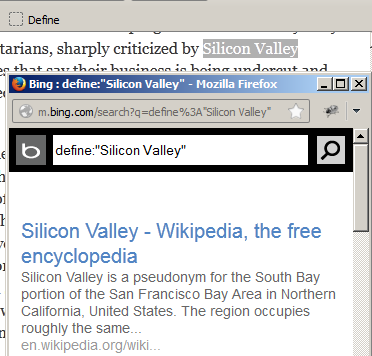
Peter Coles has published a simple Dictionary bookmarklet that would let you highlight a word on a page and get a definition for that word in a popup. It used to make use of the mobile version of Google which doesn't work anymore. Just replace the references to http://www.google.com/m/  in the code with http://m.bing.com/search  and the bookmarklet will work! Use this modified bookmarklet - Define  if you don't want to meddle with the code. Drag & drop that button to your Bookmarks toolbar. You can also adapt the bookmarklet script to work with any other online dictionary that uses a querystring in its URL via a HTTP GET request to fetch results for submitted keywords. If you don’t highlight a word ahead of time, it let’s you type in any term you want. Even if the word doesn’t show up in the dictionary, Bing should hopefully return some relevant results. Also see:  Fastest dictionary on the web - thefreedictionary.com

Putting the jqPagination jQuery Plugin to work

Image
The Financial Literacy Agenda For Mass Empowerment (FLAME) website has been publishing useful tips which they call "mantras for for financial success" through simple and colorful illustrations in the Indian print media. I ran into an image from their website but they were not all at once place. Their URL naming convention for the images makes it easy to loop through the entire collection. Having used jqPagination, an easy to use jQuery pagination plugin recently, I felt it would make it easy to navigate through all the images in that illustration series. Check it out and take a look at the code as well. Also see:  Client-side paging with jQuery

Striking a balance among non-functional requirements

Building a website requires striking a balance between non-functional but essential features like performance and security. The article  When Design Best Practices Become Performance Worst Practices  lists 3 design best practices which are performance worst practices, solutions to fix them and some interesting performance facts: Images comprise more than half of a typical page’s total payload, and much of this bulk is unnecessary. Image compression is a basic performance technique that allows developers to reduce this payload Progressive image rendering improves perceived load time because the user receives visual feedback earlier than with a baseline JPEG. According to Google, pages should ideally render content  above the fold  in one second or less, even for smartphones. According to the article, the consensus in the performance community is that if you’re serving your primary content in three seconds or less, you’re doing okay, if not great. Among the top 1...