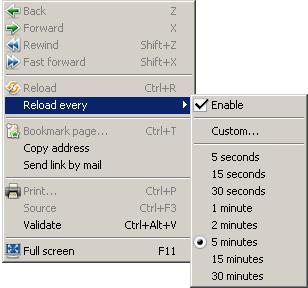
The Opera browser has a nifty feature to automatically reload a web page at pre-defined intervals. Right click Context menu, choose the "Reload every" option, set the desired time & "Enable" the feature
Open Food Facts (OFF) is a crowd-sourced database of food products from around the world. Somewhere in the world, a shopper scans the barcode on a packet of biscuits and adds basic product details. Another person photographs a package label for the same product in Hyderabad. A volunteer in France fixes a typo. That's Open Food Facts, a volunteer-built, openly licensed database of food products that's continually changing and growing. Each product is identified by a barcode and carries ingredients, nutrition facts, brands, labels and more. The whole database has millions of products, and let's say you only want the products recorded as being sold or available in one country like India. There are multiple ways to extract a subset of the OFF database. I have already tried using the daily dump available on Hugging Face through Google Colab and GitHub Actions in the past but it blew my mind that using the OFF deployed Apache Superset , you can execute a SQL query in a brows...
A few decades ago, quality training was scarce and costly. Thanks to the convergence of several new advancements, software vendors now provide online training to a worldwide audience, making skill acquisition more accessible than ever. Microsoft offers its Microsoft Learn platform, Google provides Google Skills , and Oracle University is doing a great job of delivering training for their products while also covering higher-level concepts relevant to the database, cloud, and AI domains. The following Oracle certification exams are free to take and come with learning resources: Oracle Cloud Infrastructure Foundations Associate (1Z0-1085-26) Oracle Cloud Infrastructure Architect Associate (1Z0-1072-26) Oracle Data Center Operations Foundations Associate (1Z0-3000) Oracle Multicloud Foundations Associate (1Z0-1144-26) Oracle Cloud Infrastructure AI Foundations Associate (1Z0-1122-26) Oracle AI Database Foundations Associate (1Z0-1195-26) Additionally, Oracle University offers many ...
Stats from the internet about AI compiled as I come across them - Amazon, Google, Microsoft and Meta are projected to spend $700 billion on A.I. infrastructure in 2026. Amount of debt taken on by hyperscalers, chipmakers, neoclouds and other companies providing data centers and electricity for the A.I. build out: at least $3 trillion. Share of projected S&P 500 earnings gains for this year driven directly by tech companies spending heavily on A.I.: two-thirds Share of the world’s electricity that data centers currently consume: 1.5 percent Anthropic is the biggest company ever to debut on the stock market. Its potential valuation in the initial public offering is $2 trillion or two thousand billion dollars. In 2026, Anthropic earned $16.3 billion and lost $80.7 billion. As of September 30, 2026, more than 1,900 Anthropic customers had each spent at least $1 million over the past year. Over 90% of Anthropic’s code is written by Claude Code - Krishna Rao (CFO) 75% of ...



Comments
Post a Comment