Posts

Showing posts with the label AJAX

HOW TO prevent AJAX requests within a web page in Chrome after initial load
Image
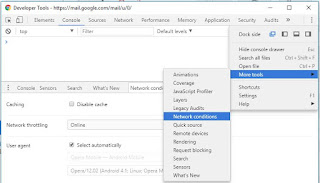
As a web developer, if you see a need to  prevent AJAX requests in Chrome after initial load for a single website, here are the steps  - 1. Use the Ctrl+Shift+I or F12 function key keyboard shortcut in Chrome to invoke Developer Tools 2. Within Dev tools, click on the three vertical dots icon on the right side of the menu, slide down to "More Tools" & select "Network conditions" from the sub menu 3. In the "Network conditions" tab, choose "Offline" in the dropdown against the "Network Throttling" option This way you can conditionally control AJAX requests for a single website without having to use the other blunt alternative of unplugging the network cable to remove all internet access. Also see: HOW TO disable CSS of a web page after it loads in a browser HOW TO disable JavaScript in a browser after the page loads
jQuery on CDN - Usage Stats

Image
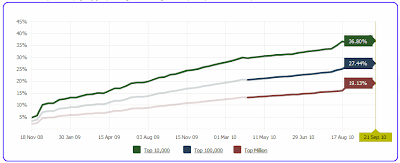
Dave Ward has done an informal study on the top 200,000 sites identified by Alexa to find which of those sites use a public jQuery CDN. His findings : 47 of the Alexa top 1,000 include a Google CDN reference. 99 of the Alexa top 2,000 reference jQuery on the Google CDN. 6,953 of the top 200,000 sites include a script reference to some version of jQuery hosted on Google’s CDN. 989 of the Alexa top 200,000 sites reference jQuery UI on the Google CDN. Dave recommends keeping your site’s CDN reference updated to the latest compatible version of jQuery for more performance gains. This is because popular sites generally upgrade to the latest stable version & sites must reference exactly the same CDN URL in order to obtain the cross-site caching benefit . Google CDN hosts: jQuery (versions 1.2.3, 1.2.6, 1.3.0, 1.3.1, 1.3.2, 1.4.0, 1.4.1) jQuery UI (versions 1.5.2, 1.5.3, 1.6.0, 1.7.0, 1.7.1, 1.7.2, 1.7.3, 1.8.0, 1.8.1, 1.8.2, 1.8.4)  File to reference looks like ...

AJAX is like steriods for web apps

An ever increasing number of web apps are utilizing AJAX to deliver an addictive user experience. Here's a list of apps/mash-ups I like that leverage AJAX - * YouTube Instant Messaging - developed by Stanford University student, Feross Aboukhadijeh, this is a predictive search results feature for YouTube that is inspired from Google Instant . This has in turn inspired Google Maps Instant . * Google Scribe - This Google Labs product provides autocomplete suggestions while you type, like the free desktop tool PhraseExpress After you install & activate the Scribe bookmarklet, it will start offering suggestions to complete sentences whenever you type within textareas or textboxes in any site. work in progress...

Screen scrape with jQuery, AJAX, JSONP & YQL

Image
Since reading this excellent article about scraping content from a Wikipedia page using Yahoo! Query Language (YQL) as a proxy for cross-domain Ajax , I'm hooked to YQL . YQL helps in circumventing the same-origin policy that prevents a script loaded from one domain from getting or manipulating properties of a document from another domain.  YQL has been around for about 2 years now & last year Yahoo introduced the capability to execute the tables of data built through YQL using JavaScript. Ajax, jQuery, JSONP (JSON with Padding) & YQL make a heady combination - check Christian Heilmann's code samples . Some facts about YQL from around the Web (work in progress) - * YQL is a hosted web service that can scrape HTML for you. It also runs the HTML through HTML Tidy and caches it for you. * It only returns the body content of the HTML - so no styling (other than inline styles) will get through. * .. .it treats the info on the web as a virtual table that developers ...

Need a Progress Indicator image-get a customized Throbber

Image
The animated image that you see in most AJAX based websites to indicate progress is called a Throbber. If you ever need a Throbber, you can turn to the free and excellent Throbber Generator by Yannick Croissant (A.K.A Country). You can choose from a variety of indicators and also change the background and foreground color of the Throbber. Trivia - I was able to know Yannick Croissant's site is in French from the awesome auto-detect language feature on Microsoft Translator and Google Translate . Related: Make a Progress Indicator For Slow-Loading Pages Build a Dynamic Progress Page For ASP.NET Pages

HOW TO speed up a ASP.NET AJAX web app

Just like making web pages cross-browser doesn't have a straight-forward solution , speeding up your ASP.NET AJAX based web application requires an understanding of it's internal aspects. Outlined below are some performance tips compiled from various sources - UpdatePanels can sometimes be dangerous . If you are using an UpdatePanel, reduce the number of controls within it if you can. Update without UpdatePanels - call WebMethods from JavaScript using ASP.NET AJAX Enable Compression and Caching using the scriptResourceHandler element in the web.config of your ASP.NET AJAX application. Consider setting ScriptManager control's properties LoadScriptsBeforeUI to "False" and explicitly set ScriptMode to "Release" . Generic ASP.NET performance improvement tips that also strongly relate to ASP.NET AJAX - Use tools like FireFox Firebug addon YSlow or the Fiddler add-on neXpert , to analyze web pages and identify why they're slow. Don’t run production...

AJAX Frameworks for ASP.NET

If you are planning to AJAX-enable a ASP.NET website, a good option is of course the ASP.NET AJAX Framework from Microsoft due to it's better integration with the Visual Studio IDE and documentation. Occasionally I see questions on the Forums from folks having issues making ASP.NET AJAX work. Very often this is because they have not picked the correct version of ASP.NET AJAX to go with the ASP.NET Framework version. So here is a quick summary. If your web application is based on ... ASP.NET 3.5 - you need ASP.NET AJAX 3.5 and it comes built-in with VS 2008. If you need specialized controls from the AJAX Control Toolkit use Toolkit version 3.5. If you are specifically building on top of .NET Framework 3.5 SP1 using Visual Studio 2008 SP1, use Toolkit version 3.5.20820. (System.Web.Extensions, Version= 3.6.0.0 corresponds to ASP.NET 3.5 Extensions December CTP) ASP.NET 2.0 - you need ASP.NET AJAX 1.0 and you have to manually install it in VS 2008 or 2005 and make sure the web.confi...

HOW TO implement AutoComplete with jQuery & ASP.NET

Image
Auto-completion of search terms is an AJAX feature popularized by Google that reduces typing by listing possible keywords as the user types. ASP.NET developers typically use the AutoComplete Extender that is the part of the ASP.NET AJAX Control Toolkit to plug it to a text box to implement auto-completion. There are other alternatives but one of the best options I've found is jQuery AutoComplete Plugin . jQuery is a lightweight JavaScript library that simplifies HTML document traversing, event handling, animating, and Ajax interactions for rapid web development. It was released in January 2006 by John Resig, a JavaScript Evangelist for the Mozilla Corporation. Using the plugin is a no-brainer as the code sample will show. All the grunt work is done by the jQuery Autocomplete Plugin. Building & deploying an Autocomplete solution takes just a few minutes and hardly any lines of code. There are a various specialized jQuery Autocomplete Plugins that offer additional features th...

Is ASP.NET AJAX truly cross browser?

It is extremely useful to know the answer if you are embarking on a long term project where you plan to use ASP.NET AJAX and the project SLA demands that your web application be cross browser. As per the official documentation , ASP.NET AJAX is compatible with most modern browsers on some operating systems and this includes the following: Microsoft Internet Explorer 6.0 or later versions. Mozilla Firefox version 1.5 or later versions. Opera version 9.0 or later versions. Apple Safari version 2.0 or later versions The supported Operating Systems are: Microsoft Windows XP with Service Pack 2 installed. Microsoft Vista. Apple OSX (Intel architecture only). The documentation is slightly incorrect when it says Apple Safari version 2.0 or later versions are supported. Precisely Safari version 2.0.4 on the Mac & above are actually supported. ASP.NET AJAX can run with the default security settings for the above browsers. If browser security and privacy settings are set too high, JavaScri...

Browser detection with Microsoft AJAX Library

Opera can disguise itself as a MS IE or Mozilla browser (Tools > Preferences | Advanced | Network > Browser Identification). This feature lets Opera "slip through" cases where access to a website is restricted to IE or Mozilla browsers. I noticed that while Peter-Paul Koch's browser detection script correctly identifies Opera even if a fake browser id is set, it is misreported by the Microsoft AJAX Client Library due to the way the browser detection code is implemented in MicrosoftAjax.js . Related: HOW TO precisely detect the browser version for IE 5 or higher

Free ASP.NET AJAX E-learning course

A free (possibly for a limited time) 2-hour clinic on Microsoft ASP.NET AJAX is available on Microsoft E-learning . If you are new to ASP.NET AJAX & want to understand the essentials quickly this is a good learning resource. The content is easy to digest & covers an extensive breadth of topics.

UpdatePanel Internals

Harish has been doing a refreshing series of articles ( I , II , ...) on UpdatePanel Internals. He shared this info in a group mail. Some of the controls that don’t work within the Update Panel are:- 1. File Upload Control. Here's " why " 2. Web Parts 3. Tree View’s Load on Demand Asynchronous feature 4. Gridview with Async Paging & Sorting Update: I found out from the ASP.NET AJAX official documentation that in addition to these controls, the following controls also are not compatible with UpdatePanel: Menu control DetailsView when its EnableSortingAndPagingCallbacks property is set to true. The default is false Login, PasswordRecovery, ChangePassword, and CreateUserWizard controls whose contents have not been converted to editable templates. The Substitution control. Validation controls, which includes the BaseCompareValidator, BaseValidator, CompareValidator, CustomValidator, RangeValidator, RegularExpressionValidator, RequiredFieldValidator, and Va...

My experiments with the ASP.NET AJAX AutoComplete Extender

"..the Colonel, seeing his mistake, turned to fluent and picturesque Urdu and Kim was contented. No man could be a fool who knew the language so intimately..."   Kim (Rudyard Kipling) Bollywood movies owe their popularity to the mandatory song & dance routine. Many of the popular Bollywood songs are in Hindustani / Urdu & understanding them requires a good grasp of the language. This was not however the reason I was overjoyed when I found a Urdu to English mini dictionary IN ENGLISH compiled by a Urdu enthusiast at NASA & converted it into a Windows app for easy personal reference in my VB6 days. Although I'm not a native speaker, I just fell for the language's charm. I have been following the ASP.NET AJAX Control Toolkit developments with interest and I like the convenience they offer in enhancing the UI & web applications without complicated code. With the code examples online , learning about the AutoComplete Extender was easy & I decide...

HOW TO build your own RSS/Atom Feed Reader with one line of code

Image
Using the RssDataSource control of the ASP.Net RssToolkit Version 2.0 , fetching a RSS feed, binding to a data control like the GridView can all be done declaratively and rolling out your own RSS/Atom Reader/Aggregator is a cinch. I learnt about the free RSS Toolkit - which makes consuming and exposing RSS feeds in ASP.NET super easy , from Scott Gu's weekly link-listing series . One link led to the other and while monkeying around with the RssToolkit controls, I thought cranking up a frill-free ASP.NET Forums feed aggregator that updates itself at intervals would be a worthwhile thing to do. Knowing that the ASP.NET AJAX Timer would be helpful for this, I set about building my app. I started by choosing the ASP.NET AJAX-enabled Web site template. Moving to Design mode, I dropped a ASP.NET AJAX UpdatePanel & Timer controls . Into the UpdatePanel I dropped the RssDataSource. Clicking on its Smart Tag prompter, you can provide the ASP.NET Forums RSS Feed URL http://forums.as...