Posts

Showing posts with the label C#

Course Reflection: "Lessons from Real World .NET Code Reviews"

Image
When I started going through the Pluralsight course " Lessons from Real World .NET Code Reviews " by Shawn Wildermuth, I thought it was a great topic and expected it to offer tangible suggestions that I could use a checklist. I'm a fan of checklists and I like the style & organization of the checklists in the Patterns & Practices book   Improving .NET Application Performance and Scalability  (published in 2004 but never updated). I felt that the two hour course started well but got preachy. I wish it was more comprehensive, focusing on coding issues that impact projects significantly rather than touching upon a few random experiences. Key points from the course: - A code review is a systematic way of quantifying code quality - The job of a code review is to determine what is being done well as well as what can be done better. It is not a witch hunt. - Look for common problems, not on-off issues - Review 200-400 lines at a time - Avoi...
Review: Microsoft Visual C# 2012 Step by Step by John Sharp

Microsoft Visual C# 2012 Step by Step is a good book for beginners. It covers a considerable breadth of the C# language in 800 odd pages while showing how to program with the language using Visual Studio, the most commonly used IDE. As with other books in the Step by Step series, the explanations are pretty detailed but never boring. The coverage of Visual Studio features while explaining C# programming topics is interesting. There are tables & illustrations to make the content engaging. The Quick Reference at the end of each chapter with brief C# snippets is a valuable addition. I guess there is no other IDE as full fledged as Visual Studio for coding with C#. Considering there are free Express editions of Visual Studio, I wonder if the vast majority of C# programmers use anything other than Visual Studio for building real-world application. Therefore I found it unusual that C# in the book's title should be referred as Visual C#. MSDN informs that Visual C# is the offici...

Which LINQ syntax is better?

There are multiple ways to write a LINQ query in C#: Use query (comprehension) syntax. Use method or Lambda syntax or Fluent syntax. Use a combination of query syntax and method syntax. So which syntax is better? MSDN recommends writing most queries using query syntax to create query expressions . The general opinion in this StackOverflow thread seems to be - "it depends". One Lambda syntax fan converted the MSDN 101 LINQ Samples which were in query syntax to Lambda syntax using  LinqPad .

HOW TO view a .NET DLL's dependencies

Image
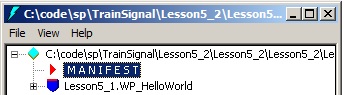
The simplest though not the most convenient way to view a .NET DLL's dependencies is to use the ildasm.exe tool Click on the Manifest node to view names of dependent assemblies The manifest lists the names and versions of all other assemblies that the current assembly depends upon . If you're adding a reference via NuGet, you can find the dependencies from the information provided for each Package in the Package listing -

Where is the .NET 4.5 folder?

Image
Looking at the %WINDIR%\Microsoft.NET\Framework directory used to be a simple way to check what versions of the .NET Framework were installed on a machine. .NET 4.5 is an "in-place upgrade" of .NET 4. That means .NET 4.5 is still the v4 CLR and adds new libraries as well as improvements to the core CLR itself.  As such, there no .NET 4.5 folder. In-place upgrade means that the CLR is the same but new libraries are added as well as bug fixes and performance improvements.  The .NET Framework can version in two ways. There are "side by side installs" and there are "in place upgrades." A major version means side-by-side and a minor version means in-place. Side-by-side means that different versions of .NET can live together on the same machine. Images from Scott Hanselman's blog The version numbers of the currently installed versions of the .NET Framework are listed in the Windows registry. You can use the Registry Editor (regedit.exe) to v...

Online IDEs for C# - frill free Visual Studio alternatives

Got a quick C# snippet to try out but don't want to use Visual Studio or don't have the resources on your computer right-away? There are some great desktop alternatives to VS to run snippets but did you know, there are also online IDEs for running .NET code : ideone  (supports more than 60 programming languages including C, C++, PHP, Python, Ruby, R) LearnCS.org  (has separate domains for  C ,  Python ,  PHP ) Compilr  (needs signup, supports mulitple programming languages including C, C++, PHP, Python, Ruby, R) MSDN Virtual Labs CodeRun This type of web applications that allow their users to upload snippets of text, usually samples of source code, for public viewing , are called Pastebins . There are plenty of Pastebins now, but the above list lets you run C# programs. Also see: Collaborative JavaScript debugging tools - jsFiddle & JS Bin Free C++ Learning Resources

Scott Allen's 10 favorite C# rules for developing software

From Scott Allen's C# Fundamentals Part 2 course on Pluralsight - Rule #10: Avoid Regions - as they are typically used to hide ugly code or classes that've exploded in size or responsibility. Think if you should break the regions into seperate classes Rule #9: Use exceptions for errors..instead of status code or booleans...but not for control flow Rule #8: Avoid boolean parameters Rule #7: Avoid too many parameters - beyond 4, consider grouping Rule #6: Warnings are errors - Go to a Project's Properties and in the Build tab of the dialog box that opens up, change "Treat warnings as errors" to All from the default None Rule #5: Encapsulate complex expressions - Instant recognition is good Rule #4: Try to avoid multiple exits - have just one Rule #3: Try to avoid comments - A meaningful method name is more effective than comments. Triple slash comments in VS are ok as they help in documentation of an API. Other developers can see your comments through Int...

Head First Design Patterns - C# & VB.NET Code Examples

Books in O'Reilly's Head First series are like "For Dummies" books, covering technical topics in an unconventional way. They contain goofy pictures and their content generates extreme reactions - readers love it or hate it. Going by the reviews on Amazon, Head First Design Patterns , a majority of the readers like it. The code samples in the book are in Java. So if you pick the book, be aware that the same samples have been ported to C# & VB.NET by volunteers - VS 2010 compatible code examples in C# on CodePlex VS 2003 compatible code examples in C# by Mark McFadden (zip) VS 2008 compatible code examples in VB.NET on CodePlex Also see: Learning resources on Design Patterns for .NET Developers Opening Questions For A Design Patterns Study Group

Comparison of Microsoft Data Access Technologies

Deciding which data access strategy to choose is not always an easy job. Here's a compilation of articles that discuss this topic - This Infosys whitepaper presents a SWOT (Strengths, Weaknesses, Opportunities, Threats) analysis of ADO.NET, LINQ, Entity Framework & WCF Data Services. There is also a comparison of Entity Framework & NHibernate. Excerpt - ADO.NET offers best performance amongst its peers (LINQ to SQL, Entity Framework, WCF Data Services)   C# guru, John Skeet's post in StackOverlow on the  pros and cons of LINQ   (work in progress..)

Free C#, XNA, Windows Phone 7 learning resources from Rob Miles

Two books by Microsoft Press author Rob Miles are available for free download - C# Yellow Book (197 pages) Introduction to Programming Through Game Development Using Microsoft XNA Game Studio (400 pages) He co-presented Windows Phone 7 Jump Start sessions. The recorded sessions of 12 hours duration are also available for download.   Also see: Free E-Book - CSharp for Sharp Kids .

HOW TO extract only specific files from a .ZIP using C#

"Well, it's better to be silent than to be a fool." - Harper Lee Online Forums are a great place to learn new tricks . I learnt today that DotNetZip is an open source class library and toolset for manipulating zip files or folders that's easier to use than the other popular library SharpZipLib . Built by Dino Chiesa, it is hosted on CodePlex and has extensive documentation & samples. It takes just a few lines & the ZipFile.ExtractSelectedEntries Method to filter specific files from a zipped file using a selection criteria expression . Talking of  open source compression\decompression Libraries, there is yet another Library on SourceForge that has been immensely popular - 7-Zip . The code is available in C++ for whoever wants to tinker. Like 7-Zip, there is a ready to use WinForms sample app based on DotNetZip which can be a free replacement for the commercial WinZip utility. Rant: At a lot of places in CodePlex, like the Issue Tracker & Reviews s...

Book Review - CSharp for Sharp Kids

Image
Using real-world analogies, Martin Dreyer does a great job of explaining the introductory concepts of C# & OOP to absolute beginners in the free E-Book C# for Sharp Kids. The 2.9 MB MSI file , containing the E-Book in MS Word format & code samples, can be downloaded from the Kid's Corner of MSDN's Beginner Developer Learning Center . The code samples are expected to run with Visual C# 2005 Express Edition but you can get it to work on a newer version of the Express Edition as well. Although this text is targeted at young developers (aged between 12-16), it is equally good for folks of any age wanting to learn about programming with C#. Spread across 5 parts & about 165 pages, it is light-hearted & filled with meaningful cartoons. Here are a couple of samples - Once readers finish the book, they will be able to build simple Console & Windows applications. It will also whet their appetite to know more about C#. I highly recommend this book to those...

"Export to Excel" without using components in a WinForms app

Way back in 2004, I wrote a program to generate a Word file dynamically without using any components in a Web application . The technique I used makes use of the fact that documents can be converted from Word/Excel to HTML (File->Save As) and vice versa.  When you manually save an Office document as a Web page, you can see from its source that it renders some interesting HTML, CSS & Office XML. By understanding and emulating this conversion technique programmatically, we can generate Word or Excel documents through web pages. This snippet shows how you can generate a report in Excel format in a web application after fetching data from a data source using the Office XML technique - System.Data.DataTable workTable = new System.Data.DataTable(); //The tablename specified here will be set as the worksheet name of the generated Excel file. workTable.TableName = "Customers"; workTable.Columns.Add("Id"); workTable.Columns.Add("Name"); System.Data...

The Beauty of Command-line Utilities

I like the way command-line tools can be adapted for automating complex tasks. For instance, if you had to populate the list of names of computers in your LAN in a combo box, the net.exe command can be utilized with the Process.Start() method in C# Process netsend = new Process(); netsend.StartInfo.FileName = "net.exe"; netsend.StartInfo.CreateNoWindow = true; netsend.StartInfo.Arguments = "view"; netsend.StartInfo.RedirectStandardOutput = true; netsend.StartInfo.UseShellExecute = false; netsend.StartInfo.RedirectStandardError = true; netsend.Start(); StreamReader sr = new StreamReader(netsend.StandardOutput.BaseStream, netsend.StandardOutput.CurrentEncoding); string sss = ""; while ((sss = sr.ReadLine()) != null) { if (sss.StartsWith("\\")) comboBox1.Items.Add(sss.Substring...

Regular Expression to negate non-matching characters

While constructing a regular expression pattern, sometimes it may be easier to write a pattern that negates the non-matching characters (did I just write a double negative ?) rather than write a more complex pattern to pick matching characters. Let's say you want to ignore a word that has vowels. The following pattern will match any single character NOT in the specified set of characters. [^aeiou] There is some nice info on Character Classes on MSDN . [^character_group] represents a Negative character group. It matches any character not in the specified character group Now we want the pattern to match not just a single character but a complete word so we use the + to indicate there are multiple characters. The ^ sign represents start of a string and $ denotes end of a string, so our final pattern to ignore a whole word that has vowels becomes this - ^[^aeiou]+$ Regular expressions can drastically replace several lines of validation code. However we need to test our pattern aggressi...

Pros & Cons of various C# Collection classes

The System.Collections and System.Collections.Specialized namespaces contain about a dozen Collection classes. How do you decide which one is optimal? This compilation of pros & cons of various C# Collection classes can help you decide. Also see: MCTS Self-Paced Training Kit (Exam 70-536): Microsoft .NET Framework 2.0 Application Development Foundation

Book Review: MCTS Self-Paced Training Kit (Exam 70-536): Microsoft .NET Framework 2.0 Application Development Foundation

Image
J ust like the ambience of the eating place & presentation of the food matter for a good gastronomic experience, to me the way technical information is presented is a key thing I look for when I buy a book. I like checking out the MS Press Certification guides when starting off on new topics (eventhough I may not take the exam) because the lessons are mapped to an organized learning plan & the way the content is presented is easy to read & understand. I feel the curriculum for the 70-536 exam on Microsoft .NET Framework 2.0 Application Development Foundation, introduced after .NET Framework 2.0 came out, is extremely relevant to .NET Developers & a similar exam should have been included in the .NET Framework 1.x series of certifications as well. In fact, the 70-536 exam will now continue to be the core requirement for both Visual Studio 2005 and the upcoming 2008 MCTS certifications. The multi-authored tome MCTS Self-Paced Training Kit (Exam 70-536): Microsoft .NET F...

HOW TO differentiate between GIFs & animated GIFs programmatically

"There are 2 kinds of people on the Web - voyeurs and exhibitionists." Michael Detouzos, MIT In my Classic ASP days, I managed a portal that was free for all. During this period I understood how important it is to monitor the website continously to stay ahead of smart-alecky visitors who try to attract attention with suggestive usernames or doing something whacky. A common prank that is played is to harass nice folks in the online community by creating a username with a underscore prefixed to some other nice guy's name (the underscore is hardly noticeable if the word is hyperlinked) & misusing his identity. And if a website offers members to upload any files, you can be assured that some vandals will be upto some mischief. All file uploads should ideally be validated & published only after moderation. Ok, now let me cut to the chase :-). There was a question recently on the ASP.NET Forums that struck a chord. A poster wanted to know whether it was possible to pr...

Book Review: Teach Yourself Regular Expressions in 10 Minutes by Ben Forta

Image
"So you've got a problem, and you want to use Regular Expressions to solve it. Now you've got two problems." - Scott Hanselman Although numerous languages (including the .NET languages like C#, VB.NET and Javascript) and tools (editors like VS.NET & EditPlus) support Regular Expressions, it is a daunting topic for developers due to its hieroglyphic & cryptic nature. When I came across the book, SAMS Teach Yourself Regular Expressions in 10 Minutes I was a little put off by the boastful and exaggerated title. Although the title does serve well to make the subject less daunting, it is a nice marketing gimmick and the author reveals in the preface that it is a tutorial book organized into a series of easy-to-follow 10 10-minute lessons. I took more time than 10 minutes to read through each of the 10 chapters and appendices and found it insightful & educative. The author follows a hands-on approach & a informal style to guide the reader gently through...

HOW TO prevent screen scraping

It is not difficult to screen scrape web pages & get specific portions of the page using regular expressions. This custom C# GetImages method  fetches all images from a specified web page URL. [BTW, it has a nice trick to show complete hyperlinks or image filepaths where relative paths are used. These would otherwise never link to original content from the scraped page. It uses the BASE tag to set the document's base URL. The BASE element should be used within the HEAD tag.] Some of the strategies that this whitepaper[pdf] [Google's cached HTML version] discusses to prevent scraping include proactive measures like putting a website policy forbidding scraping, limiting results, DRM, rendering and reactive measures like policing by monitoring Physical and Internet (through IP address) identities. While it alludes to rendering, one other possibility is to block access based on the referer page & render content conditionally. A page with valuable information could be ...