Posts

Showing posts with the label Chrome

HOW TO Selectively Download Multiple Images from a Web Page at Once (Without Browser Extensions)

Image
Firefox offers a way to download multiple images at once through the Tools menu option. Steps to follow in Firefox desktop browser in Windows: Use the Ctrl + I keyboard shortcut directly to bring up the Page Info dialog box or  use Alt+T to invoke the Tools menu and the select Page Info .  In the "Page Info" window, switch to the "Media" tab. Select the images you want to download by holding the Ctrl key while clicking or click on the Select All button. Hit the "Save As" button to download all images at once into a folder of your choice. Chrome and Edge lack a similar GUI option, but images can potentially be downloaded using JavaScript in the Developer Tools Console tab.

This Week I Learned - Week #6 2024

Image
This Week I Learned -  * "When pressure rises in companies you often have to prove your worth as a developer. And as lines of code are easy to measure, this is often the hammer used to hit the nail in the coffin of company trust.... lines of code are often seen as productivity or even quality of a developer. And that’s nonsense...Often the best code is the one that didn’t need to be written." -  Christian Heilmann *  The Prime Video team at Amazon has published a rather remarkable case study on their decision to dump their serverless, microservices architecture and replace it with a monolith instead. This move saved them a staggering 90%(!) on operating costs, and simplified the system too.   What makes this story unique is that Amazon was the original poster child for service-oriented architectures .  *  Microsoft's Data Modernization Planner can help you in finding out where your data platform maturity stands, and provide business recommendations ...

This Week I Learned - Week #48 2023

Image
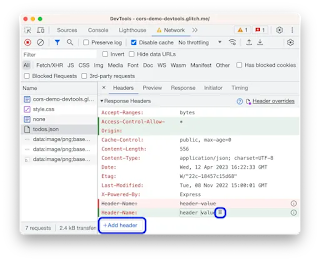
This Week I Learned -  * HTTP/3 builds on the foundations laid by HTTP/2 but introduces significant changes, primarily by shifting from TCP (Transmission Control Protocol) to QUIC (Quick UDP Internet Connections) as the underlying transport protocol. - The Valley of Code * From the Chrome Developer Tools Network panel, you can override HTTP response headers and web content , including XHR and fetch requests, to mock remote resources even if you don't have access to them or the web server. * A VSIX package is a .vsix file that contains one or more Visual Studio extensions, together with the metadata Visual Studio uses to classify and install the extensions.  *  Replicate lets you run machine learning models with a few lines of code, without needing to understand how machine learning works. *  Chatbot Arena lets you chat with any two models among these side-by-side: GPT-3.5: GPT-3.5 by OpenAI GPT-3.5-Turbo-1106: GPT-3.5-Turbo-1106 by OpenAI GPT-4-Turbo: GPT-4-T...

Browser DevTools Tips

A compilation of my browser DevTools tips to aid in web application development: HOW TO turn off internet access for a single browser tab while testing a web application   HOW TO grab text from a HTML list or dropdown with JavaScript & Dev Tools   2 ways to copy tooltip text from a web page   HOW TO disable JavaScript in a browser after the page loads   HOW TO turn off copy-pasting restrictions on web form fields of annoying websites   HOW TO change the look of websites you don't own within your browser  

This Week I Learned - Week #42 2022

Image
This Week I Learned -  *  Azure Container Apps (ACA) vs Azure Kubernetes Service (AKS) *  AWS Global Accelerator (AGA) relies on ELB to provide the traditional load balancing features such as support for internal and non-AWS endpoints, pre-warming, and Layer 7 routing. However, while ELB provides load balancing within one Region, AWS Global Accelerator provides traffic management across multiple Regions. AWS Global Accelerator is a network layer service that combines advanced networking features with the dedicated AWS Global Network to improve your application network performance by up to 60%. Global Accelerator enables you to scale your network up or down. * At the Ignite conference, Microsoft announced a new Kubernetes distribution branded AKS Lite targeting the IoT and edge workloads . AKS Lite shouldn't be mistaken as a lightweight version of AKS running in the cloud. It’s a platform built from the ground up to simplify the management of edge infrastructure...

HOW TO extract table on a public web page as a CSV file

Image
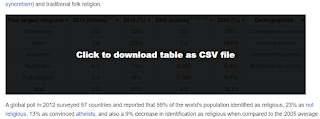
Tables within web pages on the internet don't provide interactivity most of the times and data is presented through plain HTML tables unless developers of the website implement it through client-side functionality through something like a jQuery plug-in such as  DataTables to make data more accessible . In such cases, you cannot filter or sort unless you manually copy the table to a spreadsheet and then use the functions of a software tool like Excel.  To minimize the steps, it is better to use bookmarklets that can create a CSV file from an HTML Table. Below are such bookmarklets graciously shared by some good folks on the internet - Stoyan Stefanov's ReactiveTable bookmarklet Davin Studer Export to CSV bookmarklet ShareProgress' TableThis bookmarklet   The screenshot shows how ShareProgress' TableThis bookmarklet can inject code to make a table within a Wikipedia page to be downloaded as a CSV file Bookmarklet code needs to be relatively short because of browser lim...

This Week I Learned - Week #17 2022

Image
This Week I Learned -  * The existing Azure Front Door and Azure CDN from Microsoft will now be known as Azure Front Door (classic) and Azure CDN from Microsoft (classic) moving forward.  Azure Front Door Standard and Premium have the latest capabilities and future enhancements will not be available on Azure Front Door (classic). The new Azure Front Door is a modern enterprise CDN catering to both dynamic and static content acceleration with built-in turnkey security, and a simple and predictable pricing model.  * At PyCon US 2022, Anaconda’s CEO Peter Wang announced a shiny new technology called PyScript that allows users to write Python and in fact many languages in the browser.  PyScript is a system for interleaving Python in HTML (like PHP). This means you can write and run Python code in HTML, call Javascript libraries in PyScript, and do all your web development in Python * "The web browser is the most ubiquitous, portable computer environment in the wo...

Tab Hoarders

Image
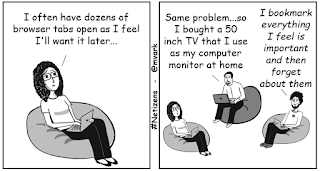
Like hoarders in the physical world, those who spend a lot of time on the internet may find it difficult to close tabs lest they miss something important - Digital FOMO .   Chrome now has a "Search Tabs" feature to indulge tab hoarders .  It can be invoked with the Ctrl+Shift+A keyboard shortcut.  BTW, Ctrl+Shift+T will undo a closed tab.

This Week I Learned - Week #14 2021

Image
This Week I Learned -  * The ASM-based deployment model for Cloud Services has been renamed Cloud Services (classic). Cloud Services (extended support) has the primary benefit of providing regional resiliency along with feature parity with Azure Cloud Services deployed using Azure Service Manager (ASM). Cloud Services (extended support) also supports two types of roles, web and worker. There are no changes to the design, architecture, or components of web and worker roles. *  Azure Deployment Manager (ADM) allows you to perform staged rollouts of resources, meaning they’re deployed region by region in an ordered fashion. As part of this rollout, the health of your services is monitored, and if unacceptable performance degradation is detected, deployment automatically stops, allowing you to troubleshoot and reduce the scale of the impact. These tools are used internally by hundreds of Microsoft services to ensure safe, reliable deployments, ensuring high availability and...

HOW TO turn off internet access for a single browser tab

Image
Web developers may occasionally have a need to test for scenarios when a web application doesn't have access to the internet. Rather than turn off access to internet completely, it is possible to selectively turn off internet access for a single browser tab just like muting audio playing within a web page. In Chromium-based browsers, open Dev Tools (F12 keyboard shortcut) and within the Network tab change the setting to Offline in the dropdown as shown in the screenshot below. This feature can also be used to conserve bandwidth for web pages that make numerous AJAX calls but can work even while offline.

HOW TO grab text from a HTML list or dropdown with JavaScript & Dev Tools

Image
Developer Tools in Chrome & Edge offers convenient ways to probe the content of web pages. Dev Tools can be invoked for specific pages open within the browser by using the F12 or Ctrl+Shift+I or the browser menu. To extract just the text of a HTML list or dropdown identified by id property value of "country" with JavaScript & Dev Tools, use the following from the Console tab - document.querySelector('#country').innerText textContent returns the text content of all elements, while innerText returns the content of all elements, except for <script> and <style> elements.  Snippets  are a feature of the Sources pane in the Developer Tools. It allows you to write small scripts to execute in the context of the current page using a built-in editor. Common tasks can be scripted and kept in a collection for re-use later.

This Week I Learned - Week #24 2020

This Week I Learned - * Azure Service Health helps you assess the health of Azure, while Azure Monitor helps you determine if there are any issues on your end. Both services use the same alerting platform to keep you notified and informed of the availability and performance of your Azure workloads. This means that you can set up an action group once and use it multiple times for different scenarios.  Azure Monitor and Azure Service Health are complementary services that you will often use together when troubleshooting issues. The Azure Status page only reports on major, widespread outages and doesn’t include any information about planned maintenance or other health advisories. * The Windows Subsystem for Linux (WSL2) lets developers run a GNU/Linux environment -- including most command-line tools, utilities, and applications -- directly on Windows, unmodified, without the overhead of a virtual machine * PowerShell is available for .NET Core, which also runs on Lin...

Google Bookmarks

Image
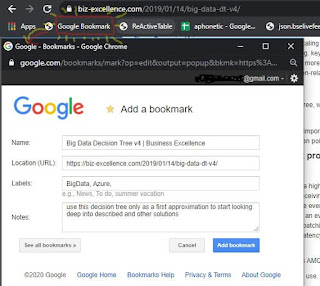
Joe Previte (@jsjoeio) asked on Twitter : Random question for y'all Imagine this scenario. 1. You're online (mobile or desktop) 2. You see something that looks interesting (link to something) 3. You don't have time to read/watch now, but want to do it later. What do you do? (i.e. what's your system?) Going by the 1000+ answers, many people struggle to manage the internet information overload while others use a variety of apps & browser extensions. Rather than depend on a new app only to bookmark, I like how some folks are re-purposing Whatsapp for bookmarking by sending links to themselves. As I already have a Google Account, I have been using Google Bookmarks bookmarklet to add notes while I bookmark my favorite articles - Google Chrome has an option to directly bookmark in the browser & sync them across your devices while signed-in, I like the Google Bookmarks service better as the Notes and Labels option help me to annotate & categorize the l...

HOW TO enable “Reader” mode in Chrome

Image
Newer versions of Microsoft Edge & Chrome (versions 75 & above) have a “Reader” mode that when enabled can remove unnecessary background clutter on a web-page making it easier to read This experimental feature can be activated by heading over to "chrome://flags/#enable-reader-mode" Restart the browser Subsequently, when you want to view a page in Reader mode in Chrome, click on the three-dot menu button in the upper right, and then choose "Distill page" to view content without distractions. You can choose to toggle the view and change it night-mode based on your preference

HOW TO disable images in web pages within Chrome

Image
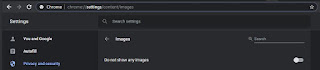
While images make web pages better looking, some sites have obtrusive image ads that spoil the browsing experience. Viewing popular websites without images will be weird and there is a way to selectively un-block images for those desired sites. If you're also concerned about conserving bandwidth, here is how you can disable images in Google Chrome. You can go to Settings | Privacy and security > Site Settings > Permissions > Images and then change the slider from "Show All" to "Do not show any images" Alternatively, copy-paste this URL to jump to that setting directly - chrome://settings/content/images ...and then change the slider from "Show All" to "Do not show any images" to apply the setting globally to every site that'll be opened subsequently. When you visit your favorite website, locate the icon in the address bar that says "Images were blocked on this page" and click on it. In the dialog box that...

This Week I Learned - Week #6 2020

This Week I Learned - * You can use VNets to provision and manage virtual private networks (VPNs) in Azure and, optionally, link the VNets with other VNets in Azure, or with your on-premises IT infrastructure to create hybrid or cross-premises solutions. Each VNet you create has its own CIDR block and can be linked to other VNets and on-premises networks as long as the CIDR blocks do not overlap. * In addition to the large IOPS capacity of the Premium Disks, Azure Blobcache is a huge value for mission critical OLTP workloads as it brings significant additional high-performance I/O capacity to Azure Virtual Machine for free. Blobcache is a multi-tier caching technology enabled by combining the VM RAM and local SSD. You can host SQL Server data files on premium SSD managed disks with read only Blobcache and leverage extremely high-performance read I/Os that exceed the underlying disk’s capabilities. High scale VMs comes with very large Blobcache sizes that can host the all the data ...