Posts

Showing posts with the label Opera

This Week I Learned - Week #7 2023

Image
This Week I Learned -  *  Migrate application workloads written in full .NET Framework, which requires running in Windows containers to .NET Standard . Migrated workloads will run in Linux containers with a smaller footprint in terms of a container image and hence provide better density. This decreases the number of agent nodes required to host and run applications. *  Azure shared disks is a feature for Azure managed disks that allow you to attach a managed disk to multiple virtual machines (VMs) simultaneously .  * You can attach an SSD persistent disk in multi-writer mode to up to two N2 virtual machine (VM) instances simultaneously so that both VMs can read and write to the disk. Persistent disks in multi-writer mode support a subset of SCSI-3 Persistent Reservations (SCSI PR) commands.  You can attach a non-boot persistent disk to more than one VM in read-only mode , which lets you share static data between multiple VMs. Sharing static data betw...

HOW TO disable JavaScript in a browser after the page loads

Image
In this age of the Cloud and automatic browser updates, everything is dynamic. You never know when & how a web page you bookmarked might change or where the browser feature you liked has disappeared. The following information was tested in Firefox 33, Chrome 38, Opera 16: Firefox: To disable JavaScript in a browser after the page loads, go to Tools > Web Developer > Inspector  In the panel that opens up, click on the  Settings  gear icon at the top right hand corner. Under Advanced Settings , check the option Disable JavaScript click on  image  to enlarge  Chrome: After a page has loaded in Chrome, hit F12 or use Ctrl+Shift+I keyboard shortcut to invoke Developer Tools . In the panel that opens up, click on the Settings gear icon at the top right hand corner. click on  image  to enlarge Check the option  Disable JavaScript [Update 25-Nov-17]:  There's now a command menu built into DevTools that makes it ...

HOW TO change HREF value of anchor dynamically when the link is clicked

Image
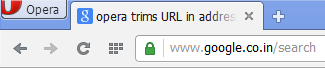
Let's say you have a link on your website that should work as normal on all days but Sunday. On Sunday, you wish to redirect users clicking on the same link to be redirected to a different page. You can detect the day of the week and redirect the user clicking on the link to a different URL dynamically - <a href="http://www.example.com" onclick =" var d = new Date();var n = d.getDay(); if(n==0){ event.preventDefault(); location.href='http://www.example.com/sunday.html' } "> Carpe Diem! </a> event.preventDefault()  cancels the default action of the anchor tag. This is kind of sneaky as the URL that the user sees in the status bar on hovering over the link will be different from the one he will be redirected to. But then, URL shortener services  & Opera browser do such sneaky things too in a different way. Don't know from which version of Opera this started but in version 16, the protocol and querystring part of a URL ar...

What is the version of your browser?

With popular browsers like Firefox & Chrome updating themselves automatically, the odds are high that you wouldn't know the version number of the browser you're using. You'll need to track the versions however if you are a web developer or have to troubleshoot a browser bug or a defect within a website to its owners. Here is a handy list of links to know about current releases of browsers: Chrome Firefox Internet Explorer Opera Safari

Browser Developer Tools - Tips, Tricks, Documentation

These days all popular browsers - IE, Firefox, Chrome, Opera, Safari, come with Developer Tools that help web developers debug HTML, JavaScript & CSS issues & build better web pages. It's probably the Netscape browser that first started helping developers with the Error Console option that would specify on which line a script error occurred & the possible cause. Firefox inherited that option while Firebug, the Firefox add-on, extended debugging facilities within Firefox to a different level. Firebug's feature-set is so comprehensive, it is possibly the inspiration for all the Developer Tools within popular browsers. Each browser's Dev Tools have some special features & they are continously evolving, thanks to the competition among themselves. The Developer Tools option can be invoked with the keyboard shortcut F12. Here is a compilation of links to the official documentation, tips & tricks for the Developer Tools - Internet Explorer: How to use F...

HOW TO access web pages faster on a slow Internet connection

Image
Disable IFRAME based ads Disable Flash based ads . These ads suck up a lot of bandwidth. It's easy to enable/disable add-ons like the Flash plugin on newer versions of IE & Firefox. Note however that you will need Flash to be enabled to watch videos on YouTube or MyPopKorn.com (the site that gives you short summaries of long drawn Indian TV serials) YouTube provides many of its videos in multiple resolutions or quality levels. Consider lowering the video quality to the lowest available to make the video stream faster. If you like watching Flash based videos like those on YouTube, don't play it immediately but allow them to load completely (i.e till you see light red line at the end in progress indicator of the player). Disable images. This will take the fun out of browsing the Internet, so take this extreme step if pages download really slow. The Opera browser has a simple option to turn off images on a per page basis. From the menu, go to View > Images > No Im...