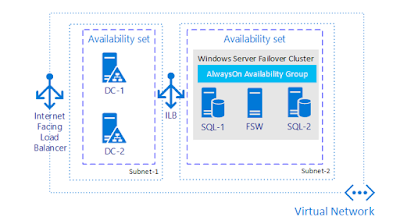
Azure in Pictures: Windows VMs for an application with N-tier architecture

Architecture diagram source: Running Windows VMs for an N-tier architecture on Azure Elements of the architecture diagram: - Availability sets. Create an availability set for each tier, and provision at least two VMs in each tier. This is required to reach the availability SLA for VMs. - Subnets. Create a separate subnet for each tier. Specify the address range and subnet mask using CIDR notation. - Load balancers. Use an Internet-facing load balancer to distribute incoming Internet traffic to the web tier, and an internal load balancer to distribute network traffic from the web tier to the business tier. - Jumpbox. Also called a bastion host. A secure VM on the network that administrators use to connect to the other VMs. The jumpbox has an NSG that allows remote traffic only from public IP addresses on a safe list. The NSG should permit remote desktop (RDP) traffic. - NSGs. Use network security groups (NSGs) to restrict network traffic within the VNet. For example,...