Posts

Showing posts with the label IE

Browsers give away device name through user agent - Et tu Browser!

Image
My mobile browser has been letting the websites I visit know what handset I use and I wouldn't have known this until I saw this targeted ad - an ad for case for Lumia 530 I knew about browser user-agent strings, but today I learnt that browsers give away device model name as well, through the user agent they expose - Mozilla/5.0 (Windows Phone 8.1; ARM; Trident/7.0; Touch; rv:11.0; IEMobile/11.0; NOKIA; Lumia 530 Dual SIM) like Gecko Cookies , prying sites like Google , Facebook , apps like TrueCaller know more about me than my friends and family . Good-bye privacy !
HOW TO print only selected text within a web page

Image
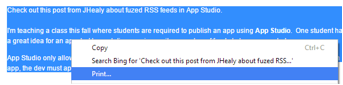
In Chrome, highlight just the text that needs to be printed and choose Print from the context menu. In Internet Explorer, after selecting the text that needs to be printed, choose Print Preview from the context menu. Choose the option "As selected on screen" instead of the default option "As laid out on the screen" from the dropdown in the toolbar. Optionally, the font size can also be increased by specifying a percentage to resize by. Google Chrome surprisingly, doesn't have the option to resize the page using the Print Preview option as in Internet Explorer.

HOW TO bulk archive a web page along with linked pages in PDF format - needs IE

Image
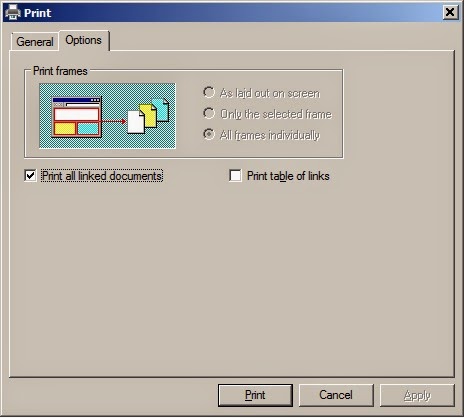
Imagine this - you're in the middle of an interesting online article and you have to turn off your computer for some reason. You can choose to save that web page as a PDF but what if that page contains linked articles that you want to read as well? Internet Explorer has a option called Print all link documents If you have a PDF printer utility installed, instead of send those files to a printer you can print a selected web page and the linked files as PDF files in a single shot for offline reading. I found it strange that the Foxit PDF Printer doesn't make the links clickable whereas you can click on links within a PDF generated by Chrome. On a related note, to export the URLs of the open tabs of a Firefox window to go through later there is a nice convenience in Firefox. Under Tools > Options , in the General tab look for the Use Current Pages button in the Startup section. When you click on the Use Current Pages button, all the URLs of the pages open in diff...

What is the version of your browser?

With popular browsers like Firefox & Chrome updating themselves automatically, the odds are high that you wouldn't know the version number of the browser you're using. You'll need to track the versions however if you are a web developer or have to troubleshoot a browser bug or a defect within a website to its owners. Here is a handy list of links to know about current releases of browsers: Chrome Firefox Internet Explorer Opera Safari

While you browse, modern browsers track your behavior

Browsers like Internet Explorer 11 & Chrome go to great lengths to fetch web pages faster & improve the user experience. Besides tracking user browser habits, IE 11 depends on Bing  to improve the user experience ... Page Prediction, preload (also called prerender), and prefetch in IE11 give the browser a head start in downloading and rendering the next page or downloading resources for the next page The predictions are done using our understanding of browsing patterns, user browsing habits, and common cues in Web pages, like “next” links and pagination. Bing’s extensive knowledge of the Web and data mining help make these predictions laser sharp. while Chrome relies on the Google search engine  to do such things as monitor what files you're trying to download: On the security front, Chrome now does even more to help protect you from malicious downloads. In addition to checking a list of known bad files, Chrome also does checks on executable files (l...

HOW TO quickly save all URLs in tabs within a IE or Firefox window

Image
This tip applies to Internet Explorer and Firefox. Picture this - While searching for something on the Web, you have opened a dozen tabs and for some reason you have to turn off your PC/laptop quickly. How do you save  all the addresses in tabs within a window for reviewing later? Madhivanan has a simple solution - Go to Tools > Internet options In the General tab, click the Use current button in the Home page  section. It will display all URLs in the textarea above it. Copy & paste it in some document for later use. The actual purpose of the Use current button is to set URLs so that the related pages open automatically when IE is opened. This tip can be extended to Firefox as well - Go to Tools > Options In the General tab look for the Use Current Pages button in the Startup section. When you click on the Use Current Pages button, all the URLs of the pages open in different tabs are copied to the Home Page text box with a pipe delimiter. C...

What is the difference between Browser Mode & Document Mode in IE

Image
If you're a web developer and your job actively involves building web pages that work the same in all browsers including the last three versions of IE, you'll be no stranger to Browser  & Document Mode in Internet Explorer These options are available with IE Developer Tools (F12 keyboard shortcut). In IE9, these modes let you emulate older versions of IE8 & IE7. Microsoft provides these modes so that websites that were built to target IE7 & lower versions don't fail hopelessly in the newer & more standards-based versions. IE provides a fallback in the form of the Compatibility View button which allows content designed for older web browsers to render well in newer versions of Internet Explorer 9.  Here are the differences between Browser Mode & Document Mode - Browser Mode determines the User Agent sent to the server & the Document Mode IE defaults to. Document Mode determines the layout (rendering engine) and the JavaScript engine. Document...

Explore console.log if you use JavaScript alert extensively for debugging

Image
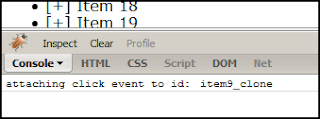
The JavaScript alert method is something that most web developers use to debug their code. However, now with all popular browsers incorporating Developer tools within them, there are easier ways to debug client-side code. Firebug is an optional add-on for Firefox that adds richer features to those natively available & probably the motivator for browsers to develop their own Developer tools. I guess, it was IE that started using F12 as keyboard shortcut to start up Developer tools and now that's synonymous with Developer tools on almost all browsers. Within the Developer tools, a Console panel exists for executing script statements on-the-fly. You can make use of Console methods to expose information that is flowing through your scripts. The console.log method can be used as an alternative to the obtrusive JavaScript alert method to track what's going on within your code without having to click OK for every dialog box that alert th...

HOW TO compare HTML5 features supported by versions 8, 9 & 10 of IE

Image
This page on the Browserscope website  lets you choose versions of the same or different browsers & see how they stack up in supporting HTML5 features. Click on the "Compare UAs" link on that page, select User Agents you want to compare & then hit the Compare button. I chose versions 8, 9 & 10 of Internet Explorer to see what's new with respect to HTML5 in IE9 & IE 10 click to enlarge image You can copy the table data to Excel & transpose the columns to rows to view the tabular data vertically as a list (in Excel2010, click on Paste dropdown in Ribbon & select Transpose). So here is the list of HTML5 supported features in IE9 as detected by Browserscope by utilizing Modernizer 2.0.4 - audio:m4a  audio:mp3  backgroundsize  borderradius  boxshadow  canvas  canvastext  csstransforms  draganddrop  fontface  generatedcontent  geolocation  hashchange  hsla  inlinesvg  localstorage  multiplebgs  opacity  postmessage  ...

The Glorious History of Internet Explorer

Image
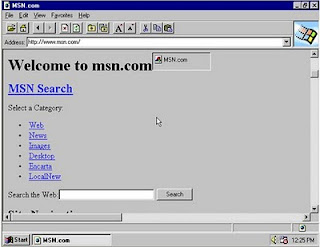
Love it or hate it, you will have to appreciate IE’s staying power. Having been around for 16 years, it is still the browser market leader . Here are some interesting facts about Internet Explorer: IE 1.0 IE 1.0, based on Mosaic, was released together with the Windows 95 Plus! Pack in 1995 Used on Windows 95, IE 1.0 was only slightly more than 1 MB in size. IE 2.0 was the very first cross-platform browser that supported both Windows and Mac. Released in 1995, IE 2.0 had support for JavaScript, frames & cookies At the end of the first week of IE 3’s release in 1996, more than 1 million copies of the browser were downloaded. IE4 which came in 1997 introduced Microsoft's Trident layout engine, which is still in use today in Internet Explorer. Released in 1999, IE 5 was the first browser to support bi-directional text. IE 5 introduced XMLHttpRequest which enables building AJAX applications. The XMLHttpRequest object was not completely functional until as late as version...

Debug JavaScript with Firebug & IE Dev Tools Console commands

Image
Instead of debugging client-side code with the JavaScript alert command, using the Firefox Firebug extension & Internet Explorer Developer Tools ' (F12 k eyboard shortcut ) Console commands makes debugging less distracting & simpler. The following Console commands work in both IE & Firebug - console.log console.info console.warn console.error console.assert To use either of these in place of an alert in your JS code, make sure you have the Console enabled. Trivia: Firebug was initially written by Joe Hewitt, one of the original Firefox creators . He now works at Facebook.

Search from browser address bar in IE, Firefox, Opera

I found out by accident that its not just Chrome that has the combined search and address bar ( Omnibox ) feature - the address bar in IE8, Firefox 3.0 & Opera 9.6 (the version numbers are the ones I've tested on) can also double up as a search box. You can type your search term in the address bar of any of these browsers and press the Enter key to see results from your default search engine. This doesn't work in Safari (version 4.0 on Windows) though. Its good to see browser features getting consistent across the board . Also see: Keyboard shortcuts common to Firefox & IE8 View math calculation results directly in Firefox Search bar

Got tough IE questions? Check EricLaw's blog

Eric Lawrence is a program manager on the Internet Explorer team & best known as the creator of Fiddler . He has also developed several IE addons & browser-related tools . I have found his blog posts to be insightful. His answers to difficult questions asked on forums are informative & comprehensive. Here's a compilation of his posts that I liked most - The Performance Impact of META REFRESH Forcing Internet Explorer To Forget To Not Remember Understanding Session Lifetime Understanding Cookie Controls Friendly HTTP Error Pages (work in progress...) Also see: Fiddling with Fiddler

HOW TO prevent 3rd-party browser extensions from being installed in IE

Image
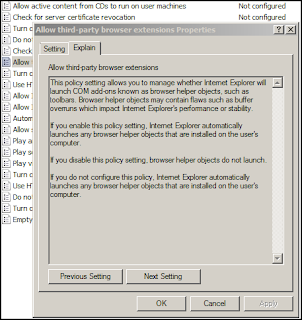
There can be some sneaky programs that install not just what they explicitly claim to do but also things like toolbars & add-ons within IE. As most people agree to a software publisher's Terms & Conditions without reading them, they may have deviously add a line that says one of your kidney & your PC are their property. These add-ons known as browser helper objects may contain flaws such as buffer overruns which impact Internet Explorer's performance or stability. If you wanted to play safe & prevent any 3rd-party browser extensions from being installed at all in IE8, there is a setting, I came across on IEBlog , that you can use. Open GPEdit.msc (Local Group Policy Editor) using the Run option in XP or the Search bar in the Start menu. Open Administrative Templates > Windows Components > Internet Explorer > Internet Control Panel > Advanced Page, and set the policy "Allow 3rd-party browser extensions" to DIS...

15 years of Internet Explorer

Image
Last month, Internet Explorer turned 15. Here's a timeline of IE releases based on excerpts from seattlepi's article on the history of IE - IE1 was born when Microsoft got a license from Spyglass Inc. for the source code of Mosaic -- the first graphical Web browser technology. Microsoft launched IE1 in August 1995 as part of the Windows 95 Plus! pack, a $49 add-on for the landmark operating system. IE2 came in November 1995, and by April 1996 it also was available for Windows NT, Windows 3.1 and Macintosh. Users could buy it as part of the Internet Starter Kit for Windows, which cost $20. It wasn't until Internet Explorer 3.0, in August 1996, that Microsoft introduced the "blue E" logo we all know now. IE4 was the Big Mama. Released in September 1997, Microsoft soon bundled it with Windows 98 -- a practice that took IE's market share from less than 20 percent in late 1997 to about 60 percent by 1999. IE4 introduced Microsoft's Trident layout e...

HOW to continuously refresh any web-page in IE8 & FF

Image
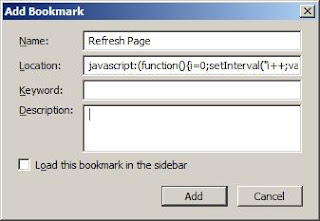
Have you ever felt hassled by a website that provides continuous updates (like cricket scores or live event updates) but requires you to reload the page manually? While Opera browser has an option to automatically reload a web page at pre-defined intervals , Internet Explorer, Firefox & Safari do not have any such feature by default. I found this code for a browser bookmarklet to automatically refresh any web-page in IE on StackOverlow - javascript:( function(){ i=0;setInterval("i++;var x=new ActiveXObject('Microsoft.XMLHTTP'); x.open('GET',location.href+'?'+i,true);x.setRequestHeader('Content-Type', 'application/x-www-form-urlencoded'); x.onreadystatechange=function(){if(x.readyState==4) {document.body.innerHTML=x.responseText;}}; x.send(null);",5000); }() ) I made the following minor change to it by replacing the use of Microsoft.XMLHTTP ActiveXObject with XMLHttpRequest object so that it works in all new browsers - j...

"Open With Google Docs Viewer" IE8 Accelerator

Image
Accelerators in IE8 work on text within a web page & let you access popular web services from the context menu. For instance, to translate a word you can highlight text from any webpage, and then click on the blue Accelerator icon that appears above your selection & choose the Translate with Live Search Accelerator. I recently built a "Open With Google Docs Viewer" IE8 Accelerator that lets you view a PDF, Powerpoint or TIFF document on the Web without downloading it to your local computer. Once installed (click on the button on this page), you can use this Accelerator to view any files of those formats within the browser with Google Docs Viewer. It is also helpful when you don't have the supporting application to open the file with. Once the file is opened within Google Docs Viewer, you can choose to download or print or edit it online in case it is a .PDF or .PPT file. It's easy to build Accelerators and you can find plenty of independently developed I...

Deleting cookies doesn't clear Hotmail's "Remember me" in IE8

Image
An anxious Hotmail/Passport user was bothered that in IE 8 his Accounts showed up even after deleting cookies. He posted this concern on the MSDN IE Web Development Forum . I verified this in IE 8 (on Windows XP SP2 & Vista) by clicking the Delete button in the Browsing History section in the General Tab of Internet Options. I believed this "Remember me" feature depended on cookies & should go away on deleting cookies. I even closed the browser & re-opened the browser after 10 minutes to see the user name still there. On deleting cookies in Chrome though, the user name does go away. I found that in the Hotmail/Windows Live Sign In page, only on clicking the X mark that you get on hovering near the user name (which represents "Don't remember this Windows Live Id") can you make the credentials go away. I checked with my Indian MVP colleagues what the reason could be for this intriguing behavior in IE 8. I got to know from Windows Client MVP Rames...

View Selection Source in IE

Image
One of the features I like in Firefox as a developer is the "View Selection Source" option that you can choose  from the context menu to view dynamically rendered source of a desired portion of the web page. This feature helps you focus on a specific portion of a web page that you want to investigate instead of getting the entire HTML source. IE 8's Developer Tools lets you view the HTML source for selected content as well but using it is cumbersome. After invoking Developer Tools (Tools > Developer Tools or F12 key) with the HTML tab open, you have to select an element in the DOM Explorer & then choose View > Source > Element Source with Style. That's about 5 steps compared to just a single step in Firefox. Patrick Clancey has shared a bookmarklet that will let you view the HTML source of a selected portion of a web page within an alert window, in just a single step. Follow these steps to install the bookmarklet in IE 8: Scroll down to the bottom o...

HOW TO test a web page in different versions of IE

Pete LePage, an Internet Explorer Product Manager discourages running multiple versions of IE on the same box (he calls them "Frankenbuilds") using tools like IETester . There several free alternatives for testing your web application in different versions of IE - Install the Virtual PC (VPC) images of IE .  For help on using a VPC image, check this  step by step guide .  Update : Modern.IE offers several options for IE browser compatibility testing including VMs of IE for OSX, Linux or Windows WebPageTest.org  is an online web performance analysis service that lets you test your web page on IE versions 7 and above. Use Expression Web SuperPreview for testing across multi-platform versions of popular browsers . Update :  Microsoft Expression products are being retired and there is no new development. Also see:  HOW TO easily verify your website design in different browsers/OSs