Posts

Showing posts with the label Performance

Some Approaches to Solving Problems

Image
P99 CONF 2023 technical conference took place in October. It had engineers from Netflix, Google, Meta, Twitter, TikTok, Uber + more share 50+ talks on topics like Rust, Go, Zig, distributed data systems, Kubernetes, edge, and AI/ML. The full library of P99 CONF tech talks and decks is now available . Notes from the talk " How to Improve Your Ability to Solve Complex Performance Problems " by  Kerry Osborne , Google Database Black Belt Team Lead.  The talk covers: Characteristics of Good Problem Solvers Basics of How Our Brains Work Some Approaches to Solving Problems What makes a good problem solver? Smart Hard Worker Technical Background It Takes Years to Acquire Learning How to Learn is an Important Part  Breaking Things (in Test) is a Great Way to Learn The Harder You Work the Faster You Progress Fundamentals are Important Diversified Background is Extremely Helpful Communication Skills - Doesn't matter if you're the smartest guy in the room if you can't convin...

This Week I Learned - Week #42 2022

Image
This Week I Learned -  *  Azure Container Apps (ACA) vs Azure Kubernetes Service (AKS) *  AWS Global Accelerator (AGA) relies on ELB to provide the traditional load balancing features such as support for internal and non-AWS endpoints, pre-warming, and Layer 7 routing. However, while ELB provides load balancing within one Region, AWS Global Accelerator provides traffic management across multiple Regions. AWS Global Accelerator is a network layer service that combines advanced networking features with the dedicated AWS Global Network to improve your application network performance by up to 60%. Global Accelerator enables you to scale your network up or down. * At the Ignite conference, Microsoft announced a new Kubernetes distribution branded AKS Lite targeting the IoT and edge workloads . AKS Lite shouldn't be mistaken as a lightweight version of AKS running in the cloud. It’s a platform built from the ground up to simplify the management of edge infrastructure...

Performance Tips for Azure App Services

Compiled from multiple online articles: * Configure your App Service to use HTTP/2 -  It brings features like header compression and binary formatting (which reduce payload sizes), request pipelineing and multiplexing. These features allow for more concurrent requests using fewer network sockets and help to avoid one slow request from blocking all subsequent requests , which is a frequent problem in HTTP 1.1. HTTP/2 might not benefit every application, so you will want to run performance tests and stress tests to document your improvements. * Turn Off the Application Request Routing Cookie - By default, Azure will make sure clients continue reaching the same app service instance during a session, because Azure can't guarantee your application isn't storing session state in server memory. To provide this behavior, the load balancer will inject a cookie into the first response to a client. This cookie is what Azure calls the Application Request Routing Cookie. If ...

This Week I Learned - Week #26 2019

Image
This Week I Learned - * The browser must download and parse CSS files before it can show the page, which makes CSS a render-blocking resource. Inlining extracted styles in the <head> of the HTML document eliminates the need to make an additional request to fetch these styles. The remainder of the CSS can be loaded asynchronously - web.dev * Azure Bastion is a new managed PaaS service that provides seamless RDP and SSH connectivity to your virtual machines over the Secure Sockets Layer (SSL). This is completed without any exposure of the public IPs on your virtual machines. Azure Bastion provisions directly in your Azure Virtual Network, providing bastion host or jump server as-a-service and integrated connectivity to all virtual machines in your virtual networking using RDP/SSH directly from and through your browser and the Azure portal experience. This can be executed with just two clicks and without the need to worry about managing network security policies. * Azure Sha...

AMPlify performance of mobile web pages

All about AMP, paraphrased from multiple sources - Google introduced the open-source project, Accelerated Mobile Pages, or AMP, in October 2015 AMP serves faster mobile web pages. Google said serving up articles from its own internet network was the best way it knew to achieve the AMP speeds, which are as much as four times faster than a regular mobile web page.  Google caches AMP pages and serving cached version from their search results. The AMP vision includes a web cache that would allow content providers (Google, Bing, Pinterest, LinkedIn etc) to serve the content much faster. The web cache is the core aspect of AMP project and the benefits of using AMP without cache are greatly reduced. Another benefit of AMP is the ability for publishers to syndicate articles across the mobile web without losing advertising or traffic. Publishers get full accounting of traffic, data and advertising revenue. Publishers also retain control of their content and design. Pages delive...

This Week I Learned - Week #166

This Week I Learned - *  When a web app goes down, you can visualize data points in a few seconds by using the appLens tool for the Web Apps feature of Azure App Service. *  A Continuous WebJob runs under the scm (kudu) site which, unless "Always On" is enabled, will not start when the site starts * If you have an application deployed to Azure App Service that's using PHP 5.4, you have to upgrade or use a custom runtime as support for PHP 5.4 ends in October 2016 *  India is home to 130 million of Truecaller's 200 million users .  Truecaller claims that two out of every three smartphones in India have the Truecaller app. The Truecaller service allows users to find out the owner of any phone number from its database, which is created by crowdsourcing contact details from users’ address books. So, even if you’ve never used the service, your name and number could be on Truecaller’s database, if at least one of your contacts has shared it. The app has an int...

HOW TO overcome disadvantages of Responsive Web Design

Image
Responsive Web Design (RWD) means having a single website that “responds” to the current device, and changes its design accordingly. Responsive Web Design is a good alternative to creating mdot websites as it can cater better to users accessing web pages through a variety of devices. Talking of devices, it is reported that Facebook is accessed by  more than 7,000 device types every day (a figure that is two years old and likely even bigger today) The free O'Reilly ebook Responsive and Fast by Akamai CTO, Web performance researcher and evangelist Guy Podjarny reveals that websites implementing Responsive Web Design can suffer from serious performance problems. This is mainly because irrespective of the screen size of the device, the same web page resource elements are downloaded even for the small screen. As examples he points out that the websites of Boston Global and Smashing Magazine (which have implemented RWD) hide some elements for the mobile view and still download r...

Striking a balance among non-functional requirements

Building a website requires striking a balance between non-functional but essential features like performance and security. The article  When Design Best Practices Become Performance Worst Practices  lists 3 design best practices which are performance worst practices, solutions to fix them and some interesting performance facts: Images comprise more than half of a typical page’s total payload, and much of this bulk is unnecessary. Image compression is a basic performance technique that allows developers to reduce this payload Progressive image rendering improves perceived load time because the user receives visual feedback earlier than with a baseline JPEG. According to Google, pages should ideally render content  above the fold  in one second or less, even for smartphones. According to the article, the consensus in the performance community is that if you’re serving your primary content in three seconds or less, you’re doing okay, if not great. Among the top 1...

HOW TO serve static content from a cookieless domain

Serving static content from a cookieless domain is a performance best practice.  Static content, such as images, JS and CSS files, don't need to be accompanied by cookies, as there is no user interaction with these resources. To reserve a cookieless domain for serving static content, register a new domain name and configure your DNS database with a CNAME record that points the new domain to your existing domain A record. Configure your web server to serve static resources from the new domain, and do not allow any cookies to be set anywhere on this domain. In your web pages, reference the domain name in the URLs for the static resources.  Though it may be better idea to host static content on totally separate domain name, you can use a sub-domain for static files if you are certain that you will never have a cookie set for *.domain.com .  You'll need to ensure applications like Google Analytics and WordPress (or any other third-party service providers) don't set cook...

Book Review: High Performance Browser Networking by Ilya Grigorik; O'Reilly

As a web developer with a keen interest in (desktop & mobile) browsers and web performance, I enjoyed reading this book High Performance Browser Networking by networking guru, Ilya Grigorik and picked numerous practical tips that I can put to work. I had several "aha!" moments while reading it. I first heard about the draft version of this book on Twitter and browsed through many of the chapters. Not surprisingly, I read high recommendations for the book from Web Performance guru Steve Souders and the creator of Fiddler, Eric Lawrence - folks passionate about the Web and browsers, whom I follow on Twitter. I grabbed the Kindle version of the book when I noticed it in the list of available books offered by the O'Reilly Blogger Review Program. This book explains in plain-English, the hows and whys of networking topics related to browsers. The author doesn't just have a deep knowledge of browsers he is also good at presenting it in an engaging manner with rea...

What do the colors within the horizontal bars in Web Performance HTTP Waterfall Charts indicate?

Image
A HTTP Waterfall chart can provide a quick visualization of what is wrong with a slow loading website. Chapter 3 of Stoyan Stefanov's Book of Speed has a nice explanation of what the colors in the a bar of Waterfall view (of twitter.com) generated by WebPageTest, mean: Dark green represents the time taken to perform a DNS lookup. DNS (Domain Name Service) lookup is the process of matching the friendly domain name twitter.com to an IP address (such as 128.242.240.20), which the browser needs in order to know how to get in touch with the server.  Think of the DNS lookup as being like a phone book: your browser knows the name (twitter.com) but needs the number (the IP address). You can see on the waterfall chart on Figure 3.2. that a separate DNS lookup needs to be done for every domain (twitter.com, a1.twimg.com, a3.twimg.com, s.twimg.com) because sub-domains may live on a different server with a different IP address.  Orange is the time to establish a con...

HTML5 Performance Tips & Tricks

Jatinder Mann's presentation at the Build 2012 conference " 50 performance tricks to make your HTML5 apps and sites faster " has some interesting facts & 50 tips on improving performance - * 3 dimensions to improve web performance - - Network - CPU - GPU * AJAX performance does not wholly depend on JavaScript performance * Where does the CPU time go? Networking HTML CSS Collections JavaScript Marshalling DOM Formatting Block building Layout Rendering Most of the 50 tips are well covered in Souders ' book  High Performance Web Sites and the YSlow documentation . Listed here are some among the 50 that apply to HTML 5 & modern web development - * Avoid 3xx Redirection - 63% of top 1000 websites worldwide contain a 3xx level redirect. A redirection can cause a delay of upto 250 ms or 10% of the typical page load time. * Persist App resources locally in Package * Cache dynamic resources in App Cache (...

Iframe facts

Key takeaways from Chapter 13: Using Iframes Sparingly of " Even Faster Websites ", a guide for performance vigilantes - Relative URLs inside the iframe are resolved relative to the iframe’s base URI, not the parent’s. JavaScript included in the iframe has limited access to the parent.  An iframe from a different domain can’t access the parent’s cookies. Iframes are one to two orders of magnitude more expensive to create than other types of DOM elements. An alternative way to insert ads with better performance would be for the main page to create a DIV to hold the contents of the ad.  We want the onload event to fire as quickly as possible. Iframes block Onload. A workaround to blocking behavior in Safari and Chrome is to set the iframe’s URL dynamically with JavaScript instead of setting it with the HTML SRC attribute. Resources in an iframe are downloaded in parallel with resources in the main page.  Using an iframe does not increase the number of parallel down...

Free, online, open-source book on web performance - Book of Speed

Stoyan Stefanov, a web performance expert, Facebook engineer, ex-Yahoo, smush.it creator & YSlow 2.0 architect, has released the draft of Book of Speed  for free & public access. Currently 5 of the planned 9 chapters are online. In his blog post announcing the release , he also mentions another free, online JavaScript resource by Marijn Haverbeke - Eloquent JavaScript . 

WebPageTest Tips & Tricks

Image
WebPageTest is a powerful online web performance testing & analysis tool that has been adding a lot of interesting new features .  Their list of test locations to check a page from is growing (currently 17) & now includes Delhi, India. It makes it easy to do "what-if" testing on production pages by showing what performance gains can be achieved by removing ads, widgets, JavaScript. It looks simple on the surface but once you start poking around Advanced Settings & see its analytical review of web pages you test, you'll wonder how it's even free. I highly recommend this tool to web developers who want to improve performance of the web pages they build. If you never tried this tool or gone through it superficially, check Patrick Meenan's  video to get started and learn directly from the creator of the tool.

Web Performance Testing - Interpreting a Waterfall Chart

Image
Some native browser Developer tools  & external   web performance analysis tools   visualize data that is generated by the series of actions that occur between a user and the server from the time a request is made till it is completely delivered, through HTTP Waterfall charts Joshua Bixby's Waterfalls 101 article explains in plain-English the parts of the Waterfall chart & how to analyze it.

Add DOM Monster to your collection of Web Perf Analysis & Optimization tools

Image
If you like web page performance analysis & optimization tools like YSlow, you will love DOM Monster (thanks @souders) "DOM Monster is a cross-platform, cross-browser bookmarklet that will analyze the DOM & other features of the page you're on, and give you its bill of health." The good thing about this tool is that you wouldn't have to update it when a new version comes out as it is in the form of a bookmarklet . DOM Monster suggestions for a ASP.NET Forums page (click to enlarge)

HOW TO monitor performance and availability status of public APIs & websites

If you use Public APIs (like Bing Search, Google Maps APIs) in your applications, it helps to be aware of performance and availability issues that those services may face. Thankfully, there are some free tools that monitor popular APIs & websites - Api-status.com  tracks 40+ Public APIs every five minutes from one of its 49 global monitoring stations. Social Down Or Not tracks uptime and performance status of social networks Neustar Webmetics Lab project Crowdsourced Monitoring tracks the health of popular services by monitoring Twitter for mentions of downtime or performance problems.  (broken) Google Apps Status Dashboard shows performance information of its consumer services as well as services for organizations using Google Apps. Facebook has a Platform Live Status page that shows current status & reports issues that arise. Amazon Web Services Service Health Dashboard shows up-to-the-minute information on service availability & also...

jQuery on CDN - Usage Stats

Image
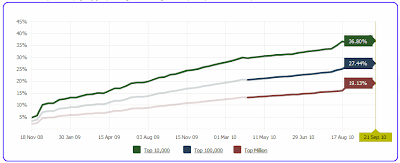
Dave Ward has done an informal study on the top 200,000 sites identified by Alexa to find which of those sites use a public jQuery CDN. His findings : 47 of the Alexa top 1,000 include a Google CDN reference. 99 of the Alexa top 2,000 reference jQuery on the Google CDN. 6,953 of the top 200,000 sites include a script reference to some version of jQuery hosted on Google’s CDN. 989 of the Alexa top 200,000 sites reference jQuery UI on the Google CDN. Dave recommends keeping your site’s CDN reference updated to the latest compatible version of jQuery for more performance gains. This is because popular sites generally upgrade to the latest stable version & sites must reference exactly the same CDN URL in order to obtain the cross-site caching benefit . Google CDN hosts: jQuery (versions 1.2.3, 1.2.6, 1.3.0, 1.3.1, 1.3.2, 1.4.0, 1.4.1) jQuery UI (versions 1.5.2, 1.5.3, 1.6.0, 1.7.0, 1.7.1, 1.7.2, 1.7.3, 1.8.0, 1.8.1, 1.8.2, 1.8.4)  File to reference looks like ...

HOW TO make your website mobile-friendly

Gartner research predicts that by 2013, mobile phones will overtake PCs as the most common Web access device worldwide . Bruce Lawson offers 3 strategies in a Dev Opera article to "mobilise" a web site to work across all devices i.e. not just mobiles but also alternative browsing devices like games consoles (Nintendo Wii, DSi), web-enabled TVs, in-car browsers etc - Strategy #1: Code well and do nothing special for mobile - The current crop of advanced mobile browsers are very good at rearranging content without being told how to by a developer...Making a good semi-liquid layout that has a min-width and max-width set in your CSS and em-based typography will work very well across a range of different devices and screen sizes. Strategy #2: Make a separate mobile site - .. (although) it results in having two sites to user-test, maintain, etc Strategy #3: Build mobile-aware adaptive sites - hardest to pull-off methodology... (but) future-proof as it tests features rather ...