Posts

Showing posts with the label Tips

Handy Trick To Check Times Across Time Zones

I recently got a webinar reminder with a pretty neat link to check the timing in my local timezone: 👉 https://time.is/compare/1100_13_Jun_2025_in_Los_Angeles This link shows what 11:00 AM on June 13, 2025 in Los Angeles translates to in your own time zone - automatically! The best part? You can easily tweak the link: Change the time ( 1100 ) Update the date ( 13_Jun_2025 ) Swap out the city ( Los_Angeles ) For example, to check 8:30 PM on July 5 in Seattle, you’d use: 🔗 https://time.is/compare/2030_5_Jul_2025_in_Seattle It’s a simple tool, but super helpful for global meetings, webinars, or virtual events. Bookmark it - you’ll thank yourself later. Fun fact - United States (incl. dependent territories) has 11 time zones!

AI Assistant Use Cases - Mnemonic Generation

Image
A mnemonic is a word or phrase that helps you remember something by using the first letters of each item. For example, Indian students are taught the mnemonic “VIBGYOR” to help them remember the colors of the rainbow. I asked Bing Copilot for a mnemonic with the letters A, I, I, T, F, B, and D to remember something I was reading. It came up with these: All Indians Invest Time For Better Development: A sentence that encourages Indians to work hard and improve their skills. Anna Is In Trouble For Breaking Dishes: A sentence that tells a story about a girl named Anna who broke some dishes and got into trouble. Apple Ice-cream Is Too Freezing But Delicious: A sentence that describes the taste of apple ice-cream. Always Include Interesting Topics For Blog Design: A sentence that gives advice for creating a good blog. The responses were quick and impressive!

HOW TO tackle Phone Addiction

Image
Dan Go, a High Performance Coach to entrepreneurs points that an average person spends 4-5 hours a day on their phone . If they did this from the ages of 20 to 80 they would have spent a total of 10+ years of their lives on a screen. It's not the phones themselves that cause addiction. Addiction largely comes from the apps themselves. They are designed to capture your attention by altering some serious chemistry in your brain. He has the following suggestions to tackle phone addiction: Cultivate awareness by tracking screentime. Most smartphones come with a built-in feature that is usually called "Screen Time", "Digital Wellbeing" or a similar variation. Typical view on Vivo phones Typical view on Samsung phones Typical view on iPhone Remove triggers. Only keep essential apps on your phone. Make your phone ugly. Set your phone to greyscale/black & white. Change the environment. The best way to reduce phone time is to remove it from your environment entirely....

Mike Tholfsen's Micro Tips on Excel

Image
Mike Tholfsen often shares nifty Excel tips through short Tiktok videos (<1m) .  These are inaccessible in India as the domain is blocked but you can view them on Twitter where he posts the same videos. Here's a compilation of his tips that I found useful - Extract first names from a list using the LEFT() function S equence () function for calendar dates Sequence() to automate a big list of numbers   SUMIF() formula VLOOKUP Extract names out of a list of email addresses with a single shortcut -Ctrl T, Flash fill Bulk-delete blank rows in Excel in 11 seconds Excel Geography data type - Data > Data Types | Geography   Auto-size rows and columns quickly in Excel using keyboard shortcuts - Ctrl+A, Alt H+O+A, Alt H+O+I AutoSum rows or columns - Alt+= Quick Analysis tool to gain insights - Ctrl+Q Pivot Table

How to Build Resilience in Midlife

Paraphrased from the NY Times article How to Build Resilience in Midlife Practice Optimism - thinking positive thoughts and surrounding yourself with positive people really does help Rewrite Your Story -Observe what you are saying to yourself and question it. Reframe struggles as a growth opportunity Don’t Personalize It - even if you made a mistake, a number of factors most likely contributed to the problem and shift your focus to the next steps you should take. Telling yourself that a situation is not personal, pervasive or permanent can be extremely useful Remember Your Comebacks - reminding yourself of the challenges you personally have overcome. setbacks are part of the journey and not a career-ending failure Support Others - besides having a strong support networks of friends and family to help in coping with a crisis, you can get an even bigger resilience boost by giving support. Cultivate higher levels of gratitude, altruism and a sense of purpose to push you through al...

This Week I Learned - Week #151

This Week I Learned - *  The Cloud OS is Microsoft's hybrid cloud solution comprised of Windows Server, Windows Azure, System Center, Windows Intune, and SQL Server - Building Clouds with Windows Azure Pack [ PDF Sampler, Chapter 1 ] *  "Widgets do track you, as well as sometimes pump advertising: disqus is a good example, they provide comments, but do put advertising content above the comment block. Another example is Facebook. The Facebook like button that's embedded on every site allow Facebook to know what stuff you like: for example, lets say you go on tmz.com for some celebrity stuff, Facebook will then derive that you like celebrity rumors, and so on." *  Tips for Extending Smartphone Battery Life : 1. Use auto-brightness for the screen 2. Block power-sucking ads 3. Tweak your email settings - most phones can be configured to instead check for (or “fetch”) emails on a schedule — say, every 30 minutes — or only when you manually tell your email app to...

Tatkal Train Ticket Reservation Tips

Tatkal train ticket reservation is a ray of hope for millions of Indians who prefer to commute by trains over other forms of travel even if they have to pay extra because the original reserved ticket quota has run out. The IRCTC website is possibly the best known site in India as it helps travellers avoid the long queues at the train reservation centers. It is also probably the most hated site as getting the more premium Tatkal ticket is a harrowing experience. ---   Update (13-Mar-2012): In an Economic Times  interview , the Head of  IRCTC, Rakesh Kumar Tandon informs that of the 8 lakh people who log on simultaneously between 8 am 8.10am, only 50,000 manage to get tickets! He attributes one customer-centric reason for the delay in completion of the Tatkal transaction to berth preference. It takes time for the system to find a particular berth. Going by this hint, a Lower berth is probably most preferred while going by experience, Side Upper is least prefe...

Notes from Pluralsight course "Introduction to Visual Studio 2010 - Part 2"

Image
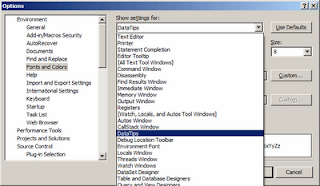
Introduction to Visual Studio 2010 - Part 2  importantly covers IntelliTrace & Extensions. Some interesting facts about VS from the video course - You can debug a release build. Release folder can contain .pdb. PDB – Program Debug Database Deploy Release version of build. Depending on the third party libraries you are using, their licensing terms  may not allow you to deploy the Debug version. Build > Clean Solution throws away all the products of a prior Build. This will mean that the next build will be full build. Rather than doing a Clean Solution & then Build Solution, you can directly do a Rebuild Solution Look at Locals window after a breakpoint is hit for variable values. Use Watch window for specific variables DataTip dimensions can be modified   Ctrl + Datatip – for a transparent background, useful when you want to see code behind a datatip Pin a DataTip to see variable value change dynamically inside it.It can be dragged, unpinned or closed. ...

Things I learnt from the Pluralsight course "Introduction to Visual Studio 2010"

Image
Visual Studio is a complex IDE that mostly looks simple on the surface but has a number of invisible features. In the Pluralsight video training course  Introduction to Visual Studio 2010  (duration: 4h 37m), Kate Gregory does a walk-through of the useful features of Visual Studio 2010. Many of the tips also apply to VS 2008. My notes - You can export & import Visual Studio settings . A whole team can identify best practices & share the same settings.  .NET tab in Add Reference lists assemblies stored in the Global Assembly Cache. There are 50 VS toolbars! They show up in context.  To learn the names of toolbars, right click on a toolbar & the currently opened toolbars are shown in the context menu with a checkbox next to it. Check additional ones that you require to make them show up. The last option of this context menu is Customize. This can be used to add new commands to a specific toolbar. This is one way to control what comma...

Some lesser known Google tricks

Image
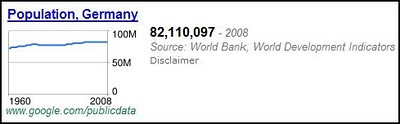
Crowdsourced answers to questions on "Hidden features of  product/service X" on the StackOverflow family of sites, make for interesting reading. I picked a few tips & trivia I didn't know earlier, from a similar thread on Google Search - 1. The calculator feature in Google understands not just numbers but also words. This query would still return the correct answer - (five plus seven) divided by six 2. Searching for "population germany" will display a chart as the first result - (Note though that Wolfram Alpha can do more complex mathematical calculations & give more detailed answers for search terms like population germany . ) 3. The results for define:camouflage are different from en:en camouflage . The latter returns a dictionary-style definition of camouflage 4. Searching for anagram gives an interesting "did you mean?" suggestion, and a query for ASCII Art also has an unexpected effect. 5. Another poster informs that ...

Resize an Image & Email with just 2 steps

Image
Got to know from Vinod Unny's tweet that you can select some pics in Explorer and click the "Email" button to auto-resize to emailable format in Windows7. This feature works in Windows XP & Vista too! Right click a large image that you want to email. Choose Send To > Mail Recipient - As soon as you do that, Windows XP provides an option to let you resize it - The dialog box is a little different in Vista - That's it! Also see: Crop Images online Free tools to generate screenshots

Digital Photography Tips & Tricks

Image
It's difficult not to get fascinated by a digital camera once you lay hands on it. It's also not easy not be intrigued by all the features and settings of the camera. The convenience of not having to buy film rolls & wait for them to be developed in order to view your photos as in older times means you can experiment a lot with your digicam . With digital cameras getting more sophisticated and their prices coming down (at least the point and shoot variety), photography is turning out to be an inexpensive hobby for many. I have been compiling articles on Photography by experts. These are some of the links I have so far: Tips for Using a Point & Shoot Camera Top 3 digital shooting mistakes—and how to prevent them Take better pictures of the great outdoors: 6 tips How To Conceptualize Your "people" Pictures 21 Settings, Techniques and Rules All New Camera Owners Should Know National Geographic Photo Tips Digital Photography All-In-One For Dummies Cheat S...