Posts

Showing posts with the label VNet

Azure Virtual Network - Highlights

Image
Azure resources communicate privately, directly, and securely with each other over virtual networks. VNet is scoped to a subscription . You can implement multiple virtual networks within each Azure subscription and Azure region. VNet is scoped to a single region/location ; however, multiple virtual networks from different regions can be connected together using Virtual Network Peering. from Learn Azure in a Month of Lunches Your subnets should not cover the entire address space of the VNet. Plan ahead and reserve some address space for the future. If you create the smallest available subnet of /29 (with eight IP addresses), Azure will retain five addresses It is recommended you have fewer large VNets rather than multiple small VNets. This will prevent management overhead. Each virtual network is isolated from other virtual networks within each Azure subscription. Vnet does NOT span Regions, it can span availability zones. You can connect one VNet to another VNet using either Virtua...

Azure in Pictures: Windows VMs for an application with N-tier architecture

Image
Architecture diagram source:  Running Windows VMs for an N-tier architecture on Azure Elements of the architecture diagram: - Availability sets. Create an availability set for each tier, and provision at least two VMs in each tier. This is required to reach the availability SLA for VMs. - Subnets. Create a separate subnet for each tier. Specify the address range and subnet mask using CIDR notation. - Load balancers. Use an Internet-facing load balancer to distribute incoming Internet traffic to the web tier, and an internal load balancer to distribute network traffic from the web tier to the business tier. - Jumpbox. Also called a bastion host. A secure VM on the network that administrators use to connect to the other VMs. The jumpbox has an NSG that allows remote traffic only from public IP addresses on a safe list. The NSG should permit remote desktop (RDP) traffic. - NSGs. Use network security groups (NSGs) to restrict network traffic within the VNet. For example,...

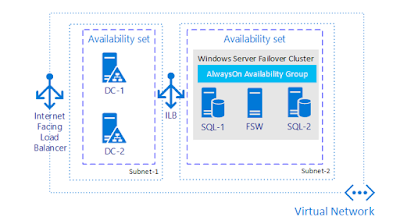
Azure In Pictures: SQL Server Always On Availability Group

Image
The figure below is a graphical representation of SQL Server availability group solution   in Azure  for HADR   consisting of the following elements: A virtual network containing multiple subnets, including a front-end and a back-end subnet Two domain controller with an Active Directory (AD) domain Two SQL Server VMs deployed to the back-end subnet and joined to the AD domain A 3-node WSFC cluster with the Node Majority quorum model An availability group with two synchronous-commit replicas of an availability database You can reduce the number of virtual machines by using a domain controller as the quorum file share witness. This would reduce the number of VMs for a two-replica availability group Related: -  Creating SQL Server 2014 Always On Availability Group in an existing Azure VNET and Active Directory instance -  SQL Server AlwaysOn Availability Groups Listener configuration with Azure External Load Balancer