Posts

Showing posts with the label WebApps

GeoIndia - Landforms Explorer

Image
I co-created a web app with Claude to show 67 geography terms with a plain-English description and a named real-world example (Delta → Sundarbans, Canyon → Gandikota Canyon, Isthmus → Adam's Bridge...) on a clickable map of India.  Try it out here  & tweak the source code to your liking if you find it useful. Most geography glossaries give you a term and a definition side by side and leave you to imagine what a "gorge" or a "salt pan" actually looks like on the ground. This sample pairs every term with a real, well-known Indian example, and lets you jump straight from the word to the place on a map It's best viewed on a desktop browser as the two-pane layout is more comfortable to browse.

Building a Hyderabad Weather Dashboard with the WeatherUnion API

Image
Claude recently helped a techie find his misplaced iPhone although the Find My iPhone feature was disabled by his organization's Mobile Device Management (MDM) policy.  Claude generated a Bluetooth RSSI meter in about one minute & by tracking the phone's Bluetooth signal strength he was able to locate the phone. Commenting on AI's growing role in enabling instant, bespoke software creation for immediate practical needs without traditional development, he  tweeted : " Apparently, you can just create the tool you need now. " That line stuck with me. As a weather enthusiast, I wanted a simple web app to see how the weather differs between localities in my Hyderabad neighbourhood, side by side, before deciding whether to step out. So I built it with the help of Claude & the WeatherUnion API . The visual template came from an unlikely place — ICFOSS's IoT-based Micro Climate Monitoring System for Kerala . It's a public dashboard tracking humidity, tempe...

Online Code Editors for Web Apps with AI Assistance

Image
In 2026, the landscape for online IDEs has shifted toward "AI-native" environments. Most platforms now offer a free tier that includes a chat assistant, though they usually limit the number of "high-reasoning" (GPT-4 or Claude 3.5/4 level) queries you can make per month. Check out this list of online code editors for web apps that feature built-in AI chat, perfect for getting started at no cost: 1. Firebase Studio is Google's modern browser-based IDE with Gemini AI chat/assistance built-in for code generation, debugging, explanations, refactoring, and even agent-driven workflows. Excellent for web apps, supports frameworks like React, Next.js, etc., live previews, and easy deployment. It has built-in Gemini chat and code completion. Because Firebase Studio was designed "for the AI era," it excels at adding Gemini-powered features (chat interfaces, content generation, personalization, etc.) into web apps. You can prototype AI flows (model inference, ag...

This Week I Learned - Week 35 2025

Image
This Week I Learned -  * "Vibe coding" is about fully giving in to the creative flow with an AI (high-level prompting), essentially forgetting the code exists. It involves accepting AI suggestions without deep review and focusing on rapid, iterative experimentation, making it ideal for prototypes, MVPs, learning, and what Karpathy calls "throwaway weekend projects." This approach is a powerful way for developers to build intuition and for beginners to flatten the steep learning curve of programming. It prioritizes speed and exploration over the correctness and maintainability required for professional applications. With "AI-assisted engineering," AI acts as a powerful collaborator, not a replacement for engineering principles. In this model, developers use AI as a "force multiplier" to handle tasks like generating boilerplate code or writing initial test cases, but always within a structured framework.  Crucially, the big difference here is the h...

What’s In a Name: A Simple Web App Using Perplexity’s Sonar API

Image
Whats In A Name is a simple Flask app that uses the Sonar API from Perplexity.ai to fetch interesting, cultural, and historical facts about names. Enter a name, get a fun fact. That’s it! If you're getting started with Perplexity’s Sonar API, this is a very basic example you can try by just placing your own Perplexity Sonar API key at the point specified in the code shared on GitHub . Based on the scenario, you can use any of the following Sonar models: sonar (lightweight search)  sonar-pro (advanced search) sonar-deep-research (exhaustive research) sonar-reasoning (fast reasoning) sonar-reasoning-pro (premier reasoning) You can deploy Flask apps on the web using one of the many options like Anaconda's  PythonAnywhere . With a limited Beginner account, you can host one web app at your-username.pythonanywhere.com with restricted outbound Internet access from your apps at low CPU/bandwidth. 

BingeBuddy

Image
Stop wondering "Where can I watch this?" The BingeBuddy web app instantly shows you which streaming platform has your favorite movies & shows. You can also dive into a celebrity's filmography and the cast & crew details of movies. It's IMDb-lite. I co-created this web app with assistance from the Claude Sonnet 4 model in GitHub Copilot.   Check the code in my GitHub Web Apps repo . It's all in a HTML page powered by The Movie Database (TMDB) REST API and vanilla JavaScript - no libraries! Just get your own TMDB API key, replace it in the code and you can have your own local or hosted version. Your feedback is always appreciated.

Bookmarker Bookmarklet v2

Image
Remember the days of Google Bookmarks? A handy little service that let you keep all your interesting web finds in one place. Well, that service has sailed off into the digital sunset. I built an alternative for myself that saves my Bookmarks to a spreadsheet in Google Sheets using Google App Script - the Bookmarker bookmarklet . It works by using a bookmarklet - a browser bookmark that runs a bit of JavaScript code when you click it. This code grabs the page's URL and title and adds it as a new row in your own copy of Google Sheets.  This provides a centralized and flexible way to keep track of interesting articles and websites, offering the ability to add your own notes in the corresponding columns. The motivation behind this was to have all bookmarks in one location, accessible from any device, rather than being tied to a specific browser. I enhanced the original code by prompting Gemini Flash within GitHub Copilot Chat to generate code to categorize a bookmarked URL. To mak...

PhonaTick - A Word List for Confusing Pronunciations

Image
The English language is full of surprises, especially when it comes to pronunciation. With more than 19 vowel sounds represented by just five vowels (plus sometimes “y”), English can be a challenge—especially for non-native speakers. Many words contain silent or extra letters that make pronunciation tricky. If your native language follows phonetic spelling (where words are pronounced as they are written), you might instinctively apply the same logic to English. This can lead to unexpected mistakes—like pronouncing the “t” in ballet or being puzzled by why colonel is pronounced ker-nil . To help with this, I started compiling a list of such tricky words in a Google Spreadsheet. Then, I learned that Google Sheets can function as a read-only database , so I built a simple web app using the Google Sheets API and JavaScript to display the list online.  Check it out ! The pronunciations are from Google & WordWeb (created by a physicist, Antony Lewis).  Switching to Datasett...

Datasette: The Open-Source Tool for Data Exploration and Publication

Image
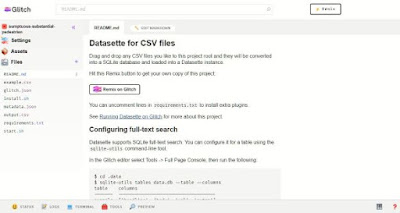
Can you imagine sharing a CSV file as URL and letting the recipients view the data through just their browser? Guess what, you can do that & more with  Datasette . Click on this link to see a table showing shelf life of some perishable food items Datasette is a tool created by Simon Willison for exploring and publishing data .  It's a web application that provides a  user interface (UI) for browsing, viewing,  faceting, filtering,  sharing and exploring data .  Datasette allows you to convert CSV files into a database table . Datasette runs on top of SQLite , which is a fast, widely used database where each database is a single file that's easy to copy and back up. Datasette is designed for read-only data, meaning you can't make changes to the data through the Datasette interface. You can run your own SQL queries against the data, which is usually risky for web applications but safe in Datasette because it uses a read-only database. Datasette's JSO...

Things Near Me – Find & Learn About Landmarks Nearby

Image
Back in 2012, I was planning to build a location-aware app that would tell me about interesting sights & news-worthy facts about places that fall in the way of a train journey. I discovered that Web Dev guru Chris Heilmann ( @codepo8 ) had built a nifty app on a similar theme and shared the JavaScript code under the BSD license.  Things Around You used the browser's geolocation feature to find Wikipedia articles on nearby landmarks via the GeoNames API & list them with a brief description. For a Windows 8 app hackathon, I utilized the Geolocation detection idea to build a little app that I called GeoBuzz & posted it on the Windows 8 App Store. It's been on the back of my mind to extend it with more features. Now that GitHub Copilot is here, there was no need to procrastinate. I had a friendly chat with GitHub Copilot ( Gemini Flash model ). In under an hour, I customized @codepo8's original sample to include a map directly on the web page instead of linking t...

This Week I Learned - Week #51 2024

Image
This Week I Learned -   * Addy Osmani open-source   web app lets you upload your image and let AI remove the background instantly. It uses Transformers.js which has enabled a whole class of client-side AI apps to come to the web. This is free for unlimited use (Canva is free for first-time) and does all processing locally and privately (nothing is uploaded to anyone’s servers). All of the processing happens client side. This means outside of just the bandwidth to serve the page itself there’s no cost to the person hosting it. * AI assistance in Chrome DevTools is now available with Chrome 131 * Instagram recently moved from Python 2 to Python 3. Dropbox also recently upgraded fully to Python 3 * OpenAI whistleblower Suchir Balaji's article on how generative AI products violate copyrighted material. * AI Tier will replace backends - Satya Nadella *  Azure AI Agent Service is a fully managed service designed to empower developers to securely build, deploy, and...

This Week I Learned - Week #45 2023

Image
This Week I Learned -  * The  user-select:none style can block a user from selecting text - body{-webkit-user-select:none;-moz-user-select:-moz-none;-ms-user-select:none;user-select:none} * Pangrams are sentences that have all 26 letters of the alphabet in them.  Codepo8 has written a Pangram Checker to write pangrams and check them while typing.  * ScyllaDB is a NoSQL data store compatible with Apache Cassandra that runs on top of Seastar. Discord migrated trillions of messages from Cassandra to ScyllaDB. The book Database Performance at Scale written by engineers at Scylla, covers strategies for achieving low latencies at high throughput. Scylla is the new name of the Israeli startup Cloudius Systems that is behind ScyllaDB. *  GitHub Skills is a collection of interactive courses on how to use GitHub designed for beginners and experts. *  Jupyter AI brings generative artificial intelligence to Jupyter notebooks, giving users the power to explain an...

HOW TO download files hosted in Azure Web App in bulk

Image
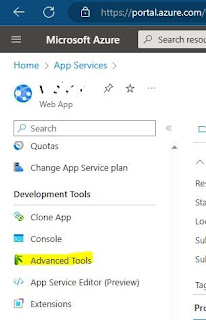
Here are the steps to download all the site files hosted in an Azure Web App service in bulk for local modifications or cloning to another hosting location - 1. Log in to the Azure portal 2. Navigate to your App Service 3. Go to the "Advanced Tools" section  4. Click on "Go" link to launch the Kudu console  5. In the Kudu console, navigate to the "Debug console" and then select "CMD" Once you are in the command prompt, navigate to the "Site" directory and then to the "wwwroot" directory. Your Web App should be located in a subdirectory of "wwwroot" 6. Click on the Download icon on the left of the label "wwwroot" to download all the files in the Web App as a zipped file. Alternatively, if your web app URL is https:// <yourappname> .azurewebsites.net/ insert the word scm after the subdomain name thus - https:// <yourappname> . scm .azurewebsites.net/ This will lead you directly to the Kudu con...

CAPTCHA

Image
CAPTCHA , an acronym for "Completely Automated Public Turing Test to Tell Computers and Humans Apart," refers to various authentication methods that validate users as humans, and not bots, by testing users with a challenge that is simple for humans but difficult for machines.  CAPTCHAs prevent scammers and spammers from using bots to fill out web forms for malicious purposes. The term CAPTCHA was coined in 2003 by a group of computer science researchers at Carnegie Mellon University led by Luis von Ahn and Manuel Blum. Launched by von Ahn in 2007, reCAPTCHA v1 had a dual aim: To make the text-based CAPTCHA challenge more difficult for bots to crack, and to improve the accuracy of optical character recognition (OCR) being used at the time to digitize printed texts.  In 2009, Google acquired reCAPTCHA and began using it to digitize texts for Google Books while offering it as a service to other organizations. According to Google , every time its CAPTCHAs are solved, tha...

Skribbl.io Tips

Image
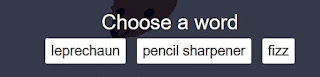
Skribbl.io is a multi-player competitive doodling & word guessing game with elements of Dumb Charades & Pictionary .  Each game consists of about 3 rounds. In every round someone has to draw their chosen word and others have to guess it to gain points.  When its your turn to draw, you have to choose a word (which can be a noun, verb or adjective) from three options and visualize that word in 80 seconds. Alternatively when somebody else is drawing you have to type your guess into the chat to gain points. The earlier you guess a word the more points you get. The person with the most points at the end of game will then be crowned as the winner . As a long time doodler, I like how the game is designed.  As the game requires you to visualize a word and draw on the spot, it is a great fun test of creativity. It has helped me to imagine better and also appreciate how other competitors think and draw. As a web developer, I admire how the minimalistic game is designed an...

HOW TO handle web request errors

Image
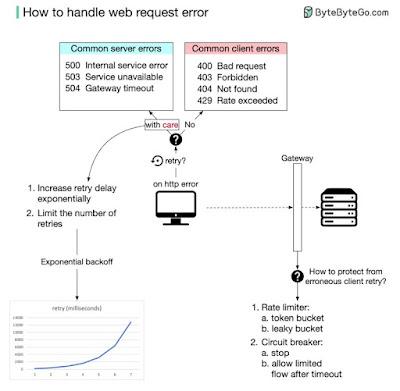
 I like illustrations that summarize a whole topic Paraphrased notes from a LinkedIn post of Alex Xu : Intermittent errors can be handled effectively with exponential backoff in the browser and with a flow control gateway on the server side.  Exponential backoff controls the latency between two retries.  A common way to control the flow of HTTP requests is to set up a flow control gateway in front of the server. This provides two useful tools: 1. Rate limiter, which limits how often a request can be made. It has two slightly different choices; the token bucket and the leaky bucket. 2. Circuit breaker. This will stop the HTTP flow immediately when the error threshold is exceeded. After a set amount of time, it will only let a limited amount of HTTP traffic through. If everything works well, it will slowly let all HTTP traffic through. More answers to web dev questions: How does the browser render a web page?

Azure Web Job vs Worker Role

As part of my learning, I keep looking out for info presented through tables & comparison charts as they  summarize lengthy topics &  are useful to review what I learn. I post them with the tag  ComparisonChart  to revisit occasionally. A comparison of the two ways Microsoft Azure provides to host background tasks : Worker Role Web Job Hosting Self-Hosted – Hosted on a dedicated virtual machine. Web App hosted – hosted within a Web App container. Coupling Decoupled from front-ends and middle tiers. Coupled with Web App which is possibly hosting a web front end or middle tier. Scalability Independently scalable. Scalable along with the Web App hosting it. Remote Access Supports remoting into the host VM. Does not support remoting. Deployment Complicated deployment. Simple deployment. Configurability High. Low. Triggers All triggers have to be programmatically introduced. Supports on-demand, scheduled and contin...

Comparison of App Service, Cloud Services, Virtual Machines, and Service Fabric

As part of my learning, I keep looking out for info presented through tables & comparison charts as they  summarize lengthy topics &  are useful to review what I learn. I post them with the tag  ComparisonChart  to revisit occasionally. The following table compares the capabilities of App Service, Cloud Services, Virtual Machines, and Service Fabric (follow the link for any updated info): Feature App Service (web apps) Cloud Services (web roles) Virtual Machines Service Fabric Notes Near-instant deployment X X Deploying an application or an application update to a Cloud Service, or creating a VM, takes several minutes at least; deploying an application to a web app takes seconds. Scale up to larger machines without redeploy X X Scale out to multiple instances without redeploy X X X X Virtual Machines can scale out to multiple instances, but the services running on them must be written to handle this scale-out. You have ...

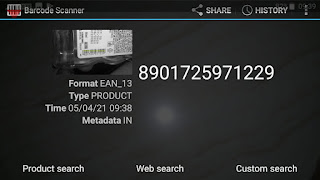
HOW TO scan a barcode with Android smartphone camera from a web page

Image
If you need a barcode to be scanned from a mobile web app & then get back the code as text from the scanner , the ZXing ("Zebra Crossing") open-source, multi-format 1D/2D barcode image processing library & ZXing Barcode Scanner  (630K+ downloads from Google Play Store in April 2021) can help. Note that this web page will only work when opened within an Android browser & smartphone with camera having ZXing Barcode Scanner installed

Gramener's Indian Elections web app - a cool data visualization

Image
Gramener's HTML5-based web app about the Indian Elections uses a bunch of JavaScript plugins and to pack a lot of data into an appealing visualization. It uses Bootstrap, jQuery, d3.js, jQuery.SerialScroll. The code shows a lot of concern for Apple devices. YSlow & PageSpeed give the app an A grade for its performance. According to a Gramener blog post , the entire Election Analytics Centre sits on a single server in Southeast Asia, hosted on Azure.  It’s a virtual machine provisioned with 4-cores and 7GB of RAM running Ubuntu 12.04 LTS, with nginx as the front-end proxy. All visualisations are rendered as SVG. Also see:  HOW TO highlight a Province within a Country with Google GeoChart