Posts

Showing posts with the label ARM

Review - Opsgility Lab: Implementing Azure Site Recovery – Azure to Azure

MSDN subscriptions are now called Visual Studio Subscriptions. One of the benefits you get with the annual  Visual Studio Subscriptions is access to the Opsgility Azure training website. With the free  Visual Studio Dev Essentials program, you get access for a shorter duration. I found their course catalog impressive. I especially found their Labs feature interesting and finished one today - Lab: Implementing Azure Site Recovery – Azure to Azure In this lab, you will configure Azure Site Recovery to protect a sample n-tier application by configuring replication from the source Azure region to a target Azure region. Once the initial replication has completed and the application is protected, you will perform a test fail over and validate application functionality. Finally, you will accomplish the cleanup of the test failover resources. A lab is no fun if it goes smoothly. I encountered the following error after I chose South India as the location for deploying the ...

This Week I Learned - Week #217

Image
This Week I Learned - *  Site Recovery provides a simple way to replicate Azure VMs between regions. Site Recovery replication for Azure virtual machines is currently in preview . * Treat servers as cattle, not as pets - An ARM template is a powerful modeling tool in support of a “no pets” policy, which is interesting to consider as your cloud environments grow more complex while also wanting to make environments easier to manage. Another benefit stems from keeping the ARM template itself as an “infrastructure as code” artifact that can be used to document – and, more to the point, as executable documentation – for stamping out environments predictably. And still another feature: the ARM runtime handles a lot of the complex parts that could come by trying to script one resource at a time via imperative PowerShell scripts – for example, error recovery and retries -  Bill Wilder, When NOT to use PowerShell with Azure * Google Alphabet generates 88% of its revenue...

Articles on Azure Portal

Azure originally provided only the classic deployment model or the Service Management model in which each resource existed independently; there was no way to group related resources together. To deploy a solution, you had to either create each resource individually through the Classic Portal or create a script that deployed all the resources in the correct order. In 2014, Azure introduced Resource Manager, which added the concept of a resource group. A resource group is a container for resources that share a common lifecycle. For Compute, Storage, and Networking resources, you have the option of using either Resource Manager or Classic deployment in the  Azure Portal  which was initially referred as Preview Portal. In December 2015, portal.azure.com (codename Ibiza), achieved general availability (GA) status and is the default portal for Azure. Microsoft guidance for new deployments is to make use of the Azure Resource Manager (ARM) model The Azure Portal is on...

Comparison of options for migrating Azure VMs from ASM (v1) to ARM (v2)

Image
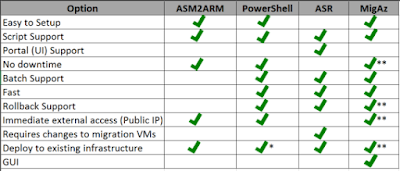
@christosmatskas has written a great article comparing  4 ways to migrate Azure VMs from ASM (v1) to ARM (v2) : ASM2ARM, a 3rd party PowerShell library - fully scripted, but slow and requires downtime Azure PowerShell - no downtime, very fast but supported scenarios are limited  Azure Site Recovery (ASR) - can be managed through UI, Azure Powershell but setup is complicated and takes time MigAz tool - powerful, open-source. Process is not a fully automated It comes with a nice comparison chart too - Also see: Azure Management Models: ASM vs ARM

Azure Management Models: ASM vs ARM

Image
Notes from articles around the web: * Azure Resource Manager and Azure Service Managment "Classic" deployment models are not completely compatible with each other.  * To simplify the deployment and management of resources, Microsoft recommends that you use Resource Manager for new resources, and, if possible, re-deploy existing resources through Resource Manager. *  The Resource Manager version of  Azure PowerShell  commands have the format Verb-AzureRmNoun whereas the Service Management version of  Azure PowerShell  commands have the format Verb-AzureNoun *  Resource Manager added the concept of the resource group. Every resource you create through Resource Manager exists within a resource group.  *  The Resource Manager deployment model provide several benefits: - Deploy, manage and monitor Azure resources as a group -  Deploy resources repeatedly -  Supports creating templates. Templates can be created to include a s...

AWS vs Azure Services

Update [2/Sep/2016]: Glad that Azure documentation has a comprehensive mapping of AWS-Azure terms AWS service Plain English definition Azure equivalent  Description Amazon Elastic Compute Cloud / EC2 Host the bits of things you think of as a computer A web service that enables you to launch and manage Linux/UNIX and Windows server instances in Amazon’s data centers. Virtual Machines (VMs) Provision Windows and Linux Virtual Machines and applications in minutes Identity and Access Management (IAM) Setup additional users, setup new AWS Keys and policies A web service that enables Amazon Web Services customers to manage users and user permissions within AWS. Azure Active Directory  Synchronize on-premises directories and enable single sign-on Amazon Simple Storage Service / S3 Store images and other assets for websites. Keep backups and share files between services. Host static websites. Also, many of the other AWS services write and read from S3. Sto...

This Week I Learned - Week #145

This Week I Learned - *  The Azure Desired State Configuration (DSC) Extension, which can be used to upload and apply a DSC configuration on an Azure VM, was introduced in August 2014. It is currently at Version 2.13 *  Building Azure VM with ARM templates consists of two rough steps: building a JSON template file and executing the New-AzureRmResourceGroupDeployment cmdlet, which then reads all of the logic inside of this JSON template file to feed the Azure API the parameters it needs to provision a VM...a simple Windows VM will require at least a 140 line template *  Installing Azure PowerShell via WebPi/MSI or Install-Module differs in several ways. One difference is that the WebPi/MSI method installs the PowerShell modules to C:\Program Files (x86)\Microsoft SDKs\Azure\PowerShell\, whereas Install-Module downloads them to C:\Program Files\WindowsPowerShell\Modules. *  Resource Manager APIs and PowerShell modules are incompletely (or simply not) documented...