Posts

Showing posts with the label Edge

HOW TO use the Read Aloud Feature in Microsoft Edge with custom content

Image
An Edge user reported on Microsoft Q&A that the Read Aloud feature is not working with PDFs and therefore came up with this workaround - Select all the text (Ctrl+A) and copy it (Ctrl+C) from the PDF. Open a new tab and paste (Ctrl+V) the text into an online editor, such as https://onlinenotepad.org/notepad  (uses Web Storage API to automatically save your notes). Use the "Read Aloud" feature in this new tab on the web page, since it usually works on regular web page text. The steps in the workaround could be used with any content that you can copy and paste!  Since Microsoft introduced this feature, content can be “Read Aloud” in various voices of your choice and can also be used with non-English content . The same Microsoft Q&A thread also reveals that the Read aloud feature in Microsoft Edge is implemented through the Microsoft Voice (Speech Recognition) component/extension.  If the Read aloud feature is not appearing for you, you can verify if the extens...

This Week I Learned - Week #21 2025

This Week I Learned -  * Hosting local AI models on the web, via existing solutions based on WebNN or WebGPU, may require domain-specific AI/ML expertise and lead to high model download costs for users and developers (since models aren’t shared across domains). Microsoft has introduced experimental web APIs in Microsoft Edge that make it possible for web developers to integrate AI into their web applications. The Prompt API and Writing Assistance APIs - now available as developer previews in Edge Canary and Dev channels - give you access to a powerful small language model, Phi-4-mini, that is built into the Edge browser . Whether you’re trying out prompt engineering, summarizing and modifying content, or generating text, these APIs are designed to help you bring AI to your web code with a few lines of JavaScript. * Devstral, an agentic LLM for software engineering tasks developed by Mistral AI and All Hands AI, is now available on Kaggle Models. Devstral is open-sourced under the ...

This Week I Learned - Week #34 2024

Image
This Week I Learned -   * DuckDB is a  fast in-process analytical database. Data stored in the DuckDB takes less memory than there file format equivalent (CSV, JSON, etc …) * Created in 2018,  DuckDB  supports various data formats and sources, offering a real analytics database with a SQL dialect. It simplifies and speeds up data analytics without the need for extensive infrastructure.  * The free Data Wrangler extension offers data viewing and cleaning directly in VS Code and the Jupyter extension. It provides a rich UI to view and analyze your data, show visualizations, automatically generate Pandas code. * Amazon hired most of the staff of agentic-AI specialist Adept AI in a move that echoes Microsoft’s absorption of Inflection. Google similarly has hired Character.AI’s co-founders and other employees and paid an undisclosed sum for nonexclusive rights to use Character.AI’s technology. * Character.AI builds chatbots that mimic personalities from his...

HOW TO Selectively Download Multiple Images from a Web Page at Once (Without Browser Extensions)

Image
Firefox offers a way to download multiple images at once through the Tools menu option. Steps to follow in Firefox desktop browser in Windows: Use the Ctrl + I keyboard shortcut directly to bring up the Page Info dialog box or  use Alt+T to invoke the Tools menu and the select Page Info .  In the "Page Info" window, switch to the "Media" tab. Select the images you want to download by holding the Ctrl key while clicking or click on the Select All button. Hit the "Save As" button to download all images at once into a folder of your choice. Chrome and Edge lack a similar GUI option, but images can potentially be downloaded using JavaScript in the Developer Tools Console tab.

Edge Copilot Sidebar can answer questions about your PDF document

Image
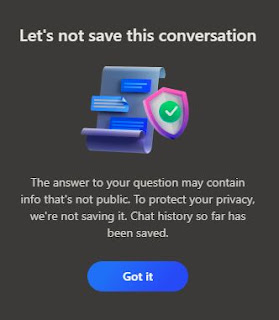
When a PDF is open, you can pose questions to the Copilot Sidebar in Edge browser regarding the document.  Questions you may ask include: • Summarizing the document or page • Generating five questions about the document • Identifying the author of the document • Determining the publication date of the document Copilot sends the content of the document to the model to generate a summary.  For a PDF document that I asked Copilot questions about, I got useful answers in most cases. Copilot notified me that it was not saving the conversation to protect privacy. In Edge there is no need to explicitly upload a PDF document, you just have to permit Copilot Sidebar to read the document that is already open. AI Assistants such as Cohere's Command, Perplexity, and Claude also have the  capacity to analyze the content of uploaded PDF documents & text files and answer any posed questions. There are however restrictions on the size of the files and content. Grounding Panel i...

This Week I Learned - Week #3 2024

Image
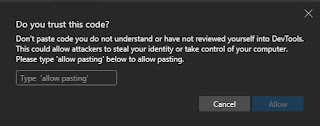
This Week I Learned -  *  CodePen is a popular online platform where developers can easily create and share HTML, CSS, and JavaScript code snippets, known as ' Pens .' It's a social space for front-end designers and developers, offering features like embedding pens on other websites, creating Collections to organize related pens, and utilizing a powerful in-browser IDE called Projects , which includes automatic preprocessing, drag-and-drop uploading, live previews, and website deployment. * As DevTools is popular with hackers who may deviously ask unsuspecting users to make changes pertaining to web pages within DevTools, the Edge browser now  shows this warning and asks for & verification - *  Surya  is a multilingual document OCR toolkit * Ozonetel, a Hyderabad-based telephony company, involved with the Swecha Movement, took this as a challenge and developed a 7 billion parameter Telugu small language model (SLM) called ‘AI Chandamama Kathalu’. The team a...

HOW TO change your default PDF Viewer to Edge

Image
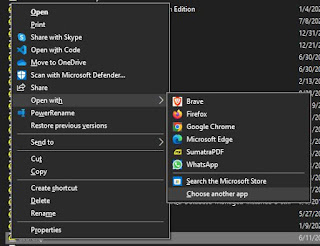
Browsers like Chrome, Edge & Firefox can open PDFs but I've made Edge my default PDF viewer as it comes with several advantages: It has useful annotation tools to add Text & Comments. You can also underline or draw and highlight text within a PDF.  Dictionary and Search are available through in-context menu  The Read Aloud feature lets you listen to PDF documents while multitasking. You have a range of natural sounding voices to choose from and the reading speed can be controlled through the " Voice options " menu from the toolbar at the top of the page. It's like having your own audiobook narrator. PDF browsing is secure from any attacks that plan to use compromised PDFs as an attack surface. Navigation features like Table of Contents & Page view make it easy to jump to different parts of long PDF files like ebooks. To change the default PDF viewer to Edge, follow either of these methods: Right-click on a PDF file and select Open with > Choose anoth...

Browser DevTools Tips

A compilation of my browser DevTools tips to aid in web application development: HOW TO turn off internet access for a single browser tab while testing a web application   HOW TO grab text from a HTML list or dropdown with JavaScript & Dev Tools   2 ways to copy tooltip text from a web page   HOW TO disable JavaScript in a browser after the page loads   HOW TO turn off copy-pasting restrictions on web form fields of annoying websites   HOW TO change the look of websites you don't own within your browser  

Microsoft Learn - Beginner series

Microsoft Learn has Beginner series for many web & Cloud technologies  including the following: Beginner's Series to: JavaScript - 51 videos, 2020 T-SQL for Beginners   Python for Beginners - 44 videos, 2019 More Python for Beginners - 20 videos, 2020 Even More Python for Beginners - Data Tools - 31 videos, 2020 Azure SQL for Beginners - 72 videos, 2020-2023 Azure Database for MySQL - Beginners Series - 16 videos, 2022 Beginner's Series to: Serverless  - 16 videos, 2021 Beginner's Series to: Django - 24 videos, 2021 PWA for Beginners - 4-chapter, 17-video tutorial that walks you through building your own Progressive Web Apps that can run cross platforms and combine the best of web and native features, 2022 Beginner's Series to: Node.js - 26 videos, 2020 Java for Beginners  - 23 videos, 2022

This Week I Learned - Week #32 2022

Image
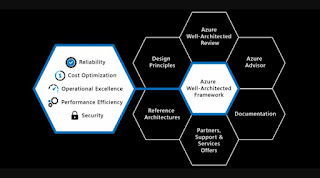
 This Week I Learned -  * Microsoft  FastTrack for Azure (FTA) team, part of Azure Engineering at Microsoft provides a design review and guidance checklist [ Excel ]. Main areas of recommendations and guidance are: >Azure Firewall >Azure Networking >Defender For Cloud >Identity >Sentinel >VM Security Checks *  Failure mode analysis (FMA) is a process for building resiliency into a system, by identifying possible failure points in the system. * A multicloud strategy enables customers to leverage services that span different cloud platforms, enabling them to select the services best suited to the workloads or apps they are managing. *  Commonly cited benefits of a multicloud strategy include : Flexibility: Customers wish to have the flexibility to optimize their architectures leveraging the cloud services best suited to their specific needs, including the flexibility to select services based on features or costs Avoiding vendor lock-in: A...

The "Read aloud selection" feature in Edge browser

Image
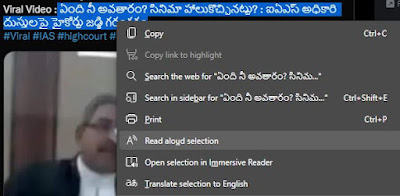
I love the "Read Aloud" feature in Immersive Reader that also appears as "Read aloud selection" in the context menu when you select text. This feature works not only for content in English but also several other world languages including Hindi, Telugu, Tamil, Bengali, Marathi, Urdu. This feature is very beneficial to me while I'm trying to read Indian languages in which I'm not proficient.  One issue that has bothered me is that when I need Read Aloud to switch to a different language (say Telugu) than the last used (English), it cannot detect the language. As a result, I have to manually change it and "Read aloud selection" lags in the changeover. Upon selecting text it would be good to have the "Read aloud selection" feature in the context menu detect language and AUTOMATICALLY choose from one of the voices in that language? I have filed this concern on Microsoft's Feeback portal and hope it will be addressed soon. If this is an is...

HOW TO extract table on a public web page as a CSV file

Image
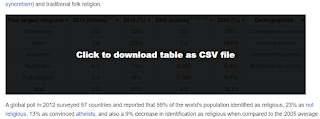
Tables within web pages on the internet don't provide interactivity most of the times and data is presented through plain HTML tables unless developers of the website implement it through client-side functionality through something like a jQuery plug-in such as  DataTables to make data more accessible . In such cases, you cannot filter or sort unless you manually copy the table to a spreadsheet and then use the functions of a software tool like Excel.  To minimize the steps, it is better to use bookmarklets that can create a CSV file from an HTML Table. Below are such bookmarklets graciously shared by some good folks on the internet - Stoyan Stefanov's ReactiveTable bookmarklet Davin Studer Export to CSV bookmarklet ShareProgress' TableThis bookmarklet   The screenshot shows how ShareProgress' TableThis bookmarklet can inject code to make a table within a Wikipedia page to be downloaded as a CSV file Bookmarklet code needs to be relatively short because of browser lim...

This Week I Learned - Week #17 2022

Image
This Week I Learned -  * The existing Azure Front Door and Azure CDN from Microsoft will now be known as Azure Front Door (classic) and Azure CDN from Microsoft (classic) moving forward.  Azure Front Door Standard and Premium have the latest capabilities and future enhancements will not be available on Azure Front Door (classic). The new Azure Front Door is a modern enterprise CDN catering to both dynamic and static content acceleration with built-in turnkey security, and a simple and predictable pricing model.  * At PyCon US 2022, Anaconda’s CEO Peter Wang announced a shiny new technology called PyScript that allows users to write Python and in fact many languages in the browser.  PyScript is a system for interleaving Python in HTML (like PHP). This means you can write and run Python code in HTML, call Javascript libraries in PyScript, and do all your web development in Python * "The web browser is the most ubiquitous, portable computer environment in the wo...

This Week I Learned - Week #3 2022

This Week I Learned -  * Sitecore supports on-premise, IaaS (VMs), and PaaS. Sitecore does not provide any out-of-the-box setup for a VM infrastructure. As VM usage and setup within an infrastructure is unique to every organization, Sitecore does not provide an automated way to assist your setup.  Sitecore Managed Cloud  (Standard & Premium) is a Cloud-based hosting service provided by Sitecore that you can use to host your Sitecore Cloud deployments on Microsoft Azure.  *  Hybrid multicloud is an IT operating model with multiple clouds both private and public with interoperability between them. * AWS documentation provides a high level comparison of the following  Discovery migration tools provided by AWS Partners  as well as its own AWS Application Discovery Service & Migration Evaluator: AppDynamics BMC Helix Discovery Cloudamize CloudChomp CC Analyzer Corent SurPaaS MaaS Datadog Device42 Dynatrace Flexera CloudScape modelizeIT New Re...

HOW TO let your PC "Read Aloud" your content and documents

Image
With Microsoft's Immersive Reader feature becoming part of more Microsoft products like the Edge browser, Word, PowerPoint, it is great to see the Read Aloud option also that comes along with it.  If your activities involve reading from a screen for long periods, some of it can be handed over to this Read Aloud feature so that you can sit back & listen while a computerized voice reads out content you specify in a locale specific accent that you can configure. You can open local PDF files in Microsoft Edge browser and have the Immersive Reader's Read Aloud feature read out the content for you. Did you know, Amazon Alexa, Amazon's voice-based AI-powered digital assistant has a desktop  version for the PC and can read Kindle books that are in your account? You can ask Alexa on PC app on Windows to read the book by specifying the title. By just saying, "Alexa, read Kindle book", I got Alexa to start reading out aloud the book I was going through on Kindle. To re...

HOW TO turn off internet access for a single browser tab

Image
Web developers may occasionally have a need to test for scenarios when a web application doesn't have access to the internet. Rather than turn off access to internet completely, it is possible to selectively turn off internet access for a single browser tab just like muting audio playing within a web page. In Chromium-based browsers, open Dev Tools (F12 keyboard shortcut) and within the Network tab change the setting to Offline in the dropdown as shown in the screenshot below. This feature can also be used to conserve bandwidth for web pages that make numerous AJAX calls but can work even while offline.

HOW TO grab text from a HTML list or dropdown with JavaScript & Dev Tools

Image
Developer Tools in Chrome & Edge offers convenient ways to probe the content of web pages. Dev Tools can be invoked for specific pages open within the browser by using the F12 or Ctrl+Shift+I or the browser menu. To extract just the text of a HTML list or dropdown identified by id property value of "country" with JavaScript & Dev Tools, use the following from the Console tab - document.querySelector('#country').innerText textContent returns the text content of all elements, while innerText returns the content of all elements, except for <script> and <style> elements.  Snippets  are a feature of the Sources pane in the Developer Tools. It allows you to write small scripts to execute in the context of the current page using a built-in editor. Common tasks can be scripted and kept in a collection for re-use later.

This Week I Learned - Week #17 2020

Image
This Week I Learned - *  Google's hybrid cloud platform Anthos will let you manage workloads running on third-party clouds like AWS and Azure. Anthos is a service based on Google Kubernetes Engine (GKE).  AWS Outposts & Azure Stack are the other hybrid cloud options . * The Read Aloud feature in Microsoft Edge on Android provides Text to Speech functionality * In the scramble to model Covid-19 spread and fatalities, data scientists — and the officials who use their models — would do better to recognize and admit what they cannot do, rather than jury-rig something that could end up doing more harm than good - Cathy O’Neil , mathematician, professor, hedge-fund analyst, data scientist, author of “ Weapons of Math Destruction ” * RJio has 388 million users while WhatsApp has 400 million in Indian $5.7 B *  Vasco da Gama , a Portuguese explorer was the first European to reach India by sea in 1498. Da Gama's discovery of the sea route to India was signific...

"Reading View" Bookmarklet for Microsoft Edge

Image
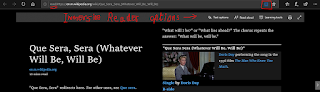
Update [20-Aug-21]  - This bookmarklet originally worked in the way described for an older version of Edge.  Edge has since changed to work more like Chrome, so while most of the article is still relevant the re-purposed links won't open automatically. The links changed by bookmarklet have to be copied and pasted. --- I love the " Reading View " feature in Edge. It lets you focus on the main content of a web page by removing irrelevant parts. Reading view can be toggled on or off from the Reading view (book icon) button on the address bar (or with Ctrl + Shift + R). I noticed that when a web page is open in Reading view, there is a " read: " operator prefixed to the URL in the address bar. This made me wonder if there is a way to have all pages open in Reading view by default. This cannot be done automatically but I figured an initial trigger can be provided through a Bookmarklet  ( from more info, check my other Bookmarklet posts ). So if you're on th...

HOW TO remove unwanted sections of a web page while printing

Image
With Chrome & Internet Explorer, it is possible to print only selected text within a web page . Today, I had need to print a web page without some sections like video and unwanted subtitles. It turns out, with Chrome Developer Tools (keyboard shortcut F12) you can delete the tags representing that section and then print the page. After the web page loads, hit F12 to open the Developer Tools pane and use the Magnifier icon to select the element in the page to delete Within the Developer Tools pane, select the tag containing the content that needs to be deleted and hit the Delete key to remove it from the web page before printing it. Also see:  HOW TO extract sets of pages from a PDF document or web page to a new PDF