Posts

Showing posts with the label PowerShell

Simplified Navigation of Microsoft Q&A Tags By Popularity
Image
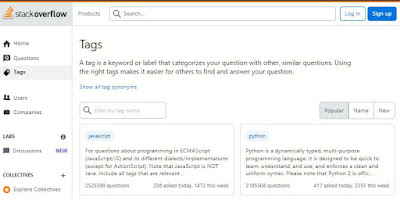
Unlike StackOverflow's convenient Filter/Search feature on the Tags page , which allows users to quickly jump to tags of their choice,  Microsoft Q&A  currently lacks such functionality.  At the time of writing there were 423 active Tags As someone interested in specific Microsoft Q&A tags to follow, paging through approximately 13 pages of tags seemed cumbersome and time-consuming. To address this issue, I discovered a PowerShell script by MotoX80 that fetches the complete Tag list from Microsoft Q&A. I then adapted this script to generate the necessary HTML code to create hyperlinks. With this single web page, users can easily navigate and explore Microsoft Q&A Tags by Popularity directly - Check it out ! Here is the modified PowerShell code I used to create hyperlinks for the Tags:


This Week I Learned - Week #261

Image
This Week I Learned - * To plan for the storage account usage needs of Azure Backup, download the VM backup capacity planning Excel spreadsheet to see the impact of your disk and backup schedule choices. *  Premium Storage supports B-series, DS-series, DSv2-series, DSv3-series, GS-series, Ls-series, M-series, and Fs-series VMs. You can use standard and premium storage disks with these VM types . You cannot use premium storage disks with VM series that are not Premium Storage-compatible. *  Tab completion in PowerShell ISE makes long cmdlet names a lot easier to type, without the need for difficult-to-remember aliases. *  Hardening of the OS is the act of configuring an OS securely, updating it, creating rules and policies to help govern the system in a secure manner, and removing unnecessary applications and services. This is done to minimize a computer OS's exposure to threats and to mitigate possible risk . *  Google and Airbnb have two of the most p...

HOW TO scan images in a web page & analyze them with Microsoft Cognitive Services Face API with PowerShell

Image
Head to this sample PowerShell script by Rob Sewell published in the PowerShell Gallery The code for the Get-SpeakerFace function to get the face attributes using the Microsoft Cognitive Services Face API is customized to get the face attributes of  images from a webpage whose URL is hard-coded. With minor tweaks, the same sample can be used to work scan images in any web page & analyze them Face API Some observations & findings from my experience running the script - If you're trying PowerShell ISE on a computer for the first time, use Run as Administrator option &   type this or variations of it into your PowerShell window before you execute the function - Set-ExecutionPolicy RemoteSigned You can choose to direct the output to a CSV file - Get-SpeakerFace | Export-csv -path  C:\PS\results.csv You can choose to specify the access key required to utilize the Face API as an environment variable as in the sample - $apiKey = $En...

This Week I Learned - Week #231

This Week I Learned - *  The Azure Portal may not tell you everything. RTFM - To convert an existing Azure Traffic Manager profile to geographic routing type , you first need to associate geographic regions to all its endpoints using the Azure Traffic Manager REST API before changing the routing type to geographic. If using portal, first delete the endpoints, change the routing method of the profile to geographic and then add the endpoints along with their geographic region mapping. *  Traffic Manager is only eligible for use with App Services (formerly known as Azure Websites and Azure Mobile Services) at the 'Standard' level or above. If you downgrade your App Service to the Free or Basic tiers, it shows as 'stopped' in Traffic Manager * Azure Traffic Manager can provide failovers under 10 seconds after an endpoint goes unhealthy * You can view, add, edit and remove files to be hosted in Azure Web App using the Kudu service Dashboard & just the browser. ...

This Week I Learned - Week #217

Image
This Week I Learned - *  Site Recovery provides a simple way to replicate Azure VMs between regions. Site Recovery replication for Azure virtual machines is currently in preview . * Treat servers as cattle, not as pets - An ARM template is a powerful modeling tool in support of a “no pets” policy, which is interesting to consider as your cloud environments grow more complex while also wanting to make environments easier to manage. Another benefit stems from keeping the ARM template itself as an “infrastructure as code” artifact that can be used to document – and, more to the point, as executable documentation – for stamping out environments predictably. And still another feature: the ARM runtime handles a lot of the complex parts that could come by trying to script one resource at a time via imperative PowerShell scripts – for example, error recovery and retries -  Bill Wilder, When NOT to use PowerShell with Azure * Google Alphabet generates 88% of its revenue...

This Week I Learned - Week #154

This Week I Learned - *  PowerShell's Invoke-RestMethod command can be used to call REST APIs * To celebrate 10 years of AWS , AWS training partner, qwikLABS is offering 95 free online self-paced labs through the end of March 2016. * “Polanyi’s Paradox” - “We know more than we can tell”. The top Go players can’t fully access their own knowledge about how they’re able to perform so well. This self-ignorance is common to many human abilities, from driving a car in traffic to recognizing a face. Polanyi’s Paradox hasn’t prevented us from using computers to accomplish complicated tasks, like processing payrolls, optimizing flight schedules, routing telephone calls and calculating taxes. But as anyone who’s written a traditional computer program can tell you, automating these activities has required painstaking precision to explain exactly what the computer is supposed to do. AlphaGo, the artificial intelligence system built by the Google subsidiary DeepMind, does ...

Azure PowerShell - Questions & Answers

1. What is Azure PowerShell? Azure PowerShell is a module that provides cmdlets to manage Azure with Windows PowerShell.  The Azure Powershell 1.0.1 MSI is hosted on Github (and not on a Microsoft domain as may be expected).  Windows PowerShell scripts are saved as ps1 files. However, if a file is saved as a psm1 file, it can be treated as a module. The functions defined in the psm1 file become the cmdlet names used. 2. How can you know if Azure PowerShell is installed on a machine? To see all available Windows PowerShell modules, the command is: get-module -listavailable See if Azure PowerShell is included. To know the PowerShell version installed on a machine, try - $psversiontable 3. How can you find the version of Azure PowerShell module installed on a machine? To check the version of a module in your PowerShell environment, the command is: (Get-Module <module name>).Version So to know the version of Azure PowerShell...

This Week I Learned - Week #133

Image
This Week I Learned - *  Microsoft’s cloud business has grown by 8 percent, to $5.9 billion . *  PowerShell one-liner to list the VM names, cloud service names and availability set names (if any) for all your VMs - (Get-AzureService).servicename | foreach {Get-AzureVM -ServiceName $_ } | select name,AvailabilitySetName *  SQLIO (SQLIO Disk Subsystem Benchmark Tool) is a tool provided by Microsoft which can also be used to determine the I/O capacity of a given configuration. *  This PowerShell script sample from Technet Gallery demonstrates how to utilize Azure PowerShell to deploy a Windows based virtual machine from the Azure image gallery and configure Storage Spaces to get the highest storage performance currently available. *  Solid-state drives (SSDs) are in a class of their own that deliver extremely high random I/O performance, often a factor of 20+ over that of 15,000 RPM hard disks .  * IBM has set up its first public cloud...

HOW TO add an entity to a Microsoft Azure Table with PowerShell

As a PowerShell newbie, I'm amazed that you can  insert entities into Azure Table Storage with a simple script  right from your desktop. I found it impressive that you can even write PowerShell code within Notepad or any basic text editor - a low barrier of entry that reminded me of developing with PHP and Classic ASP. To run the script at the PS command prompt, you have to change to directory where you saved the script and run the command ./your_script.PS1 . Using the light-weight PowerShell Integrated Scripting Environment (ISE) simplifies coding & executing the script. While using the code snippet mentioned above, you have to ensure that you're using PowerShell version 3 or above and ensure that the file path of the Microsoft.WindowsAzure.Storage & System.Data.Services.Client DLLs referenced is appropriate. Specify the Azure Storage account name and key and you're good to go. This  PowerShell script saves minimum, maximum temperature fetched from Yahoo...

Book Review: Windows PowerShell 3.0 First Steps by Ed Wilson

Image
PowerShell is a very powerful scripting language for Windows - it's a Swiss Army knife for Windows developers & server administrators. What I love about it is its low barrier of entry. It's easy to get started considering that the shell & ISE (Integrated Scripting Environment) come along with the Windows OS (Windows Vista & higher) so you practically need nothing extra to learn. The third version of PowerShell comes built into Windows 8 & Windows Server 2012. You have to explicitly install it if you're using an older version of Windows. Windows PowerShell 3.0 First Steps is an excellent book for absolute beginners, written by a PowerShell expert, Ed Wilson , who has hugely contributed to the PowerShell community and product. This book has all the characteristics that make it a good technical book . With gentle hand-holding, the author walks you through the important commands (or cmdlets). There are plenty of snippets that you can try out while you read a...

HOW TO download a list of files with a PowerShell script

If you use Windows Vista or higher, PowerShell comes along with it. So if you have to download a list of files, you can do that easily with this PowerShell script instead of installing any other tools (command-line or GUI) To get a single file, you can use just this line of code : (new-object System.Net.WebClient).DownloadFile('http://www.xyz.net/file.txt', 'C:\tmp\file.tx‌​t') You can also use the PowerShell  Invoke-WebRequest cmdlet:

Automate Azure tasks with Windows Azure PowerShell Cmdlets

The ability to run Windows Azure tasks from the command-line and thus also automate such tasks was introduced with Windows Azure SDK 1.3. Starting with Windows Azure SDK 1.8,  it is possible to manage Windows Azure Websites with the following cmdlets: New-AzureWebSite Get-AzureWebsite Remove-AzureWebsite Set-AzureWebsite Show-AzureWebSite Start-AzureWebSite Stop-AzureWebSite Here is the complete list of currently supported Windows Azure PowerShell cmdlets (via the PowerShell command  get-command -module azure | format-table -property name ): Add-AzureCacheWorkerRole Add-AzureCertificate Add-AzureDataDisk Add-AzureDisk Add-AzureDjangoWebRole Add-AzureEndpoint Add-AzureNodeWebRole Add-AzureNodeWorkerRole Add-AzurePHPWebRole Add-AzurePHPWorkerRole Add-AzureProvisioningConfig Add-AzureVhd Add-AzureVMImage Disable-AzureServiceProjectRemoteDesktop Enable-AzureMemcacheRole Enable-AzureServiceProjectRemoteDesktop Export-AzureVM Get-AzureAffinityGro...

Pluralsight Introduction to PowerShell Course - Notes

Image
Summary of the 2hour 40 minute duration Pluralsight   Introduction to PowerShell course, including other interesting material I found - + What is PowerShell? Windows PowerShell command-line interface is a new command-line tool It's a scripting language from Microsoft that complements Cmd.exe in the Windows administration context. Based on .NET Everything is a .NET object PowerShell version 2 is included with Windows 7, Windows Server 2008 R2, XP SP3, Windows Server 2003 SP2, Windows Vista SP1 PowerShell scripts have a .ps1 extension + How to get started? To start working with Powershell, go to Windows Accessories & select Windows PowerShell. PowerShell Environments: Out of box – PowerShell command window, PowerShell ISE (Integrated Shell Environment) Free ISE’s – PowerSE, PowerGUI Commercial PowerShell ISE or Integrated Scripting Environment is  a GUI for working with PowerShell You can hide the Script panel in PowerShell ISE if you work a lot in Inter...